Combining data: SET, MERGE and joins
Every ADaM data set is built by combining: ADSL variables are added to every other data set, AE records are joined to treatment dates, lab records to their reference ranges. MERGE is in more than half of real production programs, and the IN= option in two of three. This chapter uses two tiny tables, so that you can check every row by eye.
5.1 Two tiny tables
Section titled “5.1 Two tiny tables”/* Chapter 5: two tiny tables to combine */DATA dm; INPUT usubjid $ age;DATALINES;S1 63S2 64S3 71S4 74;RUN;
DATA ae; INPUT usubjid $ aedecod :$12.;DATALINES;S2 HEADACHES4 DIZZINESSS4 NAUSEAS5 RASH;RUN;DM has four subjects, S1 to S4. AE has four records: one for S2, two for S4, and one for S5, a subject that is not in DM. Two subjects are in both tables.
5.2 SET: stack records
Section titled “5.2 SET: stack records”SET with two data sets reads all records of the first data set, then all records of the second. With a BY statement, it interleaves them: it takes the records of both data sets in key order.
/* Chapter 5: SET stacks, SET with BY interleaves */DATA more;  INPUT usubjid $ age;DATALINES;S0 58S5 80;RUN;
DATA stacked;  SET dm(IN=indm) more;  LENGTH source $4;  IF indm THEN source = "DM";  ELSE         source = "MORE";RUN;
DATA interleaved;  SET dm more;  BY usubjid;RUN;
PROC PRINT DATA=stacked NOOBS; RUN;PROC PRINT DATA=interleaved NOOBS; RUN;
What you should see:
| stacked: usubjid | age | source | interleaved: usubjid | age | |
|---|---|---|---|---|---|
| S1 | 63 | DM | S0 | 58 | |
| S2 | 64 | DM | S1 | 63 | |
| S3 | 71 | DM | S2 | 64 | |
| S4 | 74 | DM | S3 | 71 | |
| S0 | 58 | MORE | S4 | 74 | |
| S5 | 80 | MORE | S5 | 80 |
IN=indm makes a temporary flag. The flag is 1 when the record comes from DM. Use it to record where each record came from.
5.3 MERGE with IN=: join side by side
Section titled “5.3 MERGE with IN=: join side by side”MERGE with BY puts records with the same key side by side. The IN= flags tell you which data sets gave a record to the current row. Click Next to watch every record.
/* Chapter 5: MERGE with IN= flags */DATA all match dm_only;  MERGE dm(IN=indm) ae(IN=inae);  BY usubjid;  OUTPUT all;  IF indm AND inae THEN OUTPUT match;  IF indm AND NOT inae THEN OUTPUT dm_only;RUN;
PROC PRINT DATA=all NOOBS; RUN;PROC PRINT DATA=match NOOBS; RUN;PROC PRINT DATA=dm_only NOOBS; RUN;05_merge.sas
PDV
| Variable | Value |
|---|
just changed kept from the last record
SAS Log
What you should see:
| ALL: usubjid | age | aedecod |
|---|---|---|
| S1 | 63 | |
| S2 | 64 | HEADACHE |
| S3 | 71 | |
| S4 | 74 | DIZZINESS |
| S4 | 74 | NAUSEA |
| S5 | . | RASH |
MATCH has 3 rows (S2 and both S4 rows) and DM_ONLY has 2 (S1 and S3). Two rules:
- One to many works. S4 has one DM record and two AE records. MERGE keeps
age = 74for the whole BY group. - Use the flags. S5 has an AE but no DM record. In a real study that is a data issue to report, not a row to drop silently.
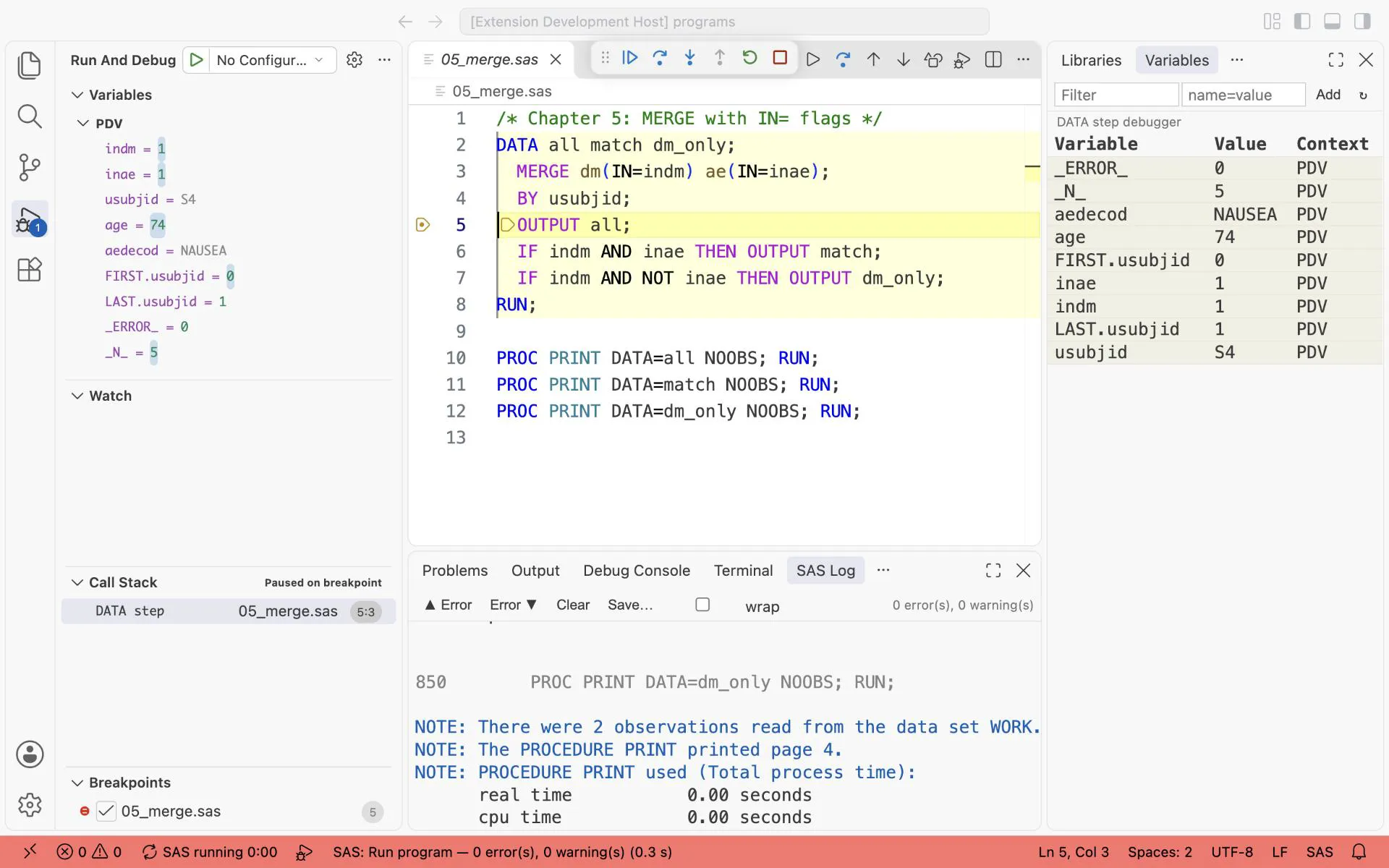
MERGE with IN=, stopped at OUTPUT all on the second record of subject S4: age = 74 comes from DM, aedecod = NAUSEA from AE, and indm = 1, inae = 1.
Exercise 5-1. Change 05_merge.sas to write a data set ae_only with the AE records that have no DM record. Which subject is in it?
5.4 Two MERGE traps
Section titled “5.4 Two MERGE traps”The last data set wins. Both data sets can have a variable with the same name. Then the value from the data set that is named last replaces the first value:
/* Chapter 5: the same variable in both data sets: the last one wins */DATA dm_new;  INPUT usubjid $ age;DATALINES;S2 65S3 72;RUN;
DATA overwritten;  MERGE dm dm_new;  BY usubjid;RUN;
PROC PRINT DATA=overwritten NOOBS; RUN;
What you should see: S2 has age 65 and S3 has age 72: the values of DM_NEW. No message tells you that a value was replaced. From each data set, keep only the variables that you need with KEEP=, or rename them with RENAME=.
Many to many does not work. Sometimes both data sets have several records for the same key. Then MERGE pairs them one by one:
/* EXPECT: NOTE MERGE statement has more than one data set with repeats of BY values *//* Chapter 5: many records on both sides: MERGE does not do what you expect */DATA cm;  INPUT usubjid $ cmdecod :$12.;DATALINES;S4 ASPIRINS4 PARACETAMOLS4 IBUPROFEN;RUN;
DATA m2m;  MERGE ae(WHERE=(usubjid = "S4")) cm;  BY usubjid;RUN;
PROC PRINT DATA=m2m NOOBS; RUN;
What you should see:
NOTE: MERGE statement has more than one data set with repeats of BY values.| usubjid | aedecod | cmdecod |
|---|---|---|
| S4 | DIZZINESS | ASPIRIN |
| S4 | NAUSEA | PARACETAMOL |
| S4 | NAUSEA | IBUPROFEN |
The result is wrong. NAUSEA is repeated, and no rule connects an AE to a medication. The log shows only a NOTE. Treat this NOTE as an ERROR. The DataStep Studio Suspicious Log lists it for you.
5.5 Joins in PROC SQL: inner, left, full
Section titled “5.5 Joins in PROC SQL: inner, left, full”PROC SQL works with queries. A query names the columns that you want, the table they come from, and the rows to keep:
PROC SQL; CREATE TABLE result AS /* optional: write a table, else SQL prints */ SELECT usubjid, age /* the columns, separated by commas */ FROM dm /* the table */ WHERE age > 65 /* the rows to keep */ ORDER BY usubjid; /* the order of the result */QUIT;A join is a query with two tables in FROM. Chapter 6 explains every part of the query, also GROUP BY and HAVING. Here you need only the shape.
PROC SQL joins tables without sorting them first. The three joins differ only in one thing: which records without a partner they keep.
/* Chapter 5: inner, left and full join of the same two tables */PROC SQL;  TITLE "Inner join";  SELECT dm.usubjid, dm.age, ae.aedecod    FROM dm INNER JOIN ae    ON dm.usubjid = ae.usubjid;
  TITLE "Left join";  SELECT dm.usubjid, dm.age, ae.aedecod    FROM dm LEFT JOIN ae    ON dm.usubjid = ae.usubjid;
  TITLE "Full join";  SELECT COALESCE(dm.usubjid, ae.usubjid) AS usubjid, dm.age, ae.aedecod    FROM dm FULL JOIN ae    ON dm.usubjid = ae.usubjid;QUIT;TITLE;
What you should see:
| Join | Keeps | Rows |
|---|---|---|
| Inner | only keys in both tables | S2 HEADACHE, S4 DIZZINESS, S4 NAUSEA |
| Left | every DM row, AE where it matches | S1, S2 HEADACHE, S3, S4 NAUSEA, S4 DIZZINESS |
| Full | every row of both tables | S1, S2 HEADACHE, S3, S4 NAUSEA, S4 DIZZINESS, S5 RASH |
Here are the same results as tables. A green row has its key in both inputs, blue only in DM, orange only in AE. A dot is a missing value: the join found no partner.
key in both tables only in DM only in AE
| usubjid | age |
|---|---|
| S1 | 63 |
| S2 | 64 |
| S3 | 71 |
| S4 | 74 |
| usubjid | aedecod |
|---|---|
| S2 | HEADACHE |
| S4 | DIZZINESS |
| S4 | NAUSEA |
| S5 | RASH |
| usubjid | age | aedecod |
|---|---|---|
| S2 | 64 | HEADACHE |
| S4 | 74 | DIZZINESS |
| S4 | 74 | NAUSEA |
| usubjid | age | aedecod |
|---|---|---|
| S1 | 63 | . |
| S2 | 64 | HEADACHE |
| S3 | 71 | . |
| S4 | 74 | NAUSEA |
| S4 | 74 | DIZZINESS |
| usubjid | age | aedecod |
|---|---|---|
| S1 | 63 | . |
| S2 | 64 | HEADACHE |
| S3 | 71 | . |
| S4 | 74 | NAUSEA |
| S4 | 74 | DIZZINESS |
| S5 | . | RASH |
- In the full join,
usubjidof S5 exists only inAE.COALESCE(dm.usubjid, ae.usubjid)takes the first value that is not missing, so S5 keeps its key. Its age is missing. - Look at the order of the two S4 rows: DIZZINESS first in the inner join, NAUSEA first in the left join. SQL does not promise any order. If the order matters, add
ORDER BY.
The left join is the one you use most: keep every subject of the population, and add what you find.
Exercise 5-2. Run the inner join with ORDER BY usubjid, aedecod. In which order are the S4 rows now?
Exercise 5-3. Rewrite the left join of 05_joins.sas as a MERGE. Is the result identical?
5.6 Subqueries
Section titled “5.6 Subqueries”A subquery is a query inside another query. Use one to select records by a list from another table. Or use one to compute one number for every row.
/* Chapter 5: subqueries */PROC SQL;  TITLE "Subjects of DM with at least one AE";  SELECT usubjid, age    FROM dm    WHERE usubjid IN (SELECT usubjid FROM ae);
  TITLE "Subjects with a TEAE, as a share of the safety population";  SELECT COUNT(DISTINCT usubjid)                                  AS n_teae,         (SELECT COUNT(*) FROM refadm.adsl WHERE saffl = "Y")     AS bign,         CALCULATED n_teae / CALCULATED bign * 100                AS pct FORMAT=5.1    FROM refadm.adae    WHERE trtemfl = "Y";QUIT;TITLE;
What you should see: S2 (64) and S4 (74), the DM subjects with at least one AE. Then, on the pilot study:
| n_teae | bign | pct |
|---|---|---|
| 218 | 254 | 85.8 |
218 of the 254 subjects in the safety population had at least one treatment-emergent AE.
Exercise 5-4. Use a subquery to list the subjects of refadm.adsl that have no record in refadm.adae. How many are there?
5.7 MERGE or SQL?
Section titled “5.7 MERGE or SQL?”| You need to | Use |
|---|---|
| Add subject variables (ADSL) to event records | MERGE with IN=, or a left join |
| Keep record order, use FIRST./LAST. in the same step | MERGE |
| Join without sorting, or on a condition other than equal keys | SQL |
| All combinations of two many-record tables (rare, on purpose) | SQL |
Answers
Section titled “Answers”The answers to Exercises 5-1 to 5-4 are in Answers, Part I.