Reshaping and lookups: ARRAY, DO, TRANSPOSE, formats, hash
SDTM is long: one record per test. Many derivations need wide data: one record per subject. Many derivations apply the same rule to many variables. And many need a value from another data set. The tools for this are ARRAY, the DO loop, PROC TRANSPOSE, PROC FORMAT and the hash object. PROC FORMAT is in about one real program in four, PROC TRANSPOSE in one in five.
7.1 ARRAY: one rule for many variables
Section titled “7.1 ARRAY: one rule for many variables”An array is a temporary name for a list of variables. One loop then does the work of many statements.
/* Chapter 7: one loop instead of four IF statements */DATA flags;  SET refadm.adsl(KEEP=usubjid saffl ittfl efffl comp24fl);  ARRAY fl{*}  saffl ittfl efffl comp24fl;  ARRAY nfl{*} saffn ittfn efffn comp24fn;  DO i = 1 TO DIM(fl);    IF      fl{i} = "Y" THEN nfl{i} = 1;    ELSE IF fl{i} = "N" THEN nfl{i} = 0;  END;  DROP i;RUN;
PROC MEANS DATA=flags SUM MAXDEC=0;  VAR saffn ittfn efffn comp24fn;RUN;
What you should see:
| Variable | Sum |
|---|---|
| saffn | 254 |
| ittfn | 254 |
| efffn | 234 |
| comp24fn | 118 |
The sums are the numbers of subjects in the safety, intent-to-treat, efficacy and week-24 completer populations.
ARRAY fl{*} ...counts the variables for you.DIM(fl)returns that count, so the loop still works when you add a flag to both lists.nflcreates the four numeric variables, because they do not exist yet.- An array holds variables of one type only.
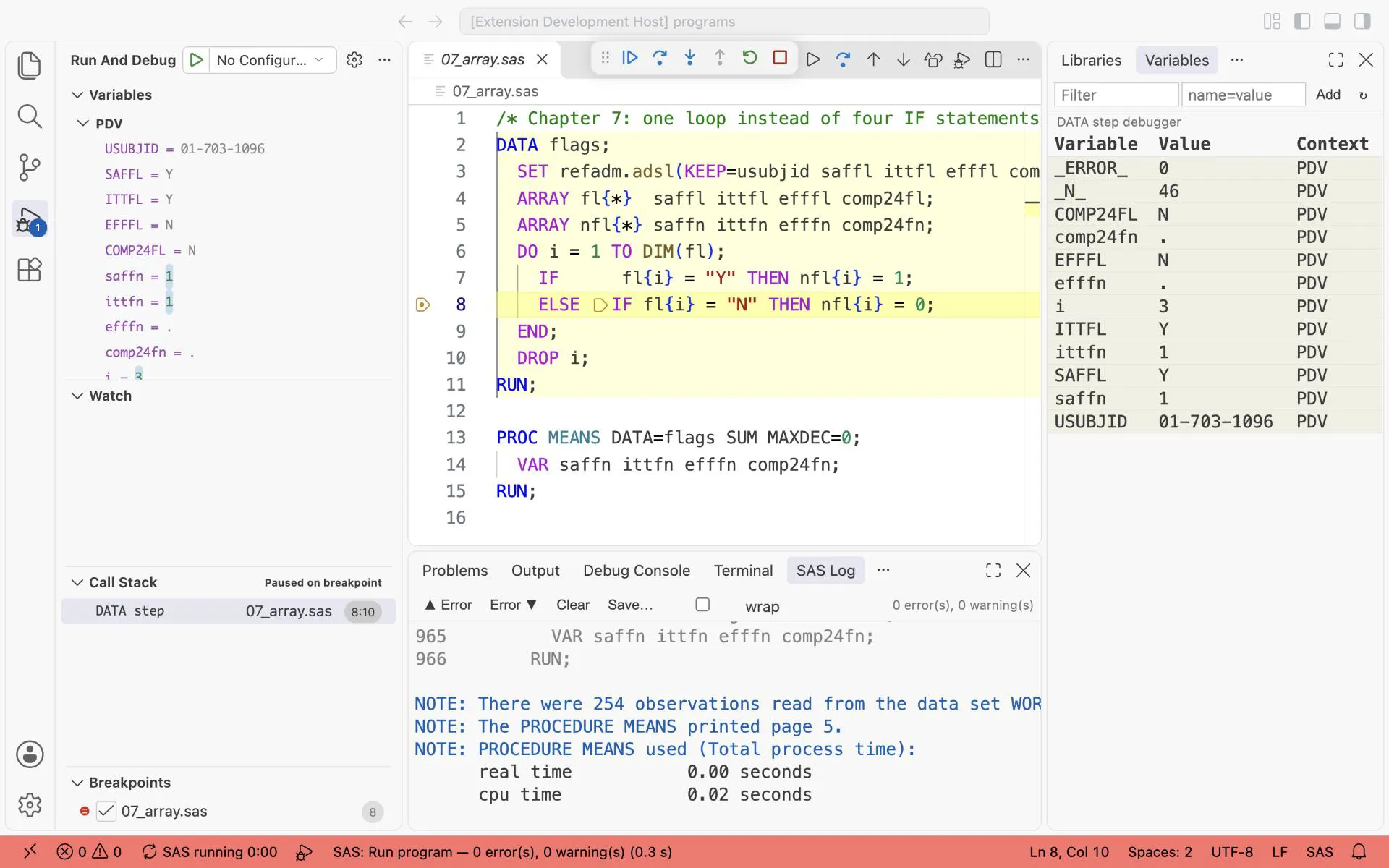
The array loop at i = 3: fl{3} is EFFFL, its value is N, so the ELSE IF branch sets efffn next.
Exercise 7-1. In 07_array.sas, add comp8fl and comp16fl to the KEEP= list and to the first array. Add comp8fn and comp16fn to the second array and to the VAR of PROC MEANS. What are their sums?
7.2 Loops and choices: DO, DO WHILE, DO UNTIL, SELECT
Section titled “7.2 Loops and choices: DO, DO WHILE, DO UNTIL, SELECT”The array loop above is an iterative DO: it counts from 1 to DIM(fl). Three more forms do the rest of the work.
/* Chapter 7: DO loops and SELECT */
/* Step 010: an iterative DO: one record per day of one exposure record */DATA ex_days;  SET sdtm.ex(WHERE=(usubjid = "01-701-1015") KEEP=usubjid exseq exdose exstdtc exendtc);  exstdt = INPUT(exstdtc, E8601DA.);  exendt = INPUT(exendtc, E8601DA.);  DO adt = exstdt TO exendt;    OUTPUT;  END;  FORMAT exstdt exendt adt DATE9.;  KEEP usubjid exseq exdose exstdt exendt adt;RUN;
TITLE1 "01-701-1015: days per exposure record";PROC FREQ DATA=ex_days;  TABLES exseq * exdose / LIST NOCUM NOPERCENT;RUN;
/* Step 020: DO WHILE tests at the top: the body can run zero times */DATA flags;  LENGTH list $40 flag $8;  list = "SAFFL ITTFL EFFFL";  i    = 1;  flag = SCAN(list, i);  DO WHILE (flag NE "");    OUTPUT;    i    = i + 1;    flag = SCAN(list, i);  END;  KEEP i flag;RUN;TITLE1 "One record per word of the list";PROC PRINT DATA=flags NOOBS; RUN;
/* Step 030: DO UNTIL tests at the bottom. Around SET, it reads one whole BY group per loop of the DATA step */DATA ae_per_subject;  n_ae = 0;  DO UNTIL (LAST.usubjid);    SET refadm.adae(KEEP=usubjid);    BY usubjid;    n_ae = n_ae + 1;  END;RUN;TITLE1 "AEs per subject, the first five subjects";PROC PRINT DATA=ae_per_subject(OBS=5) NOOBS; RUN;
/* Step 040: SELECT: one branch for each value */DATA trt_group;  SET refadm.adsl(KEEP=usubjid trt01pn);  LENGTH trtgrp $10;  SELECT (trt01pn);    WHEN (0)      trtgrp = "Placebo";    WHEN (54, 81) trtgrp = "Active";    OTHERWISE     trtgrp = "Unknown";  END;RUN;TITLE1 "Placebo against active";PROC FREQ DATA=trt_group;  TABLES trtgrp / NOCUM;RUN;TITLE;
What you should see: the exposure records of subject 01-701-1015 become one record per day: 15, 153 and 14 days for the three records (EXDOSE 0: this subject is on placebo). Then the three words of the list (SAFFL 1, ITTFL 2, EFFFL 3), the AEs per subject for the first five subjects:
n_ae USUBJID 3 01-701-1015 4 01-701-1023 2 01-701-1028 2 01-701-1034 4 01-701-1047and the two groups of SELECT: Active 168, Placebo 86.
DO adt = exstdt TO exendt;counts from one date to another, one day at a time.OUTPUTinside the loop writes one record per pass. This is how you make daily records from a start and an end date.DO WHILE (condition)tests before each pass. If the condition is false at the start, the body never runs. Here the loop stops whenSCANfinds no fourth word.DO UNTIL (condition)tests after each pass, so the body runs at least once. Put aSETand aBYinside it, and one pass of the DATA step reads one whole BY group. The counter starts at 0 at the top, and the record is written once at the end: one row per subject, with noRETAINand noFIRST.. The result is the same as in chapter 4: 3 AEs for 01-701-1015, 4 for 01-701-1023.SELECT (value); WHEN (...) ...; OTHERWISE ...; END;chooses one branch. It is easier to read than a longIF-THEN-ELSEchain. Always writeOTHERWISE.
Exercise 7-2. In Step 040, set trt01pn = 99 on the first record (IF _N_ = 1 THEN trt01pn = 99; before the SELECT) and remove the OTHERWISE line. What does SAS write, and how many records does TRT_GROUP get?
7.3 PROC TRANSPOSE: long to wide
Section titled “7.3 PROC TRANSPOSE: long to wide”One record per subject with the baseline blood pressure and pulse:
/* Chapter 7: long to wide, one record per subject */PROC TRANSPOSE DATA=sdtm.vs(WHERE=(vsblfl = "Y" AND vstestcd IN ("SYSBP" "DIABP" "PULSE")                                   AND vstpt = "AFTER LYING DOWN FOR 5 MINUTES"))               OUT=vswide(DROP=_name_ _label_) SUFFIX=bl;  BY usubjid;  ID vstestcd;  VAR vsstresn;RUN;
PROC PRINT DATA=vswide(OBS=3) NOOBS; RUN;
What you should see:
| USUBJID | DIABPbl | PULSEbl | SYSBPbl |
|---|---|---|---|
| 01-701-1015 | 56 | 56 | 130 |
| 01-701-1023 | 84 | 68 | 130 |
| 01-701-1028 | 85 | 62 | 138 |
BYgives one output record per subject.IDnames the new columns from the values ofvstestcd.VARgives the values.SUFFIX=bladdsblto each new name.- The pilot measures vital signs in three positions. The
WHEREselects one position on purpose. Without it, PROC TRANSPOSE stops with an ERROR about a repeated ID value. Do not keep “the last record” of each test after a sort instead. You then get the position that sorts last. The result looks correct, but the choice is random.
Exercise 7-3. Remove the vstpt condition from 07_transpose_1_wide.sas. Read the ERROR and explain it.
Exercise 7-4. Transpose the baseline blood pressure and pulse records of subject 01-701-1015 with ID vstestcd vstpt instead. How many value columns do you get?
7.4 PROC TRANSPOSE: wide back to long
Section titled “7.4 PROC TRANSPOSE: wide back to long”/* Chapter 7: wide back to long */PROC TRANSPOSE DATA=vswide(OBS=2) OUT=vslong(RENAME=(col1=aval)) NAME=paramcd; BY usubjid; VAR diabpbl pulsebl sysbpbl;RUN;
PROC PRINT DATA=vslong NOOBS; RUN;What you should see:
| USUBJID | paramcd | aval |
|---|---|---|
| 01-701-1015 | DIABPbl | 56 |
| 01-701-1015 | PULSEbl | 56 |
| 01-701-1015 | SYSBPbl | 130 |
| 01-701-1023 | DIABPbl | 84 |
| 01-701-1023 | PULSEbl | 68 |
| 01-701-1023 | SYSBPbl | 130 |
NAME=paramcd names the column that holds the old variable names. RENAME=(col1=aval) names the values. This long shape is the shape of an ADaM BDS data set.
7.5 Formats in depth
Section titled “7.5 Formats in depth”A format turns a value into text. An informat turns text into a value. PROC FORMAT makes both, and a few options do most of the work.
/* Chapter 7: formats in depth: ranges, OTHER, INVALUE, PICTURE and MULTILABEL */PROC FORMAT;  /* ranges: < excludes the end point; LOW does not catch a missing value, OTHER does */  VALUE agegrp  LOW -< 65  = "<65"                65 - 80    = "65-80"                80 <- HIGH = ">80"                OTHER      = "Missing";  /* an informat reads text into a number */  INVALUE sevn  "MILD"     = 1                "MODERATE" = 2                "SEVERE"   = 3                OTHER      = .;  /* a picture format writes a number into a template: 75.58 becomes (75.6%) */  PICTURE pctf (ROUND)  LOW - HIGH = "009.9%)" (PREFIX="(");  /* MULTILABEL: one value may belong to more than one group, for example a Total column */  VALUE trtml (MULTILABEL NOTSORTED)                0         = "Placebo"                54        = "Xanomeline Low Dose"                81        = "Xanomeline High Dose"                54, 81    = "Xanomeline Total"                0, 54, 81 = "Total";RUN;
/* Step 010: the age format against the AGEGR1 of ADSL: the two must agree */DATA age_check;  SET refadm.adsl(KEEP=usubjid age agegr1);  LENGTH agegrp $7;  agegrp = PUT(age, agegrp.);  agree  = (agegrp = agegr1);RUN;TITLE1 "AGEGR1 from ADSL against PUT(age, agegrp.)";PROC FREQ DATA=age_check;  TABLES agegr1 * agegrp / LIST NOCUM NOPERCENT;RUN;
/* Step 020: INPUT with the informat gives a number that sorts by severity */DATA ae_sev;  SET refadm.adae(KEEP=usubjid aesev WHERE=(NOT MISSING(aesev)));  aesevn = INPUT(aesev, sevn.);RUN;TITLE1 "AESEV and the number from the informat";PROC FREQ DATA=ae_sev;  TABLES aesevn * aesev / LIST NOCUM NOPERCENT;RUN;
/* Step 030: the picture format */DATA pct_demo;  pct = 65 / 86 * 100;  txt = PUT(pct, pctf.);  PUTLOG "NOTE: " pct= txt=;RUN;
/* Step 040: MULTILABEL needs MLF on the CLASS statement; PRELOADFMT ORDER=DATA keeps the order of the format */TITLE1 "Age with a Xanomeline Total and a Total column";PROC MEANS DATA=refadm.adsl N MEAN MAXDEC=1;  WHERE saffl = "Y";  CLASS trt01an / MLF PRELOADFMT ORDER=DATA;  FORMAT trt01an trtml.;  VAR age;RUN;
/* Step 050: where SAS looks for formats, and what one format contains */OPTIONS FMTSEARCH=(work);TITLE1 "The format AGEGRP";PROC FORMAT FMTLIB;  SELECT agegrp;RUN;TITLE;
What you should see: the format agrees with AGEGR1 for every subject:
AGEGR1 agegrp Frequency65-80 65-80 144<65 <65 33>80 >80 77and the informat gives a number that sorts by severity:
aesevn AESEV Frequency 1 MILD 770 2 MODERATE 378 3 SEVERE 43Then NOTE: pct=75.581395349 txt=(75.6%) in the log, the mean age with two more columns (Xanomeline Total: 168 subjects, mean 75.0; Total: 254, mean 75.1), and the content of the format AGEGRP.
- Ranges.
LOW -< 65means “up to 65, without 65”.80 <- HIGHmeans “above 80”. The format gives the same groups asAGEGR1in ADSL for all 254 subjects. OTHERcatches every value that no range covers, also a missing value.LOWdoes not catch a missing value.INVALUEmakes an informat:INPUT(aesev, sevn.)turns MILD, MODERATE and SEVERE into 1, 2 and 3. A number sorts by severity, the text sorts by the alphabet.PICTUREwrites a number into a template.009.9gives at least one digit before the point and one after.PREFIX="("adds the bracket in front.(ROUND)rounds instead of cutting.MULTILABELlets one value belong to several groups: 54 is “Xanomeline Low Dose” and also “Xanomeline Total” and “Total”. Only some procedures use it: PROC MEANS, PROC SUMMARY and PROC TABULATE, withMLFon theCLASSstatement.NOTSORTEDwithPRELOADFMT ORDER=DATAkeeps the rows in the order of the format.FMTSEARCH=is the list of places where SAS looks for formats.PROC FORMATwrites toWORK.FORMATSwhen you name no library. In a study, the formats are in a permanent library, and every program starts withOPTIONS FMTSEARCH=(...).FMTLIBprints what a format contains.
Exercise 7-5. Write a VALUE format sevf that turns 1, 2 and 3 back into MILD, MODERATE and SEVERE. Use it on aesevn in a PROC FREQ. What is printed, and in which order?
7.6 A format built from data: a lookup table
Section titled “7.6 A format built from data: a lookup table”A format can translate codes to text. When the codes and texts are in a data set, build the format from that data set with CNTLIN=. Then nobody types them by hand.
/* Chapter 7: build a format from data and use it as a lookup */PROC SQL;  CREATE TABLE trtfmt AS    SELECT DISTINCT "trtf" AS fmtname, trt01pn AS start, trt01p AS label      FROM refadm.adsl;QUIT;
PROC FORMAT CNTLIN=trtfmt;RUN;
DATA lookup;  SET refadm.adae(OBS=3 KEEP=usubjid trtan);  LENGTH trt_txt $40;  trt_txt = PUT(trtan, trtf.);RUN;
PROC PRINT DATA=trtfmt NOOBS; RUN;PROC PRINT DATA=lookup NOOBS; RUN;
What you should see: the control data set
| fmtname | start | label |
|---|---|---|
| trtf | 0 | Placebo |
| trtf | 54 | Xanomeline Low Dose |
| trtf | 81 | Xanomeline High Dose |
and trt_txt = Placebo for the first three ADAE records (subject 01-701-1015, TRTAN = 0).
A CNTLIN= data set needs at least fmtname, start and label. A format is a fast lookup for one value per key: no sort, no merge.
Exercise 7-6. Use trtf. in a PROC FREQ of refadm.adae with TABLES trtan;. What changes in the output?
7.7 Three ways to look up a value: join, format, hash
Section titled “7.7 Three ways to look up a value: join, format, hash”Every ADaM data set needs values from ADSL, for example the first dose date TRTSDT on every record. Chapter 5 did this with MERGE and a join. Here are three ways that need no sort of the big data set, on all 29643 VS records.
/* Chapter 7: three ways to look up TRTSDT from ADSL for every VS record */
/* Way 1: PROC SQL with a left join: no sort needed, SAS does the matching */PROC SQL;  CREATE TABLE vs_sql AS    SELECT v.usubjid, v.vsseq, v.vstestcd, v.vsstresn, a.trtsdt      FROM sdtm.vs AS v LEFT JOIN refadm.adsl AS a           ON v.usubjid = a.usubjid      ORDER BY v.usubjid, v.vsseq;QUIT;
/* Way 2: a format built from ADSL: the key is the text USUBJID, the label the date as text */DATA trtsdt_fmt;  SET refadm.adsl(KEEP=usubjid trtsdt) END=last;  LENGTH fmtname $8 type $1 start $40 label $12;  fmtname = "trtsdt";  type    = "C";  start   = usubjid;  label   = PUT(trtsdt, 8.);  OUTPUT;  /* subjects that are not in ADSL get a missing date */  IF last THEN DO;    hlo   = "O";    label = ".";    OUTPUT;  END;  KEEP fmtname type start label hlo;RUN;PROC FORMAT CNTLIN=trtsdt_fmt;RUN;DATA vs_fmt;  SET sdtm.vs(KEEP=usubjid vsseq vstestcd vsstresn);  trtsdt = INPUT(PUT(usubjid, $trtsdt.), 8.);  FORMAT trtsdt DATE9.;  LABEL  trtsdt = "Date of First Exposure to Treatment";RUN;
/* Way 3: a hash object: ADSL is loaded into memory once, then each VS record asks it */DATA vs_hash;  IF _N_ = 1 THEN DO;    IF 0 THEN SET refadm.adsl(KEEP=usubjid trtsdt);    DECLARE HASH h(DATASET: "refadm.adsl(KEEP=usubjid trtsdt)");    h.DEFINEKEY("usubjid");    h.DEFINEDATA("trtsdt");    h.DEFINEDONE();  END;  SET sdtm.vs(KEEP=usubjid vsseq vstestcd vsstresn);  /* FIND returns 0 when the key is found; otherwise TRTSDT must be set to missing */  IF h.FIND() NE 0 THEN CALL MISSING(trtsdt);RUN;
/* all three must give the same result */PROC SORT DATA=vs_fmt;  BY usubjid vsseq; RUN;PROC SORT DATA=vs_hash; BY usubjid vsseq; RUN;PROC COMPARE BASE=vs_sql COMPARE=vs_fmt NOSUMMARY;  ID usubjid vsseq;RUN;%PUT NOTE: SQL against format: SYSINFO=&SYSINFO.;PROC COMPARE BASE=vs_sql COMPARE=vs_hash NOSUMMARY;  ID usubjid vsseq;RUN;%PUT NOTE: SQL against hash: SYSINFO=&SYSINFO.;
PROC SQL NOPRINT;  SELECT COUNT(*), NMISS(trtsdt) INTO :nrec TRIMMED, :nmiss TRIMMED FROM vs_hash;QUIT;%PUT NOTE: VS records &nrec., without TRTSDT &nmiss.;
What you should see in the log:
NOTE: SQL against format: SYSINFO=0NOTE: SQL against hash: SYSINFO=0NOTE: VS records 29643, without TRTSDT 0All three give the same 29643 records, and every record found its date.
- The join is the easiest to read. SAS does the matching.
- The format maps a text key to a text label. The date travels as text (
PUT(trtsdt, 8.)) and comes back as a number withINPUT.HLO = "O"adds anOTHERrow: a subject that is not in ADSL gets a missing date. - The hash object loads ADSL into memory once, at
_N_ = 1. Thenh.FIND()looks up the key of each VS record.FINDreturns 0 when it finds the key. When it does not, the variable keeps the value of the last record, so set it to missing yourself.IF 0 THEN SETnever reads a record. It only tells the compiler the type and length ofusubjidandtrtsdt. - When to use which: the join for most work; the hash when one big data set needs several values from another, in a DATA step that must keep its record order; the format when you need the same lookup in many programs.
Exercise 7-7. Add age to the hash: to the KEEP= lists, to DEFINEDATA and to CALL MISSING. How many VS records belong to subjects older than 80?
Answers
Section titled “Answers”The answers to Exercises 7-1 to 7-7 are in Answers, Part I.