Macro basics, the way working programmers write them
The macro language writes SAS code for you. It runs before SAS sees your DATA steps and PROCs. It reads your program, replaces &names and %calls with text, and gives the result to SAS. Keep this picture in mind, and most macro surprises go away. This chapter covers the 20% of the macro language that you will use every day. Part V goes deeper.
8.1 Macro variables are text
Section titled “8.1 Macro variables are text”/* Chapter 8: macro variables are text that SAS pastes into your code */%LET lib = refadm;%LET ds = adsl;%LET flag = saffl;
PROC FREQ DATA=&lib..&ds.; TABLES &flag. / NOCUM;RUN;
%PUT NOTE: The step read &=lib. &=ds. &=flag.;What you should see: a frequency table of SAFFL (254 subjects, all Y), and in the log:
NOTE: The step read LIB=refadm DS=adsl FLAG=saffl%LETstores text.&lib.pastes it back. The period ends the name.&lib..&ds.has two periods: the first ends the namelib, the second is the period between library and data set. The result isrefadm.adsl.%PUT &=lib.writesLIB=refadm. It is a quick way to check a value.- Code outside any macro is called open code. A
%LETin open code makes a global macro variable: every macro can read it (see 8.4).
Exercise 8-1. In 08_let.sas, write &lib.&ds. with one period. What does the log say?
8.2 Macros with keyword parameters
Section titled “8.2 Macros with keyword parameters”/* Chapter 8: keyword parameters with defaults */%MACRO freq_one(data=refadm.adsl, var=sex, where=1); PROC FREQ DATA=&data.; WHERE &where.; TABLES &var. / NOCUM; RUN;%MEND freq_one;
%freq_one()%freq_one(var=agegr1, where=%STR(saffl = "Y"))What you should see: two tables. %freq_one() uses every default: SEX for all subjects, F 143 and M 111. The second call counts AGEGR1 in the safety population: <65 33, 65-80 144, >80 77.
Keyword parameters (name=default) can come in any order. A caller sets only what differs from the default. %STR( ) hides the = and the quotes of a condition from the macro processor. So the whole condition reaches the WHERE statement.
Exercise 8-2. Call %freq_one(var=race, where=%STR(sex = "F")). How many female subjects are White?
8.3 A loop over a list
Section titled “8.3 A loop over a list”/* Chapter 8: one PROC FREQ per variable in a list */%MACRO freq_each(data=, vars=); %LOCAL i var; %DO i = 1 %TO %SYSFUNC(COUNTW(&vars., %STR( ))); %LET var = %SCAN(&vars., &i., %STR( )); TITLE "&var. in &data."; PROC FREQ DATA=&data.; TABLES &var. / NOCUM; RUN; %END; TITLE;%MEND freq_each;
%freq_each(data=refadm.adsl, vars=sex race agegr1)What you should see: three tables: SEX (F 143, M 111), RACE (AMERICAN INDIAN OR ALASKA NATIVE 1, BLACK OR AFRICAN AMERICAN 23, WHITE 230) and AGEGR1.
COUNTW counts the words of the list. %SCAN takes the word with the number &i.. %LOCAL i var; keeps the loop variables inside the macro.
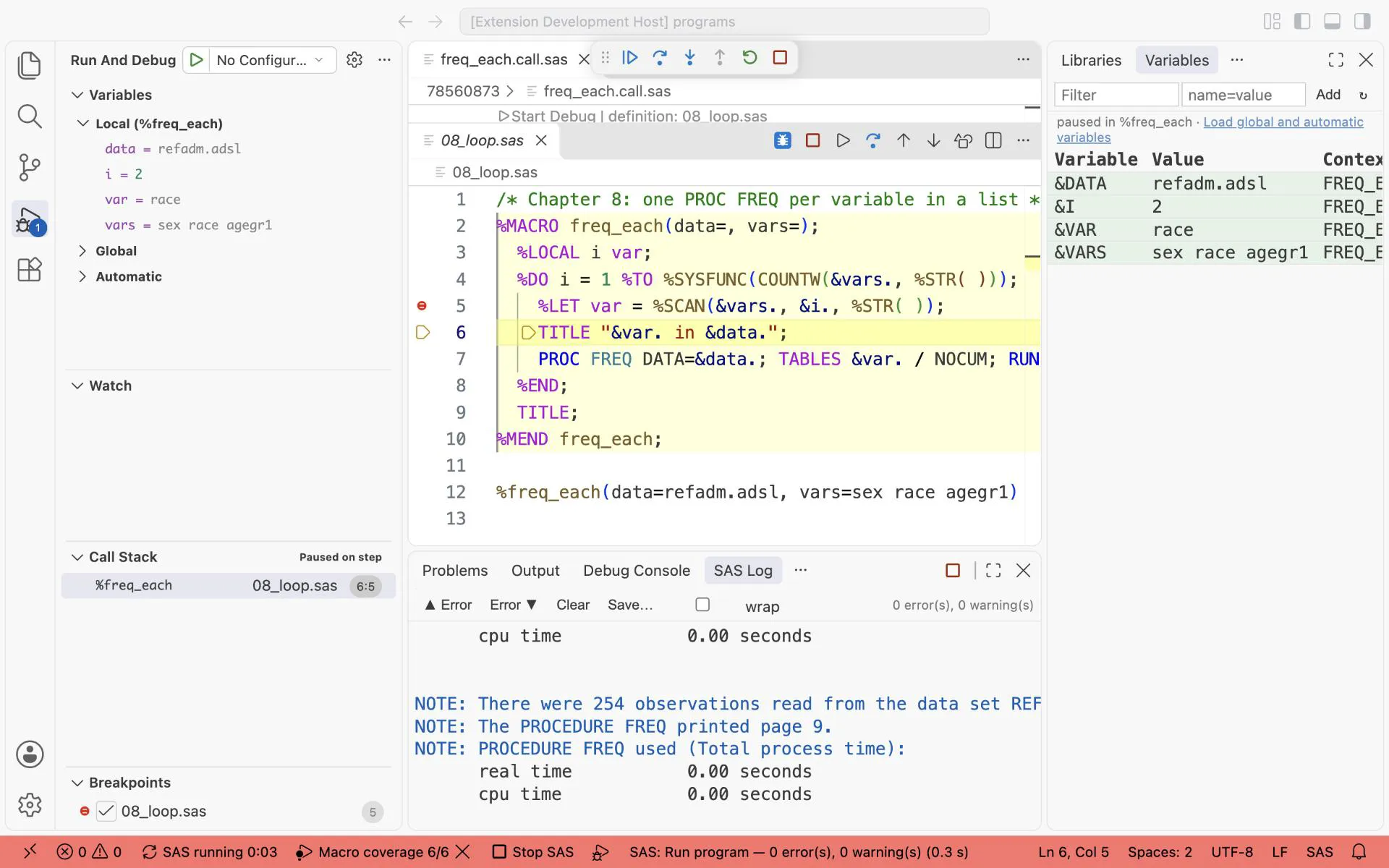
Stopped in %freq_each where &i. = 2: the Variables view shows i = 2 and var = race, before the TITLE statement runs.
8.4 Where a macro variable lives
Section titled “8.4 Where a macro variable lives”/* Chapter 8: where does a macro variable live? */%LET where = global;
%MACRO inner(); %PUT NOTE: inner sees &=where.;%MEND inner;
%MACRO outer(); %LOCAL where; %LET where = outer; %inner()%MEND outer;
%outer()%PUT NOTE: after the call &=where.;What you should see:
NOTE: inner sees WHERE=outerNOTE: after the call WHERE=global%outer declares its own where with %LOCAL. %inner has no where of its own. So it looks in the macro that called it, and finds outer. After the call, the global where is unchanged. The rule: declare every macro variable of a macro with %LOCAL. Then the macro never changes a variable of the caller.
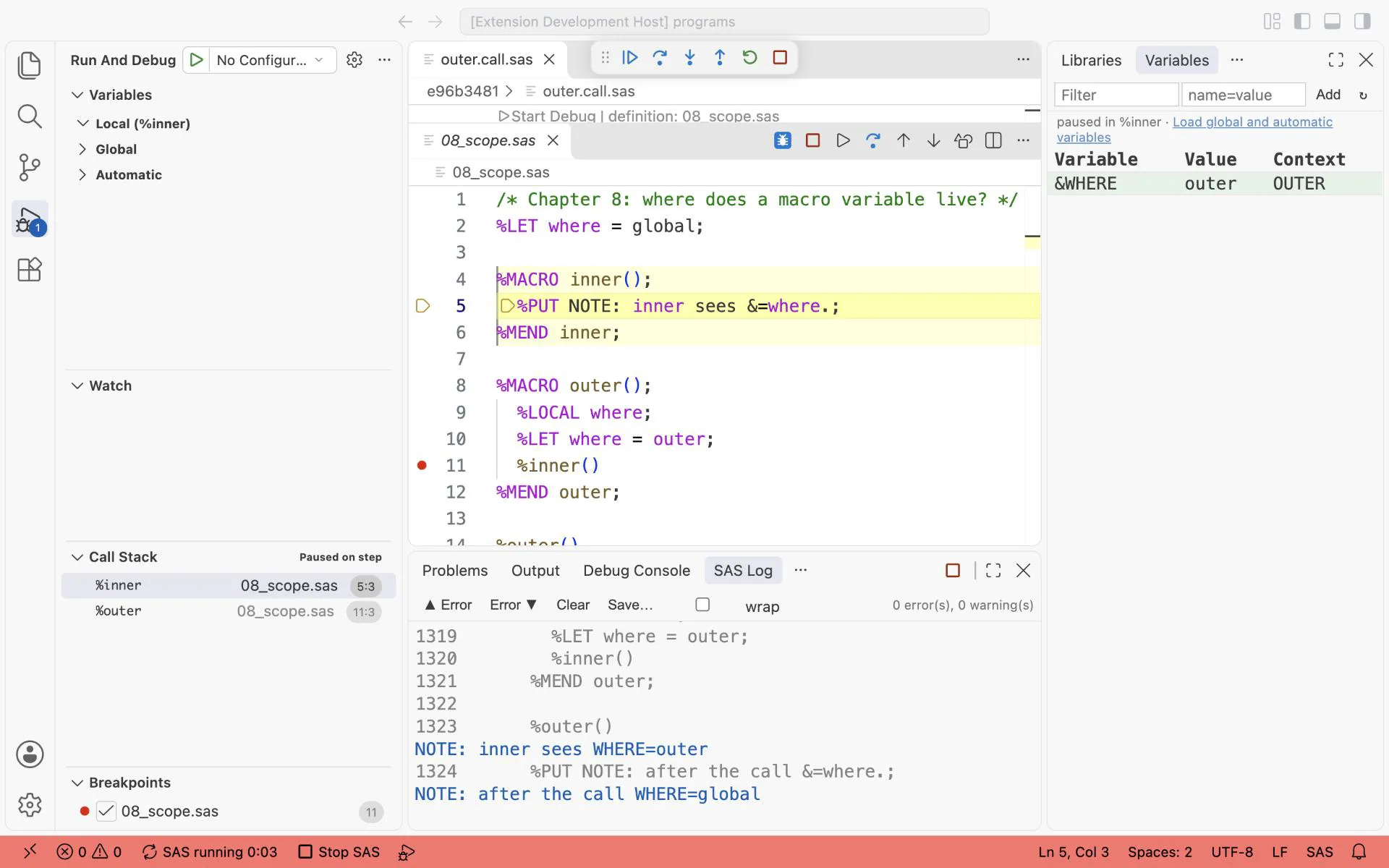
The macro debugger, stepped into %inner: the call stack shows %inner called from %outer, and &WHERE = outer comes from the local scope of %outer.
Exercise 8-3. Remove %LOCAL where; from %outer and run 08_scope.sas again. What does the second NOTE say now, and why?
8.5 Two utility macros every library needs
Section titled “8.5 Two utility macros every library needs”/* Chapter 8: two utility macros that every library needs */%MACRO nobs(ds); %LOCAL dsid n rc; %LET dsid = %SYSFUNC(OPEN(&ds.)); %IF &dsid. %THEN %DO; %LET n = %SYSFUNC(ATTRN(&dsid., NLOBSF)); %LET rc = %SYSFUNC(CLOSE(&dsid.)); %END; %ELSE %LET n = -1; &n.%MEND nobs;
%MACRO varexist(ds, var); %LOCAL dsid rc res; %LET res = 0; %LET dsid = %SYSFUNC(OPEN(&ds.)); %IF &dsid. %THEN %DO; %IF %SYSFUNC(VARNUM(&dsid., &var.)) > 0 %THEN %LET res = 1; %LET rc = %SYSFUNC(CLOSE(&dsid.)); %END; &res.%MEND varexist;
%PUT NOTE: ADSL has %nobs(refadm.adsl) records, a missing data set gives %nobs(work.nothere).;%PUT NOTE: TRTSDT in ADSL: %varexist(refadm.adsl, trtsdt), FOO in ADSL: %varexist(refadm.adsl, foo);What you should see:
NOTE: ADSL has 254 records, a missing data set gives -1.NOTE: TRTSDT in ADSL: 1, FOO in ADSL: 0These macros make no SAS step at all. They run functions with %SYSFUNC and leave a value where you call them. So you can use them inside a %PUT, a %IF or another macro.
8.6 A macro written the professional way
Section titled “8.6 A macro written the professional way”A macro that others use must explain itself, check its input, and clean up after itself. This one counts subjects and records by any variables:
/*******************************************************************************| Macro Name    : count_by| Macro Version : v1.02| Purpose       : Count subjects and records by one or more variables.|| Parameters|   data  = input data set, required             Example: refadm.adae|   by    = grouping variables, required          Example: trtan aesev|   where = filter, default 1 (all records)       Example: %STR(trtemfl = "Y")|   out   = output data set, default counts|   debug = Y keeps the _cb_ work data sets, default N|| Usage|   %count_by(data=refadm.adae, by=trtan aesev, where=%STR(trtemfl = "Y"))|| Change log|   v1.00  first version|   v1.01  checks of the required parameters and of the variables|   v1.02  debug parameter keeps the intermediate data sets*******************************************************************************/%MACRO count_by(  data  =, by    =, where = 1, out   = counts, debug = N);  %LOCAL i v byc;
  /* Step 0: clean up the work data sets of an earlier call */  PROC DATASETS LIBRARY=work NOLIST NOWARN; DELETE _cb_:; RUN; QUIT;
  %IF %LENGTH(&data.) = 0 OR %LENGTH(&by.) = 0 %THEN %DO;    %PUT %STR(ERR)OR: [COUNT_BY] DATA= and BY= are required.;    %GOTO finish;  %END;  %IF NOT %SYSFUNC(EXIST(&data.)) %THEN %DO;    %PUT %STR(ERR)OR: [COUNT_BY] Data set &data. does not exist.;    %GOTO finish;  %END;  %DO i = 1 %TO %SYSFUNC(COUNTW(&by., %STR( )));    %LET v = %SCAN(&by., &i., %STR( ));    %IF %varexist(&data., &v.) = 0 %THEN %DO;      %PUT %STR(ERR)OR: [COUNT_BY] Variable &v. is not in &data..;      %GOTO finish;    %END;  %END;  %LET byc = %SYSFUNC(TRANWRD(%SYSFUNC(COMPBL(&by.)), %STR( ), %STR(, )));
  /* Step 1: the records to count */  DATA _cb_001_in;    SET &data.;    WHERE %UNQUOTE(&where.);  RUN;
  /* Step 2: subjects and records per group */  PROC SQL;    CREATE TABLE &out. AS      SELECT &byc., COUNT(DISTINCT usubjid) AS n_subj, COUNT(*) AS n_rec        FROM _cb_001_in        GROUP BY &byc.;  QUIT;
  %finish:  %IF %UPCASE(&debug.) NE Y %THEN %DO;    PROC DATASETS LIBRARY=work NOLIST NOWARN; DELETE _cb_:; RUN; QUIT;  %END;%MEND count_by;
%count_by(data=refadm.adae, by=trtan aesev, where=%STR(trtemfl = "Y"))
PROC PRINT DATA=counts NOOBS; RUN;
What you should see:
| TRTAN | AESEV | n_subj | n_rec |
|---|---|---|---|
| 0 | MILD | 58 | 210 |
| 0 | MODERATE | 25 | 65 |
| 0 | SEVERE | 5 | 6 |
| 54 | MILD | 61 | 227 |
| 54 | MODERATE | 53 | 160 |
| 54 | SEVERE | 16 | 25 |
| 81 | MILD | 68 | 294 |
| 81 | MODERATE | 52 | 129 |
| 81 | SEVERE | 8 | 10 |
The habits in this macro, one by one:
- A header that a reader can use without reading the code: purpose, every parameter with an example, a call, and a change log with versions.
- Keyword parameters, one per line, with the comma first. A new parameter is one new line.
- Step 0 cleans up: every work data set of the macro starts with
_cb_, soDELETE _cb_:removes them all, also after an earlier call that failed. - Numbered intermediate data sets (
_cb_001_in): when something is wrong, you open each step’s data set in order. debug=Ykeeps them, so you can inspect them after the call. The default deletes them.- Checks before work: required parameters, the data set, every variable.
Wrong calls stop with a clear message:
/* EXPECT: ERROR [COUNT_BY] *//* Chapter 8: wrong calls stop with a clear message */%count_by(data=refadm.adae, by=trtan nosuchvar)%count_by(data=work.nothere, by=trtan)%count_by(by=trtan)What you should see:
ERROR: [COUNT_BY] Variable nosuchvar is not in refadm.adae.ERROR: [COUNT_BY] Data set work.nothere does not exist.ERROR: [COUNT_BY] DATA= and BY= are required.The macro writes %STR(ERR)OR instead of the word itself. The log of the macro code then never contains the word, so a log check finds only real messages. [COUNT_BY] tells the reader which macro complained.
Exercise 8-4. Call %count_by(data=refadm.adsl, by=trt01an sex, debug=Y). Which _cb_ data set is left in WORK?
8.7 Two rules that save an afternoon
Section titled “8.7 Two rules that save an afternoon”%IF outside a macro needs %DO and %END. Since SAS 9.4M5 you can write %IF in open code, but only in the form %IF ... %THEN %DO; ... %END;. A one-line %THEN %LET ...; fails, and SAS then skips code until it finds an %END.
/* Chapter 8: %IF outside a macro needs %DO and %END */%IF %SYSFUNC(EXIST(refadm.adsl)) %THEN %DO; %PUT NOTE: ADSL found.;%END;%ELSE %DO; %PUT %STR(WAR)NING: ADSL not found.;%END;What you should see: NOTE: ADSL found.
A %GOTO label must not be a macro keyword.
/* EXPECT: ERROR The target of the %GOTO statement was a reserved macro keyword *//* EXPECT: ERROR A dummy macro will be compiled *//* EXPECT: ERROR Macro keyword STOP is not yet implemented *//* Chapter 8: a label must not be a macro keyword */%MACRO check_ds(ds=); %IF NOT %SYSFUNC(EXIST(&ds.)) %THEN %GOTO stop; %PUT NOTE: &ds. exists.; %stop:%MEND check_ds;What you should see:
ERROR: The target of the %GOTO statement was a reserved macro keyword, STOP.ERROR: A dummy macro will be compiled.ERROR: Macro keyword STOP is not yet implemented.Name the label finish or cleanup, as %count_by does. %GOTO to a label at the end of the macro is the clean way to stop early and still clean up.
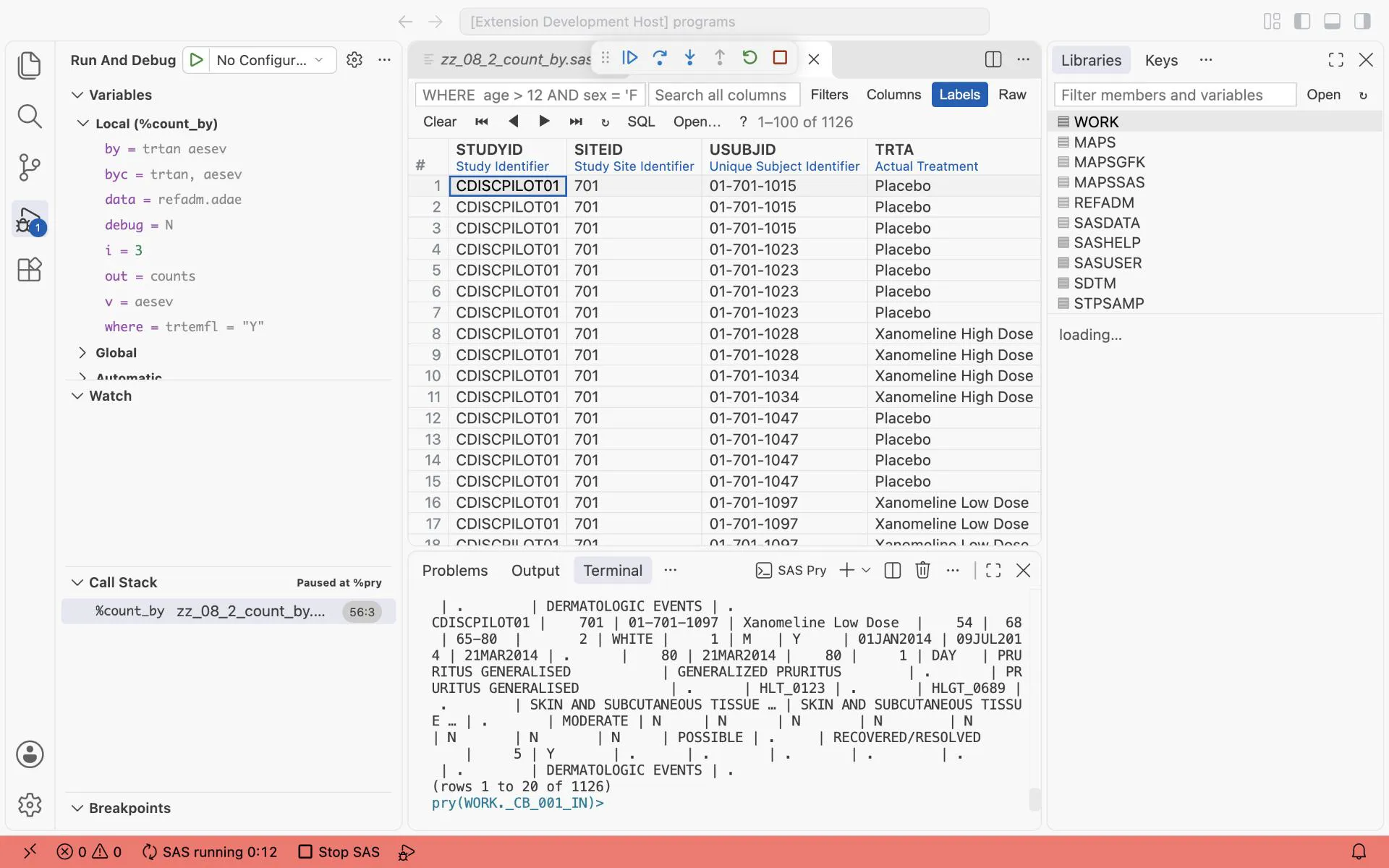
%pry after Step 1 of %count_by: the Variables show by = trtan aesev and where = trtemfl = “Y”, and vt _cb_001_in shows the 1126 treatment emergent records the macro will count.
Answers
Section titled “Answers”The answers to Exercises 8-1 to 8-4 are in Answers, Part I.