Case study: list processing with %m_loop
A study with many subgroups asks for the same table again and again: by sex, by age group, by race, by baseline BMI. This case study follows a pattern from production work. Keep the subgroups in one documented list. Write the table for one subgroup. Let one small macro, %m_loop, do the loop for every analysis.
1. One list, one comment per item
Section titled “1. One list, one comment per item”/* Case study: list processing, a subgroup list and a table for ONE subgroup */
/* Naming and order of the subgroups */%LET subgroups = sex /* Sex: F, M */ agegr1 /* Age group: <65, 65-80, >80 years */ race /* Race: as collected */ bmiblgr1 /* Baseline BMI: <25, 25-<30, >=30 kg/m2 */;%PUT NOTE: subgroups=&subgroups.;
/* The label of a variable, as text: %varlabel(data set, variable) */%MACRO varlabel(ds, var); %LOCAL dsid num lbl rc; %LET dsid = %SYSFUNC(OPEN(&ds.)); %IF &dsid. > 0 %THEN %DO; %LET num = %SYSFUNC(VARNUM(&dsid., &var.)); %IF &num. > 0 %THEN %LET lbl = %SYSFUNC(VARLABEL(&dsid., &num.)); %LET rc = %SYSFUNC(CLOSE(&dsid.)); %END; %IF %LENGTH(&lbl.) = 0 %THEN %LET lbl = &var.; &lbl.%MEND varlabel;
/* One table: change from baseline by treatment, for ONE subgroup variable */%GLOBAL tables_made;%LET tables_made = 0;%MACRO chg_table(paramcd=SYSBP, atptn=815, avisit=Week 24, by=&each., by_title=%varlabel(refadm.adsl, &each.)); /* Step 010: the analysis records, with the subgroup from ADSL */ PROC SQL; CREATE TABLE _ct_010 AS SELECT b.&by., a.trtpn, a.trtp, a.chg FROM refadm.advs AS a INNER JOIN refadm.adsl AS b ON a.usubjid = b.usubjid WHERE a.paramcd = "¶mcd." AND a.atptn = &atptn. AND a.avisit = "&avisit." AND NOT MISSING(a.chg); QUIT; /* Step 020: n, mean and SD per subgroup and treatment */ PROC MEANS DATA=_ct_010 NWAY NOPRINT; CLASS &by. trtpn trtp; VAR chg; OUTPUT OUT=_ct_020(DROP=_type_ _freq_) N=n MEAN=mean STD=sd; RUN; TITLE1 "Change from baseline in ¶mcd. at &avisit."; TITLE2 "by &by_title."; PROC PRINT DATA=_ct_020 NOOBS; VAR &by. trtp n mean sd; FORMAT mean sd 8.2; RUN; TITLE; %LET tables_made = %EVAL(&tables_made. + 1); PROC DATASETS LIBRARY=work NOLIST NOWARN; DELETE _ct_:; RUN; QUIT;%MEND chg_table;
/* The old way: a loop macro written for this one analysis */%MACRO _subgroup_chg(subgroups=); %LOCAL i _subgroup_i; %DO i = 1 %TO %SYSFUNC(COUNTW(&subgroups., %STR( ))); %LET _subgroup_i = %SCAN(&subgroups., &i., %STR( )); %chg_table(by=&_subgroup_i., by_title=%varlabel(refadm.adsl, &_subgroup_i.)) %END;%MEND _subgroup_chg;
%_subgroup_chg(subgroups=&subgroups.)%PUT NOTE: tables made by the old way: &tables_made.;Look at the %LET subgroups = statement first. Each item has a comment with the categories from the SAP. SAS removes the comments before the macro processor sees the text, so the value is only the four names:
NOTE: subgroups=sex agegr1 race bmiblgr1The list is the one place that says which subgroups the study reports, in which order. It belongs in the program that every other program runs first, for example initialize.sas. Add a subgroup there, and every subgroup analysis gets it.
Then two macros:
%varlabel(ds, var)returns the label of a variable as text. It opens the data set with%SYSFUNC(OPEN(...)), finds the variable withVARNUM, readsVARLABELand closes the data set. Because it writes no SAS code, you can call it in the middle of a statement:TITLE2 "by %varlabel(refadm.adsl, agegr1)";writesby Pooled Age Group 1.%chg_tablemakes one table: mean change from baseline in systolic blood pressure (lying,ATPTN815) at Week 24, by treatment, for one subgroup variable. Its defaults areby=&each.andby_title=%varlabel(refadm.adsl, &each.). Keep them in mind for step 3.
What you should see: four tables. The first one:
| SEX | TRTP | n | mean | sd |
|---|---|---|---|---|
| F | Placebo | 34 | -5.32 | 13.24 |
| F | Xanomeline Low Dose | 18 | 2.83 | 16.57 |
| F | Xanomeline High Dose | 14 | -4.07 | 19.54 |
| M | Placebo | 24 | 2.42 | 15.80 |
| M | Xanomeline Low Dose | 9 | -6.44 | 17.68 |
| M | Xanomeline High Dose | 16 | -6.94 | 15.35 |
with the titles Change from baseline in SYSBP at Week 24 and by Sex. Together the rows hold 58, 27 and 30 subjects: the same numbers as refadm.advs has for SYSBP, lying, Week 24. The split by subgroup lost no one.
2. The old way repeats itself
Section titled “2. The old way repeats itself”The end of the program calls %_subgroup_chg, a macro that loops over the list and calls %chg_table for each item. It works: NOTE: tables made by the old way: 4. Now write the next subgroup analysis, for adverse events or for laboratory values. You write the same macro again:
%LOCAL i _subgroup_i; /* the same */%DO i = 1 %TO %SYSFUNC(COUNTW(&subgroups., %STR( ))); /* the same */ %LET _subgroup_i = %SCAN(&subgroups., &i., %STR( )); /* the same */ %chg_table(by=&_subgroup_i., by_title=...) /* only this changes */%END; /* the same */Four lines of every five stay the same. Only the macro call inside the loop changes. Code that stays the same belongs in a macro of its own.
3. Write the loop once: %m_loop
Section titled “3. Write the loop once: %m_loop”/* Case study: %m_loop, write the loop once (needs 19_9_1) *//******************************************************************************* Macro : %m_loop Version : 1.0 Purpose : Call a macro once for each item of a list. Inside the called macro, &each. holds the current item. Parameters : macro= the macro call without the %, with its parameters (required) list= the items (empty: the macro is called once, &each. is empty) delimiter= the character between the items (default: blank) Example : %m_loop(macro=chg_table(paramcd=SYSBP), list=sex agegr1) Change log : 2026-11-01 1.0 first version: each and the counter _ml_i are %LOCAL, the counter has a private name (see 19_9_3)*******************************************************************************/%MACRO m_loop(macro=, list=, delimiter=%STR( )); %LOCAL each _ml_i; %IF %LENGTH(&list.) = 0 %THEN %¯o.; %ELSE %DO _ml_i = 1 %TO %SYSFUNC(COUNTW(&list., &delimiter.)); %LET each = %SCAN(&list., &_ml_i., &delimiter.); %¯o.; %END;%MEND m_loop;
/* Iterate over all subgroups: the analysis is one line */%LET tables_made = 0;%m_loop( macro = chg_table(paramcd=SYSBP, atptn=815, avisit=Week 24) , list = &subgroups.)%PUT NOTE: tables made by %NRSTR(%m_loop): &tables_made.;
/* The same loop, another analysis: only the macro call changes */%LET tables_made = 0;%m_loop( macro = chg_table(paramcd=DIABP, atptn=815, avisit=Week 24) , list = sex agegr1)%PUT NOTE: tables made for DIABP: &tables_made.;%m_loop takes a macro call as text, macro=chg_table(paramcd=SYSBP, ...), and runs %¯o.; once for each item of list=. Before each call it sets each to the current item.
Why does %chg_table get the right subgroup without a by= in the call? A default value is stored as text: by holds the text &each.. SAS resolves this text each time the macro uses &by.. At that moment %m_loop is running, and each is one of its local macro variables. A called macro can read the local variables of the macros that called it. So in the first round &by. gives sex, in the second agegr1, and so on. Watch the scopes in DataStep Studio shows this text.
What you should see:
NOTE: tables made by %m_loop: 4NOTE: tables made for DIABP: 2The same four tables as the old way, then two diastolic tables for a shorter list. The second analysis is one call, with no new loop. Three more details:
- The commas inside the call need no quoting. In
macro=chg_table(paramcd=SYSBP, atptn=815, avisit=Week 24)the commas are inside parentheses, so SAS keeps them withmacro=. - An empty list calls the macro once, with an empty
each. A table macro can use that for the “all subjects” table. delimiter=lets an item hold blanks, for example a list of WHERE conditions separated by|.
4. The loop counter that another macro changed
Section titled “4. The loop counter that another macro changed”The first version of %m_loop counted with %DO _i, and _i was not %LOCAL. That works until the called macro also counts with _i. This program tests five cases. The inner macro %arm_counts loops over the three treatment arms with %DO _i = 1 %TO 3, and it also forgot %LOCAL _i:
/* Case study: a loop counter that another macro can change (needs 19_9_1 and 19_9_2) */
/* an inner macro that loops with _i and forgot %LOCAL */%MACRO arm_counts(by=&each.); %LOCAL n; %DO _i = 1 %TO 3; PROC SQL NOPRINT; SELECT COUNT(DISTINCT &by.) INTO :n TRIMMED FROM refadm.adsl WHERE trt01pn = %SCAN(0 54 81, &_i.); QUIT; %END; %PUT NOTE: &by.: &n. categories in the last arm; %LET tables_made = %EVAL(&tables_made. + 1);%MEND arm_counts;
/* A: the loop counter _i is not %LOCAL */%MACRO loop_a(macro=, list=); %LOCAL each; %DO _i = 1 %TO %SYSFUNC(COUNTW(&list., %STR( ))); %LET each = %SCAN(&list., &_i., %STR( )); %¯o.; %END;%MEND loop_a;
/* B: _i is %LOCAL, but the inner macro still finds it */%MACRO loop_b(macro=, list=); %LOCAL each _i; %DO _i = 1 %TO %SYSFUNC(COUNTW(&list., %STR( ))); %LET each = %SCAN(&list., &_i., %STR( )); %¯o.; %END;%MEND loop_b;
%LET tables_made = 0;%loop_a(macro=arm_counts, list=&subgroups.)%PUT NOTE: A, _i not local: &tables_made. of 4 subgroups done;
%LET tables_made = 0;%loop_b(macro=arm_counts, list=&subgroups.)%PUT NOTE: B, _i local: &tables_made. of 4 subgroups done;
/* C: %m_loop counts with its own name, _ml_i */%LET tables_made = 0;%m_loop(macro=arm_counts, list=&subgroups.)%PUT NOTE: C, %NRSTR(%m_loop) with _ml_i: &tables_made. of 4 subgroups done;
/* D: the inner macro is fixed: %LOCAL n _i */%MACRO arm_counts(by=&each.); %LOCAL n _i; %DO _i = 1 %TO 3; PROC SQL NOPRINT; SELECT COUNT(DISTINCT &by.) INTO :n TRIMMED FROM refadm.adsl WHERE trt01pn = %SCAN(0 54 81, &_i.); QUIT; %END; %PUT NOTE: &by.: &n. categories in the last arm; %LET tables_made = %EVAL(&tables_made. + 1);%MEND arm_counts;%LET tables_made = 0;%loop_b(macro=arm_counts, list=&subgroups.)%PUT NOTE: D, inner macro fixed: &tables_made. of 4 subgroups done;
/* E: a global _i, and a loop that does not declare it */%LET _i = kept;%loop_a(macro=arm_counts, list=sex)%PUT NOTE: E, global _i after loop_a: &_i.;%LET _i = kept;%m_loop(macro=arm_counts, list=sex)%PUT NOTE: E, global _i after %NRSTR(%m_loop): &_i.;%SYMDEL _i;What you should see:
NOTE: A, _i not local: 1 of 4 subgroups doneNOTE: B, _i local: 1 of 4 subgroups doneNOTE: C, %m_loop with _ml_i: 4 of 4 subgroups doneNOTE: D, inner macro fixed: 4 of 4 subgroups doneNOTE: E, global _i after loop_a: 2NOTE: E, global _i after %m_loop: keptThere is no ERROR and no WARNING in the log. Three tables are missing, and nothing says so. What happened:
- A. The loop starts with
_i = 1and calls%arm_counts. Its%DO _i = 1 %TO 3looks for a variable_i, finds the one of the loop, and leaves it at 4. Back in the loop,%ENDadds 1:_iis 5, more than the 4 items, and the loop stops. Onlysexwas done. - B.
%LOCAL _iin the loop does not help. A macro looks up a name in its own scope first, then in the scope of the macro that called it, and so on outward. The inner macro still finds the loop’s_i. - C.
%m_loopcounts with_ml_i, a name no other macro uses. The inner macro does not find an_i, makes its own, and the loop is safe. - D. The real fix is in the inner macro:
%LOCAL n _i;. A macro that declares all its variables cannot change anyone else’s. - E. If a global
_iexists, a loop that does not declare its counter uses that global one and overwrites it:keptbecame2.%m_loopdeclares its counter, so the global value stays.
5. Watch the scopes in DataStep Studio
Section titled “5. Watch the scopes in DataStep Studio”-
Run
19_9_1_subgroups.sasonce withF4, so SAS knows%chg_tableand%varlabel. -
Open
19_9_2_m_loop.sas, put the cursor on the line%MACRO m_loop(and click Debug Macro. The call pane opens above the definition. Write the call in it:%m_loop(macro = chg_table(paramcd=SYSBP, atptn=815, avisit=Week 24), list = &subgroups.)When a file defines a macro and also calls it, Debug Macro starts from the definition. From a call in another file, DataStep Studio copies the call for you, as in the study macro case study.
-
Set a breakpoint on the line
%¯o.;(line 22), right-click it, choose Edit Condition and type the condition&_ml_i. = 2. Click Start Debug and pressF5.What you should see: the run stops in the second round. The Variables of
%m_loopshoweach = agegr1and_ml_i = 2, and the Call Stack shows%m_loop.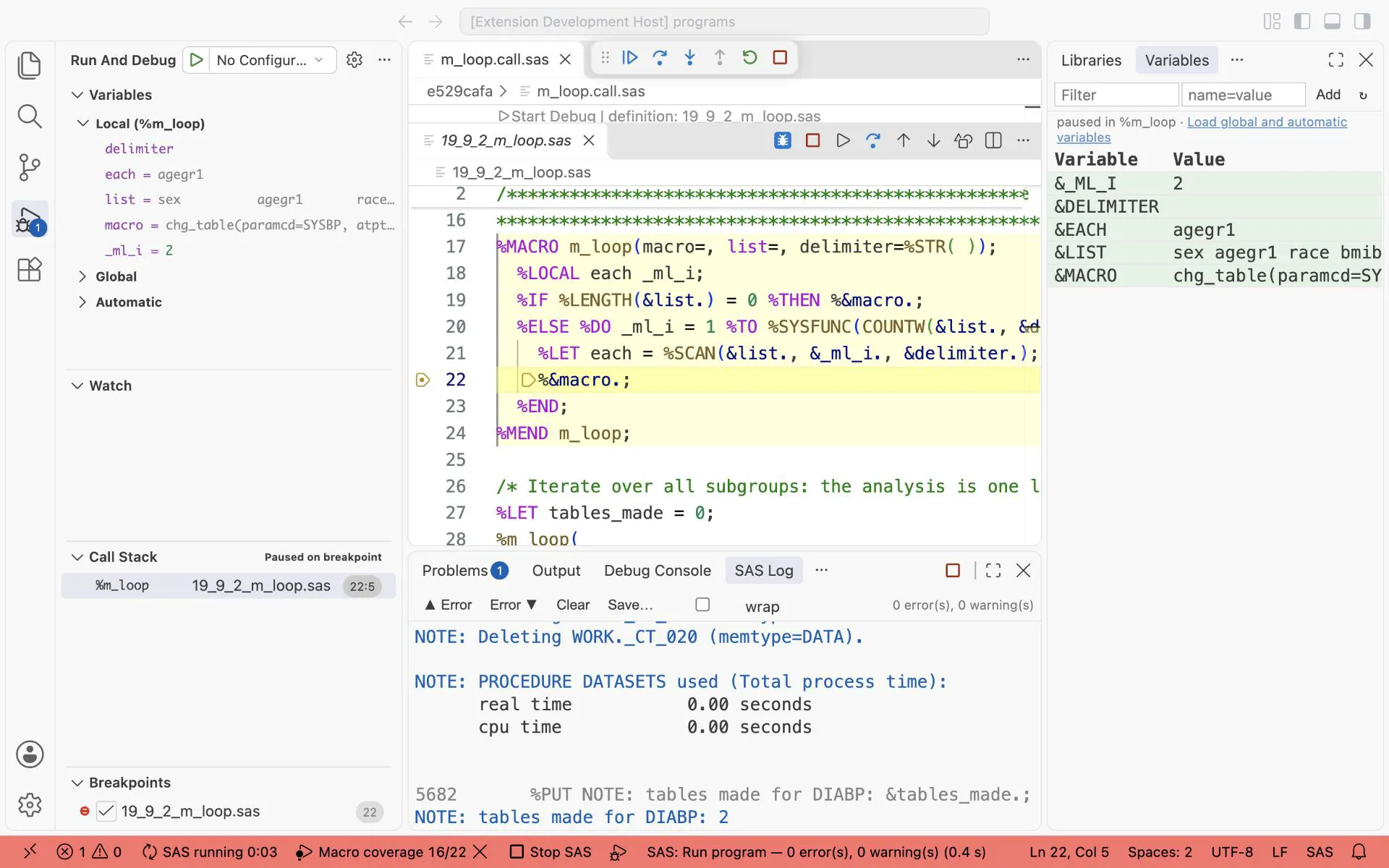
The macro debugger in %m_loop, stopped at %¯o.; with the condition &_ml_i. = 2: each = agegr1, the second subgroup.
-
The macro debugger steps through the macros of the file you debug.
%chg_tablecomes from19_9_1_subgroups.sas, so to look inside it, use%pry. Write this line just before%LET tables_made = ...in%chg_table:%pry(when=%SYMEXIST(_ml_i) AND &by. = agegr1)%SYMEXIST(_ml_i)is true only when%m_loopcalled the macro, so the old loop does not stop. Run19_9_1_subgroups.sas, then19_9_2_m_loop.saswithF4. In the SAS Pry terminal typebt, thenls.What you should see:
btshows#0 %chg_tableand below it#1 %m_loop: the macro that called it.lsshowsby = &each.: the default, still as text. It becameagegr1only where&by.was used, as in the%prycondition that stopped here. Typecto let the run go on.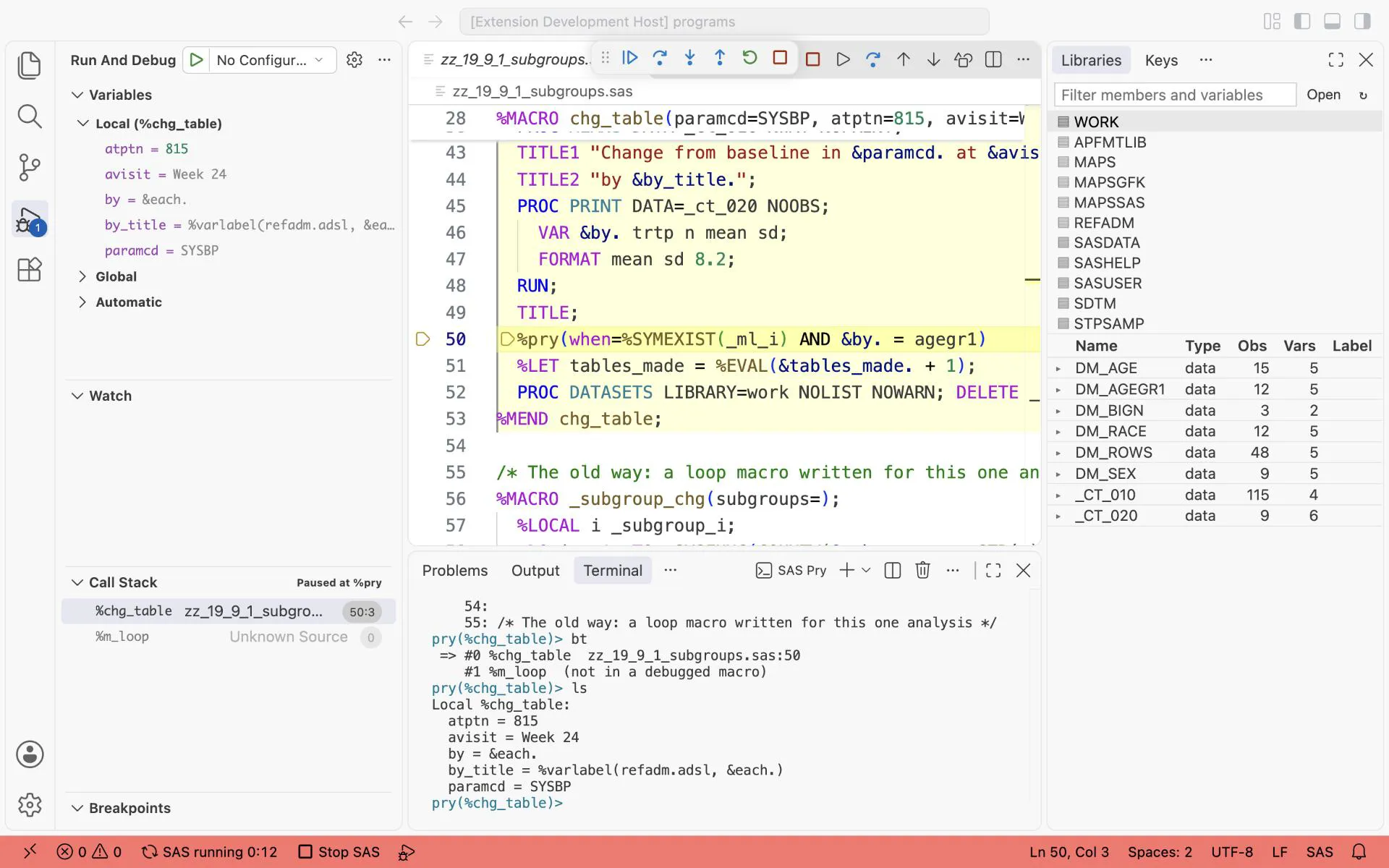
%pry inside %chg_table: bt shows %chg_table called by %m_loop, and ls shows by = &each., the default still as text.
Exercises
Section titled “Exercises”- Add
durdsgr1(pooled disease duration) to the subgroup list, with a comment. How many tables does the%m_loopcall make now, without any other change? - Call
%m_loop(macro=chg_table(paramcd=SYSBP), list=). What happens, and why? Change%chg_tableso that an emptybymakes one table for all subjects. - Make the SYSBP table by sex for the three positions with
%m_loop(..., list=815|816|817, delimiter=|). Why doesmacro=chg_table(atptn=&each., by=sex, by_title=Sex)give a WARNING, and how do you avoid it?
Answers: Answers, Parts IV and V.