How the macro processor works
The macro language is a text generator. It runs first, writes SAS code, and only then does SAS compile and run that code. Almost every macro surprise comes from forgetting this order. This chapter shows the order step by step.
17.1 Two processors, one program
Section titled “17.1 Two processors, one program”When you submit a program, the word scanner reads it token by token. A token that starts with & or % goes to the macro processor, which replaces it with text. Everything else goes to the DATA step or PROC compiler. So the macro processor has finished its work on a step before that step runs:
your program ──► word scanner ──► & and % ──► macro processor ──► text ─┐ │ │ └──────────► other tokens ◄────────────────────────┘ │ ▼ compiler, then execution17.2 Names that build names
Section titled “17.2 Names that build names”/* Chapter 17: how the macro processor resolves names */%LET trt1 = Placebo;%LET trt2 = Xanomeline Low Dose;%LET trt3 = Xanomeline High Dose;%LET i = 2;%PUT NOTE: &&trt&i.;
%LET name = trt3;%PUT NOTE: &&&name.;
/* Integer and decimal arithmetic */%PUT NOTE: EVAL gives %EVAL(7 / 2), SYSEVALF gives %SYSEVALF(7 / 2);
/* Data step functions in macro code */%PUT NOTE: %SYSFUNC(PUTN(0, DATE9.)) %SYSFUNC(COUNTW(sex race agegr1)) %SYSFUNC(PROPCASE(xanomeline high dose));What you should see:
NOTE: Xanomeline Low DoseNOTE: Xanomeline High DoseNOTE: EVAL gives 3, SYSEVALF gives 3.5NOTE: 01JAN1960 3 Xanomeline High Dose&&trt&i.is read in passes. Pass 1:&&becomes&,&i.becomes2, so the text is&trt2. Pass 2:&trt2becomesXanomeline Low Dose. This is an indirect reference, the usual way to walk throughtrt1,trt2,trt3in a loop.&&&name.:&&becomes&,&name.becomestrt3, then&trt3resolves.%EVALdoes whole-number arithmetic: 7 / 2 is 3.%SYSEVALFdoes decimal arithmetic: 3.5.%SYSFUNCcalls a DATA step function from macro code: a format, a word count, a case change.
%EVAL cannot read a decimal at all:
/* EXPECT: ERROR A character operand was found in the %EVAL function *//* Chapter 17: %EVAL knows only whole numbers */%PUT NOTE: %EVAL(1.5 + 1);What you should see: ERROR: A character operand was found in the %EVAL function or %IF condition where a numeric operand is required. The condition was: 1.5 + 1. %IF uses %EVAL too, so %IF &dose. > 1.5 fails the same way. Use %SYSEVALF for decimals.
17.3 Macro code runs before the step runs
Section titled “17.3 Macro code runs before the step runs”/* EXPECT: WARNING Apparent symbolic reference WHEN not resolved *//* Chapter 17: macro code runs before the DATA step runs */%SYMDEL when / NOWARN;
DATA _NULL_; CALL SYMPUTX("when", "set while the step runs"); PUT "inside the step: &when.";RUN;
%PUT NOTE: after the step: &=when.;What you should see:
WARNING: Apparent symbolic reference WHEN not resolved.inside the step: &when.NOTE: after the step: WHEN=set while the step runsThe macro processor met &when. while it read the step, before the step ran and before CALL SYMPUTX created the variable. So the reference stayed unresolved. After RUN; the variable exists. Rule: a macro variable created by CALL SYMPUTX (or SELECT INTO) can be used only in a later step.
17.4 Quoting: protect special characters
Section titled “17.4 Quoting: protect special characters”Some characters mean something to the macro processor or to SAS: ; ends a statement, & and % start macro references, an unmatched quote opens a string. Quoting functions hide them.
/* Chapter 17: quoting functions protect special characters */%LET code = %STR(TITLE "Demography"; FOOTNOTE "Safety population";);%PUT NOTE: &=code.;
%LET amp = %NRSTR(R&D department);%PUT NOTE: &=amp.;
DATA _NULL_;  CALL SYMPUTX("site", "O'Brien Clinic");RUN;
%MACRO show(text);  %PUT NOTE: show received [&text.];%MEND show;
%show(%BQUOTE(&site.))%PUT NOTE: SUPERQ gives %SUPERQ(site);
What you should see:
NOTE: CODE=TITLE "Demography"; FOOTNOTE "Safety population";NOTE: AMP=R&D departmentNOTE: show received [O'Brien Clinic]NOTE: SUPERQ gives O'Brien Clinic| Function | When | Example |
|---|---|---|
%STR | text you type, with ; or blanks to keep | %STR(TITLE "a"; FOOTNOTE "b";) |
%NRSTR | text you type, with & or % that must not resolve | %NRSTR(R&D) |
%BQUOTE | a value from data, maybe with an unmatched quote | %BQUOTE(&site.) |
%SUPERQ | a value from data, never resolved again | %SUPERQ(site) (no &) |
The value O'Brien Clinic came from data. Passed to a macro without %BQUOTE, the single quote stays unmatched and the rest of the program becomes one long string. Quote every value that comes from data.
The same rule explains the trap of Chapter 6: in LIKE "%FL" the macro processor sees %FL inside double quotes and looks for a macro. Single quotes stop the macro processor; double quotes do not.
17.5 The classic log options, and something better
Section titled “17.5 The classic log options, and something better”/* Chapter 17: the classic log options */%MACRO freq_each(data=, vars=); %LOCAL i var; %DO i = 1 %TO %SYSFUNC(COUNTW(&vars., %STR( ))); %LET var = %SCAN(&vars., &i., %STR( )); PROC FREQ DATA=&data.; TABLES &var. / NOCUM; RUN; %END;%MEND freq_each;
OPTIONS MPRINT MLOGIC SYMBOLGEN;%freq_each(data=refadm.adsl, vars=sex)OPTIONS NOMPRINT NOMLOGIC NOSYMBOLGEN;What you should see (part of the log):
MLOGIC(FREQ_EACH): Beginning execution.MLOGIC(FREQ_EACH): Parameter DATA has value refadm.adslSYMBOLGEN: Macro variable VARS resolves to sexMLOGIC(FREQ_EACH): %DO loop beginning; index variable I; start value is 1; stop value is 1; by value is 1.MPRINT(FREQ_EACH): PROC FREQ DATA=refadm.adsl;MPRINT(FREQ_EACH): TABLES sex / NOCUM;MLOGIC(FREQ_EACH): Ending execution.MPRINT shows the code a macro writes, MLOGIC the macro’s own logic, SYMBOLGEN every resolution. For one variable that is readable; for a real macro it is thousands of lines.
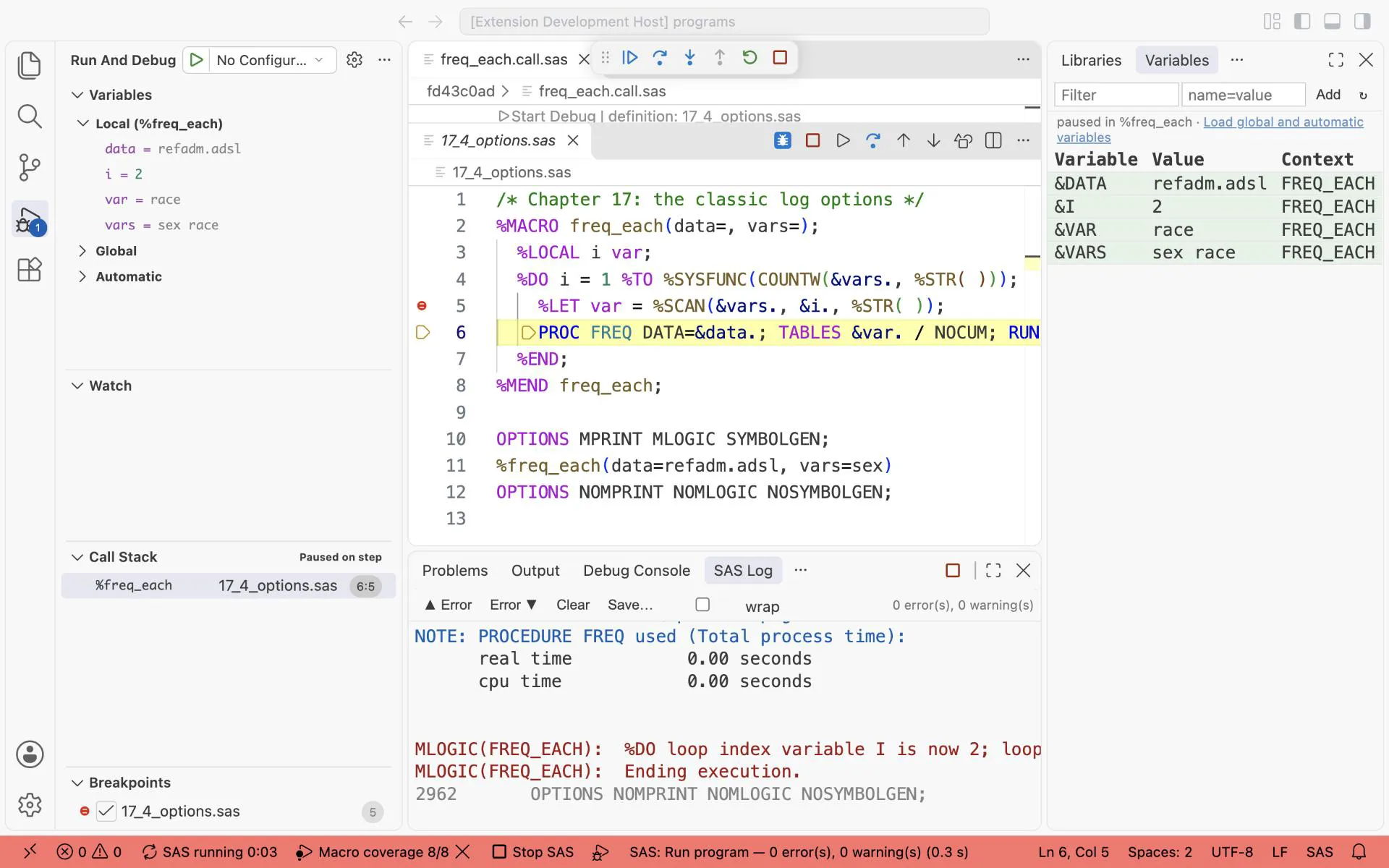
The same stop for this chapter’s program: the Variables view shows what MLOGIC and SYMBOLGEN write to the log, without searching the log.
Write macros you want to debug with empty parentheses, %MACRO name();, because of a known call-pane issue.
Exercises
Section titled “Exercises”Exercise 17-1. Create trt1 to trt3 with PROC SQL INTO :trt1- from ADSL, then print all three in a %DO loop with &&trt&i..
Exercise 17-2. What does %PUT %EVAL(10 / 4) %SYSEVALF(10 / 4, CEIL); print? Check in the log.
Exercise 17-3. Store Smith & Jones in a macro variable so that %PUT &=x.; prints it without a WARNING.
Exercise 17-4. Fix 17_2_timing.sas so that the PUT statement prints the value: move the use of &when. to where it is allowed.
Answers: Chapter 17 answers.