Code from data
A program that types every parameter code by hand breaks when the data change. A data-driven program reads the codes from the data and writes one step for each. This is the heart of every table macro.
18.1 Get a list from the data
Section titled “18.1 Get a list from the data”/* Chapter 18: lists of values from the data */PROC SQL NOPRINT; SELECT DISTINCT paramcd INTO :params SEPARATED BY " " FROM refadm.advs; SELECT DISTINCT paramcd, param INTO :pcd1-, :plab1- FROM refadm.advs;QUIT;%LET nparam = &sqlobs.;%PUT NOTE: &=params. &=nparam.;%PUT NOTE: &=pcd1. &=plab1.;
/* CALL SYMPUTX: a value computed in a DATA step */DATA _NULL_; SET refadm.adsl END=eof; IF saffl = "Y" THEN nsaf + 1; IF eof THEN CALL SYMPUTX("nsaf", nsaf);RUN;%PUT NOTE: &=nsaf.;What you should see:
NOTE: PARAMS=DIABP HEIGHT PULSE SYSBP TEMP WEIGHT NPARAM=6NOTE: PCD1=DIABP PLAB1=Diastolic Blood Pressure (mmHg)NOTE: NSAF=254INTO :params SEPARATED BY " "puts all values into one macro variable: a list for%SCAN.INTO :pcd1-, :plab1-puts each row into its own numbered variables. The dash with no upper limit creates as many as there are rows.&sqlobs.holds the number of rows of the last query. Copy it at once (%LET nparam = &sqlobs.;): the next query changes it.CALL SYMPUTXtakes a value from a DATA step. Remember Chapter 17: it is available only afterRUN;.
18.2 One summary per parameter
Section titled “18.2 One summary per parameter”/* Chapter 18: one summary per parameter, driven by the data */%MACRO by_param(data=); %LOCAL i n; PROC SQL NOPRINT; SELECT DISTINCT paramcd, param INTO :_pcd1-, :_plab1- FROM &data.; QUIT; %LET n = &sqlobs.; %DO i = 1 %TO &n.; TITLE "Baseline &&_plab&i."; PROC MEANS DATA=&data.(WHERE=(paramcd = "&&_pcd&i." AND ablfl = "Y")) N MEAN STD MAXDEC=1; CLASS trtpn; VAR aval; RUN; %END; TITLE;%MEND by_param;
%by_param(data=refadm.advs)What you should see: a loop over all six parameters, and five PROC MEANS tables, each titled from its label. The first one:
| Planned treatment (N) | N | Mean | Std Dev |
|---|---|---|---|
| 0 | 255 | 77.1 | 10.9 |
| 54 | 252 | 76.4 | 10.3 |
| 81 | 252 | 78.3 | 10.3 |
under the title Baseline Diastolic Blood Pressure (mmHg). N is larger than the number of subjects because the pilot measures blood pressure in three positions, each with its own baseline record.
There is no table for HEIGHT. The log says why: NOTE: No observations were selected from data set REFADM.ADVS., followed by the condition WHERE (paramcd='HEIGHT') and (ablfl='Y');. Height has no record flagged as baseline. A data-driven program shows such surprises at once; a hand-written one would hide them. When a new parameter appears in the data, the macro writes its table without any change.
18.3 CALL EXECUTE and the timing trap
Section titled “18.3 CALL EXECUTE and the timing trap”CALL EXECUTE sends code from a DATA step to run after the step. It is natural for “one call per row”. But a macro call inside it runs at once, while the DATA step runs:
/* Chapter 18: CALL EXECUTE and the timing trap */%MACRO count_param(paramcd=); PROC SQL NOPRINT; SELECT COUNT(*) INTO :n TRIMMED FROM refadm.advs WHERE paramcd = "¶mcd."; QUIT; %PUT NOTE: ¶mcd. has &n. records;%MEND count_param;
PROC SQL; CREATE TABLE plist AS SELECT DISTINCT paramcd FROM refadm.advs WHERE paramcd IN ("PULSE" "SYSBP");QUIT;
%LET n = (not counted yet);
/* Trap: the macro runs while the DATA step runs, before its PROC SQL */DATA _NULL_; SET plist; CALL EXECUTE(CATS('%count_param(paramcd=', paramcd, ')'));RUN;
/* Fix: %NRSTR delays the call until the step has ended */DATA _NULL_; SET plist; CALL EXECUTE(CATS('%NRSTR(%count_param(paramcd=', paramcd, '))'));RUN;What you should see:
NOTE: PULSE has (not counted yet) recordsNOTE: SYSBP has (not counted yet) recordsNOTE: PULSE has 8885 recordsNOTE: SYSBP has 8889 recordsIn the first DATA step, the macro’s %PUT ran immediately, before its PROC SQL had a chance to run, so it printed the old value. %NRSTR hides the call until the DATA step has ended; then each call runs in order, its PROC SQL first and its %PUT after. Rule: inside CALL EXECUTE, always wrap a macro call in %NRSTR.
18.4 DOSUBL: run now, use the result now
Section titled “18.4 DOSUBL: run now, use the result now”DOSUBL runs a piece of code immediately, in a side session, and continues the DATA step afterwards. Macro variables it creates come back:
/* Chapter 18: DOSUBL runs code now and gives the result back */DATA counts;  SET plist;  rc = DOSUBL(CATS('PROC SQL NOPRINT; SELECT COUNT(*) INTO :n TRIMMED FROM refadm.advs WHERE paramcd = "', paramcd, '"; QUIT;'));  n  = INPUT(SYMGET("n"), ?? BEST.);RUN;
PROC PRINT DATA=counts NOOBS;RUN;
What you should see:
| PARAMCD | rc | n |
|---|---|---|
| PULSE | 0 | 8885 |
| SYSBP | 0 | 8889 |
rc = 0 means the code ran. This program uses work.plist from 18_3_execute.sas, so run that program first.
18.5 Parameters as a small specification language
Section titled “18.5 Parameters as a small specification language”Real table macros take many variables, each with a label and a number of decimals. Experienced programmers pack that into one parameter with two separators: # between items, | between the parts of an item.
/* Chapter 18: a parameter written as a small specification language */%MACRO desc(data=, cont=, by=, out=desc);  %LOCAL i item var lab dec;  %DO i = 1 %TO %SYSFUNC(COUNTW(%SUPERQ(cont), #));    %LET item = %QSCAN(%SUPERQ(cont), &i., #);    %LET var  = %SCAN(&item., 1, |);    %LET lab  = %QSCAN(&item., 2, |);    %LET dec  = %SCAN(&item., 3, |);    PROC MEANS DATA=&data. NOPRINT NWAY;      CLASS &by.;      VAR &var.;      OUTPUT OUT=_desc_&i. N=n MEAN=mean STD=sd;    RUN;    DATA _desc_&i.;      LENGTH label $40 stat $20;      SET _desc_&i.;      label = "%TRIM(&lab.)";      stat  = CATX(" ", PUT(mean, 8.%EVAL(&dec. + 1)), CATS("(", PUT(sd, 8.%EVAL(&dec. + 2)), ")"));      KEEP label &by. n stat;    RUN;  %END;  DATA &out.;    SET _desc_:;  RUN;  PROC DATASETS LIBRARY=work NOLIST NOWARN; DELETE _desc_:; RUN; QUIT;%MEND desc;
%desc(data=refadm.adsl, cont=age|Age (years)|0 # bmibl|BMI (kg/m2)|1, by=trt01pn)
PROC PRINT DATA=desc NOOBS;RUN;
What you should see:
| label | stat | TRT01PN | n |
|---|---|---|---|
| Age (years) | 75.2 (8.59) | 0 | 86 |
| Age (years) | 75.7 (8.29) | 54 | 84 |
| Age (years) | 74.4 (7.89) | 81 | 84 |
| BMI (kg/m2) | 23.64 (3.672) | 0 | 86 |
| BMI (kg/m2) | 25.06 (4.271) | 54 | 83 |
| BMI (kg/m2) | 25.35 (4.158) | 81 | 84 |
%QSCAN(%SUPERQ(cont), &i., #)takes the item and keeps it quoted, because the label contains parentheses.- The third part sets the decimals: the mean gets one more than the data, the SD two more, a common convention in clinical tables.
- One call now describes any number of variables, and the call reads like the table shell.
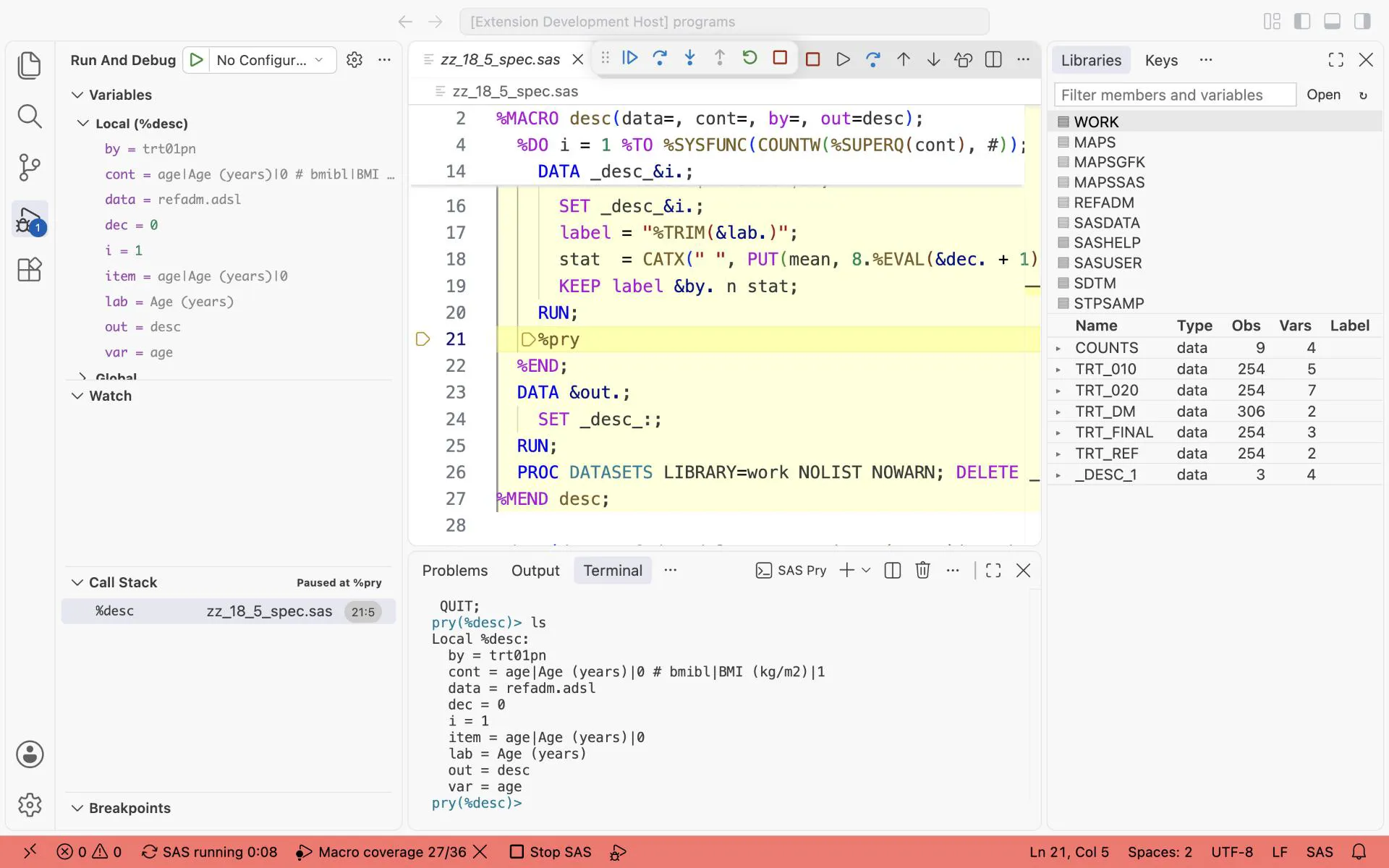
%pry inside the %DO loop of %desc: ls shows how one item of the specification, age|Age (years)|0, was split into var = age, lab = Age (years) and dec = 0.
18.6 A specification from the metadata: the core of define.xml
Section titled “18.6 A specification from the metadata: the core of define.xml”Every ADaM data set goes to the regulator with define.xml: a file that describes each data set and each variable. For a variable it holds the name, the label, the type, the length, the format and how the value was derived. Programmers do not type define.xml. They keep a specification (often a spreadsheet, one row per variable) and generate both the define.xml and the ATTRIB statements of their programs from it. One source, so the data set and its description cannot disagree.
SAS keeps the same information about every data set. PROC CONTENTS ... OUT= writes it to a data set: one row per variable. This program uses the reference ADSL as the specification, checks our ADSL of chapter 9 against it, and lets the specification write the ATTRIB statement:
/* Chapter 18: a variable specification from the metadata, the core of define.xml (needs ADSL from 09_1) */
/* Step 010: the specification: one row per variable of the reference ADSL */PROC CONTENTS DATA=refadm.adsl OUT=spec_010(KEEP=varnum name type length label format) NOPRINT;RUN;
DATA spec_adsl;  LENGTH variable $32;  SET spec_010;  variable = UPCASE(name);  DROP name;RUN;
PROC SORT DATA=spec_adsl;  BY varnum;RUN;
TITLE "The variable specification of ADSL (first 8 rows)";PROC PRINT DATA=spec_adsl(OBS=8) NOOBS;  VAR varnum variable type length label format;RUN;TITLE;
/* Step 020: a macro that checks a data set against the specification */%MACRO spec_check(data=, spec=, label=);  PROC CONTENTS DATA=&data. OUT=_sc_010(KEEP=name length label) NOPRINT;  RUN;  PROC SQL NOPRINT;    SELECT COUNT(*), SUM(o.label NE s.label), SUM(o.length NE s.length)      INTO :n_both TRIMMED, :n_label TRIMMED, :n_length TRIMMED      FROM _sc_010 AS o INNER JOIN &spec. AS s ON UPCASE(o.name) = s.variable;  QUIT;  %PUT NOTE: &label.: &n_both. variables in both, &n_label. other labels, &n_length. other lengths;  PROC DATASETS LIBRARY=work NOLIST NOWARN;    DELETE _sc_:;  RUN; QUIT;%MEND spec_check;
%spec_check(data=adsl, spec=spec_adsl, label=Before)
/* Step 030: the specification writes the ATTRIB statement for the shared variables */PROC CONTENTS DATA=adsl OUT=our_vars(KEEP=name) NOPRINT;RUN;
PROC SQL NOPRINT;  SELECT CATX(" ", s.variable,              CATS("LENGTH=", IFC(s.type = 2, "$", ""), s.length),              CATS("LABEL=", QUOTE(TRIM(s.label))))    INTO :attrib SEPARATED BY " "    FROM spec_adsl AS s    WHERE s.variable IN (SELECT UPCASE(name) FROM our_vars);QUIT;/* %QSUBSTR, not %SUBSTR: the cut can fall inside a quoted label, and an unquoted half quote would swallow the rest of the program */%PUT NOTE: ATTRIB starts with: %QSUBSTR(%SUPERQ(attrib), 1, 90);
/* Step 035: a shorter length cuts values: check first that every value fits */PROC CONTENTS DATA=adsl OUT=our_len(KEEP=name length) NOPRINT;RUN;
PROC SQL NOPRINT;  SELECT CATS("MAX(LENGTH(", o.name, "))"), CATS(s.length), o.name    INTO :maxlist SEPARATED BY ", ", :speclen SEPARATED BY " ", :shorter SEPARATED BY " "    FROM our_len AS o INNER JOIN spec_adsl AS s ON UPCASE(o.name) = s.variable    WHERE o.length > s.length;  SELECT CATX(" ", &maxlist.) INTO :maxlen TRIMMED FROM adsl;QUIT;%PUT NOTE: shorter in the specification: &shorter.;%PUT NOTE: specification lengths &speclen., longest values &maxlen.;
/* Step 040: apply it: ATTRIB before SET decides the attributes.                 *//* The values fit (step 035), so the WARNING about multiple lengths is expected: *//* switch it off for this step only, and back on after it.                      */OPTIONS VARLENCHK=NOWARN;DATA adsl_spec;  ATTRIB &attrib.;  SET adsl;RUN;OPTIONS VARLENCHK=WARN;
%spec_check(data=adsl_spec, spec=spec_adsl, label=After)
What you should see: the first rows of the specification, with TYPE 2 for text and 1 for numbers, then in the log:
NOTE: Before: 26 variables in both, 1 other labels, 5 other lengthsNOTE: ATTRIB starts with: STUDYID LENGTH=$12 LABEL="Study Identifier" USUBJID LENGTH=$11 LABEL="Unique Subject IdentNOTE: shorter in the specification: AGEU RACE ETHNICNOTE: specification lengths 5 32 22, longest values 5 32 22NOTE: After: 26 variables in both, 0 other labels, 0 other lengths- Step 010.
PROC CONTENTS ... OUT= NOPRINTgives one row per variable: name, type, length, label and format. The SQL viewdictionary.columnsholds the same, but on SAS OnDemand a query on it reads the metadata of every library and can take minutes. - Step 020. The check counts the variables that our ADSL shares with the specification, and how many of them have another label or another length.
- Step 030. The query writes one
name LENGTH= LABEL=item per shared variable into the macro variableattrib. The specification writes the code. The%PUTuses%QSUBSTR, not%SUBSTR: the first 90 characters end inside a quoted label, and%SUBSTRremoves the macro quoting. The half quote then makes SAS wait for the closing quote, and the rest of the program never runs. The first version of this program did exactly that. - Step 035. Our ADSL makes
AGEU,RACEandETHNIClonger than the specification. A shorter length cuts values, so the program checks first: the longest values are exactly as long as the specification allows. - Step 040.
ATTRIBbeforeSETdecides the attributes of the new data set. When it makes a variable shorter, SAS writesWARNING: Multiple lengths were specified for the variable AGEU by input data set(s). This can cause truncation of data.Step 035 proved that nothing is cut, soOPTIONS VARLENCHK=NOWARN;switches the warning off for this one step, and the next line switches it on again. Never switch it off without that check.
In a study, the specification comes from the spreadsheet of the lead programmer instead of the reference data. The code stays the same: read the specification into a data set, and let it write the ATTRIB statement.
Exercises
Section titled “Exercises”Exercise 18-1. Add a parameter exclude= to %by_param and skip the parameter codes it lists, for example exclude=HEIGHT TEMP. Build the list with WHERE paramcd NOT IN (...) in the query, not with an %IF in the loop.
Exercise 18-2. Add a fourth part to the specification language: a format for the label (|$label.), and use it when it is there.
Exercise 18-3. Rewrite 18_3_execute.sas with DOSUBL instead of CALL EXECUTE. Which version is easier to read?
Exercise 18-4. Add the format to the specification and to the generated ATTRIB statement: FORMAT= only for variables that have one in the PROC CONTENTS output.
Answers: Chapter 18 answers.