Look at data without writing code
Before you write a table program, know the data: which values a column has, which records are odd, how many subjects are behind a count. Most programmers write a PROC PRINT or PROC FREQ for each question and delete it again. The data viewer answers with a few keys and writes the WHERE for you. All keys are on the cheat sheet.
21.1 Open a data set
Section titled “21.1 Open a data set”| How | When |
|---|---|
F12 | the data set the last step created |
| double-click in Libraries | any data set of any library |
Ctrl+Alt+D on a data set name in your program | the data set your cursor is on, for example refadm.adae in a SET statement |
| a click on a variable in Libraries | the data set, opened at that column |
The data set opens as an editor tab. At the top is the WHERE box, and next to it the buttons Filters, Columns, Labels and Raw. The line below shows which rows you see, for example 1–100 of 1191. F3 (or Shift+F4) closes it, as in a SAS data window.
With the setting datastepStudio.data.openIn set to the panel, data sets open in the SAS Data panel instead.
21.2 The keys
Section titled “21.2 The keys”Press ? in the viewer to list every key. The ones you use every day:
| Key | What it does |
|---|---|
| arrows, PageUp, PageDown | move |
g | go to an observation number |
w | type a WHERE clause |
/ | search all columns |
t | filter the current column: >13, 1-5, a,b,c, !a, A*, . for missing, or a date like 01JAN2020 |
f | frequencies of the current column |
| Enter / Shift+Enter on a cell | keep / remove the rows with that value |
Ctrl+Alt+E | add column = value of the current cell to the WHERE box |
Ctrl+Alt+I | value picker: tick values, the SAS condition is written as you tick, Enter keeps those rows |
Ctrl+Alt+R | show all rows again (also: Data Viewer: Show All Rows) |
s, a, d | sort |
h, c | hide a column, choose columns |
l | labels on or off |
v | raw or formatted values |
21.3 A worked exploration: severe adverse events
Section titled “21.3 A worked exploration: severe adverse events”The question from the statistician: how many subjects had a severe treatment-emergent adverse event, by treatment? You find the answer in the data viewer first, then you write the program.
- In Libraries, open REFADM and double-click ADAE. What you should see: 1191 rows.
- Press
wand typetrtemfl = "Y" AND aesev = "SEVERE", then Enter. What you should see: 41 rows. - Click a cell in the column TRTA and press
f. What you should see: Placebo 6, Xanomeline High Dose 10, Xanomeline Low Dose 25. These are records, not subjects. - Click a cell in USUBJID and press
f. What you should see: most subjects have 1 record, but some have 2 or 3: 01-708-1019 and 01-708-1428 have 3 each. So the number of subjects is smaller than 41. - Press
Ctrl+Alt+Ion the TRTA column, tick Placebo withSpace, and press Enter. What you should see: the WHERE box now holds a condition withtrta IN ('Placebo'), and only Placebo rows are left. - Press
Ctrl+Alt+Rto show all rows again.
Now you know what the program must count: distinct subjects, not records. The program confirms it:
/* Chapter 21: check what the data viewer showed, severe treatment-emergent AEs */PROC SQL; SELECT trta, COUNT(*) AS n_rec, COUNT(DISTINCT usubjid) AS n_subj FROM refadm.adae WHERE trtemfl = "Y" AND aesev = "SEVERE" GROUP BY trta;QUIT;What you should see:
| Actual Treatment | n_rec | n_subj |
|---|---|---|
| Placebo | 6 | 5 |
| Xanomeline High Dose | 10 | 8 |
| Xanomeline Low Dose | 25 | 16 |
41 records, 29 subjects. Chapter 26 shows how a program that counts records instead of subjects goes wrong, and how to find it.
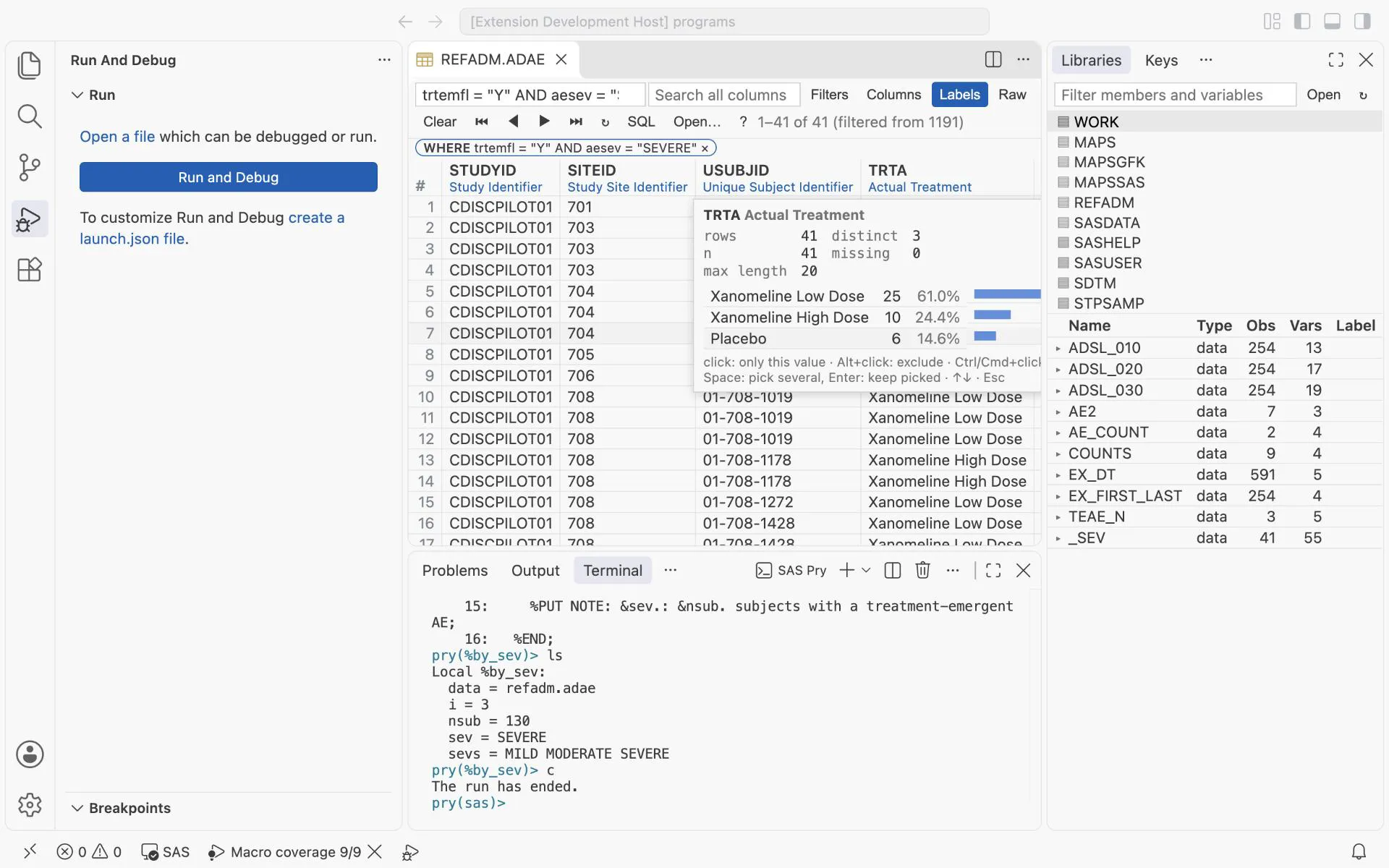
The data viewer on REFADM.ADAE with the WHERE trtemfl = “Y” AND aesev = “SEVERE”: 41 of 1191 rows. f on TRTA shows the frequencies: 25 low dose, 10 high dose, 6 placebo.
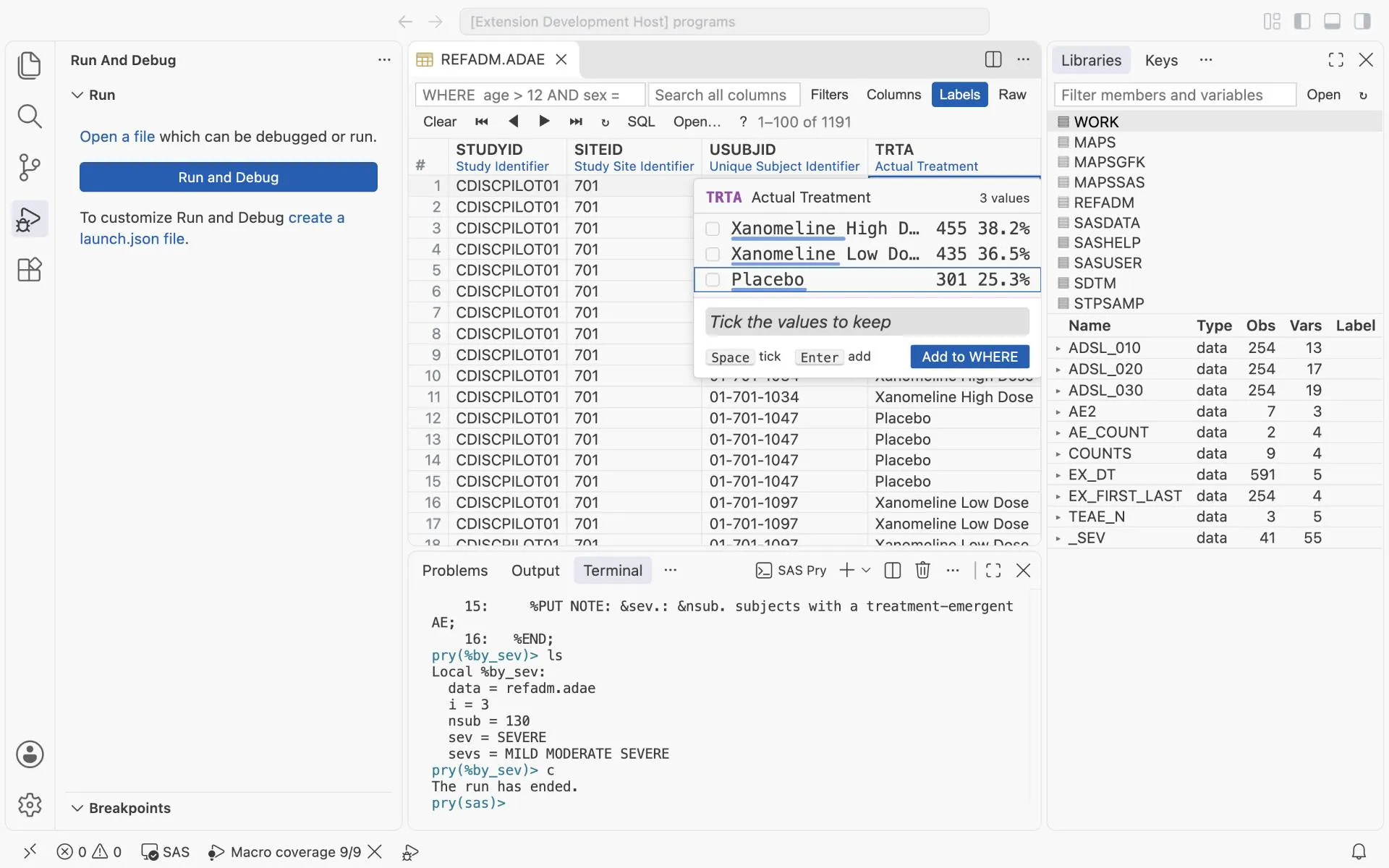
The value picker (Ctrl+Alt+I) on TRTA: every value with its count. Tick the values to keep, and Add to WHERE writes the condition for you.
21.4 Viewer or program?
Section titled “21.4 Viewer or program?”| Use the data viewer to | Use a program to |
|---|---|
| learn a new data set: values, missing values, odd records | produce anything that goes into a deliverable |
| find the record behind a surprising number | count, summarise or derive |
| check a WHERE clause before you put it into a program | get a result that a second programmer can reproduce |
look at the data at a %pry stop (vt, chapter 24) | document what you did |
The viewer helps you understand. The program is what you validate.
Exercises
Section titled “Exercises”Exercise 21-1. Open REFADM.ADSL. With t on the column AGE, keep only subjects older than 80 (>80). How many are there? Compare with the age groups in chapter 2.
Exercise 21-2. In REFADM.ADAE, find the records whose ASTDT is missing (filter . on the column). What does that tell you about the start dates?
Exercise 21-3. Use the value picker to keep two treatment arms, then copy the WHERE text into a PROC FREQ and run it.
Answers: Chapter 21 answers.
Next: write code faster.