The DATA step and the PDV
Three ideas carry most of SAS: how a DATA step runs, how SAS stores dates, and how to read the log. This chapter teaches them, and how data gets into SAS and out again. Learn them once, and every later chapter is easier.
2.1 Your first DATA step
Section titled “2.1 Your first DATA step”/* Chapter 2: your first DATA step */DATA dm_rand; SET sdtm.dm(KEEP=usubjid siteid age sex race armcd arm rfstdtc rfendtc); WHERE armcd NE "Scrnfail";RUN;Press F4. The step reads SDTM DM and keeps the randomised subjects.
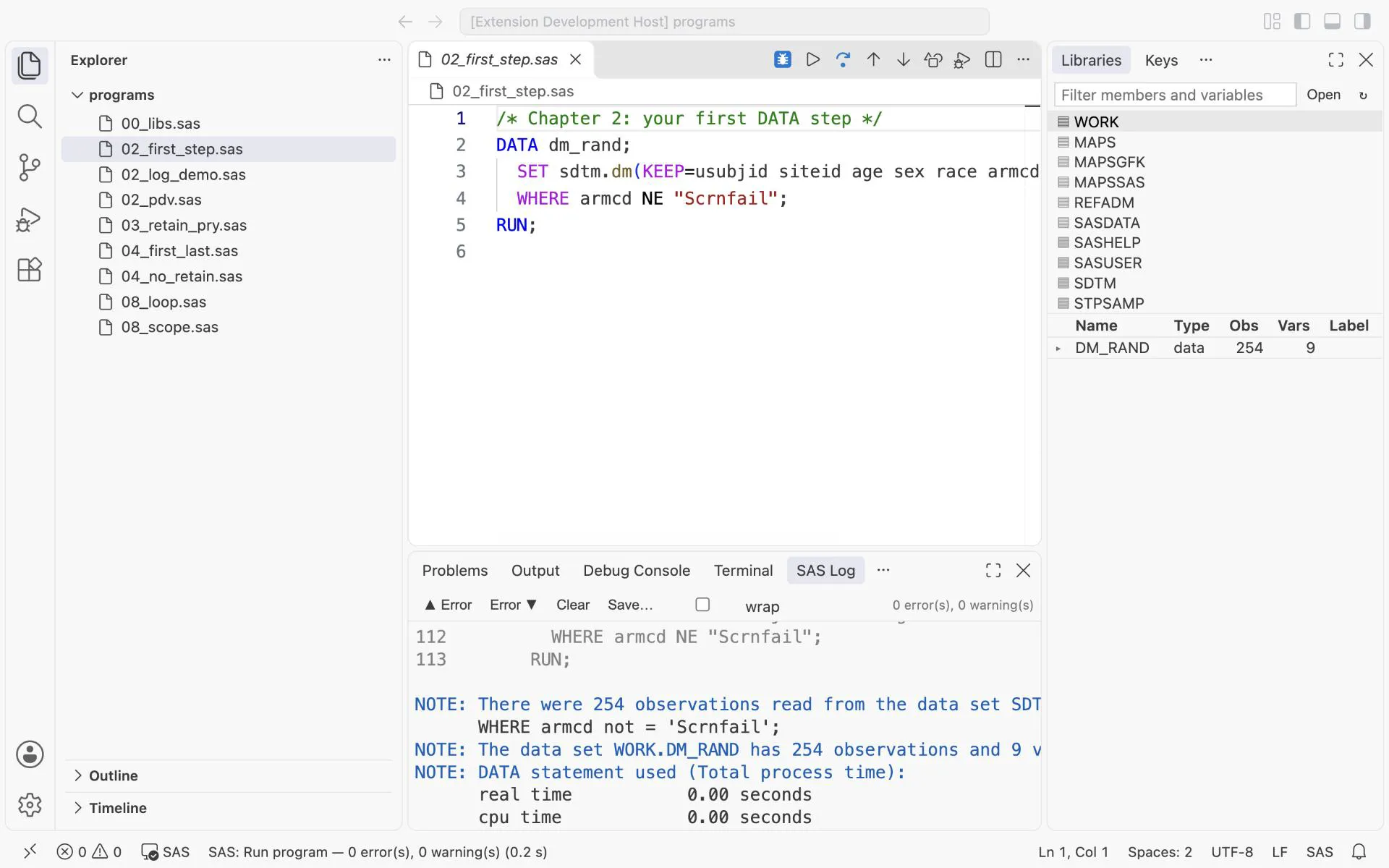
What you should see: the log says that 254 observations were read and written. On the right, the Libraries tab lists WORK.DM_RAND with 254 rows and 9 variables. These are the 306 subjects of DM without the 52 screen failures.
DATA dm_rand;names the output data set. A one-level name means the temporaryWORKlibrary.SETreads the input one record at a time.KEEP=reads only the variables you list.WHEREselects records before they enter the step.
Press F12 to open the data set you just made:
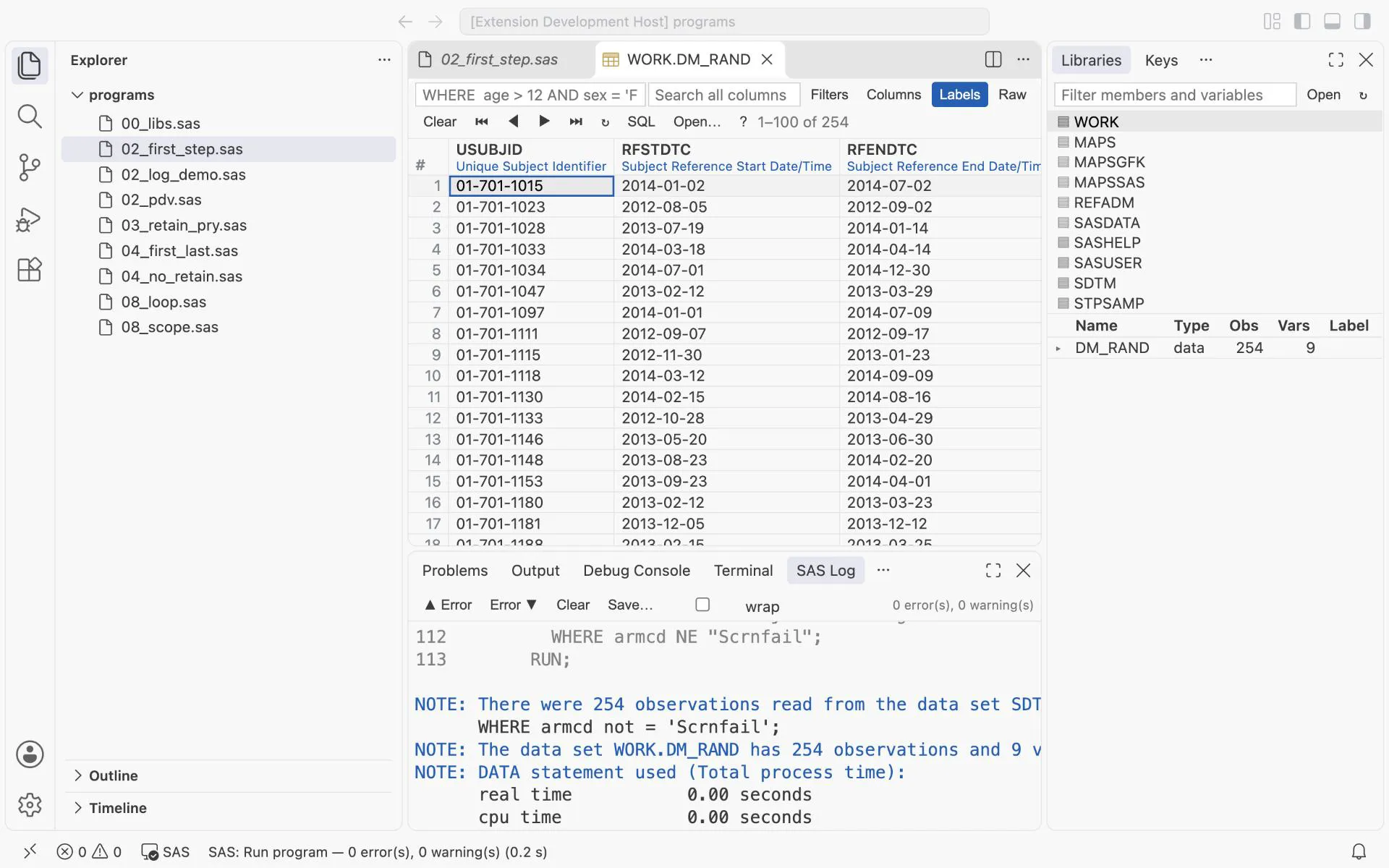
Exercise 2-1. Change the WHERE to keep only the placebo arm. How many rows do you get?
2.2 The PDV: watch a DATA step work
Section titled “2.2 The PDV: watch a DATA step work”A DATA step runs in two phases.
- Compile. SAS reads the code from top to bottom. It builds the program data vector (PDV): one slot per variable.
- Execute. SAS runs the statements once for each input record, in a loop.
Most surprises in SAS come from this loop.
Click Next to run this program one statement at a time.
02_pdv.sas
PDV
| Variable | Value |
|---|
just changed kept from the last record
SAS Log
Now do it yourself in DataStep Studio:
- Put the cursor in the step and click Debug DATA Step in the title bar.
- Click in the margin of line 4 to set a breakpoint.
- Right-click the breakpoint, choose Edit Breakpoint, and type the condition
_N_ = 2. - Press
F5.
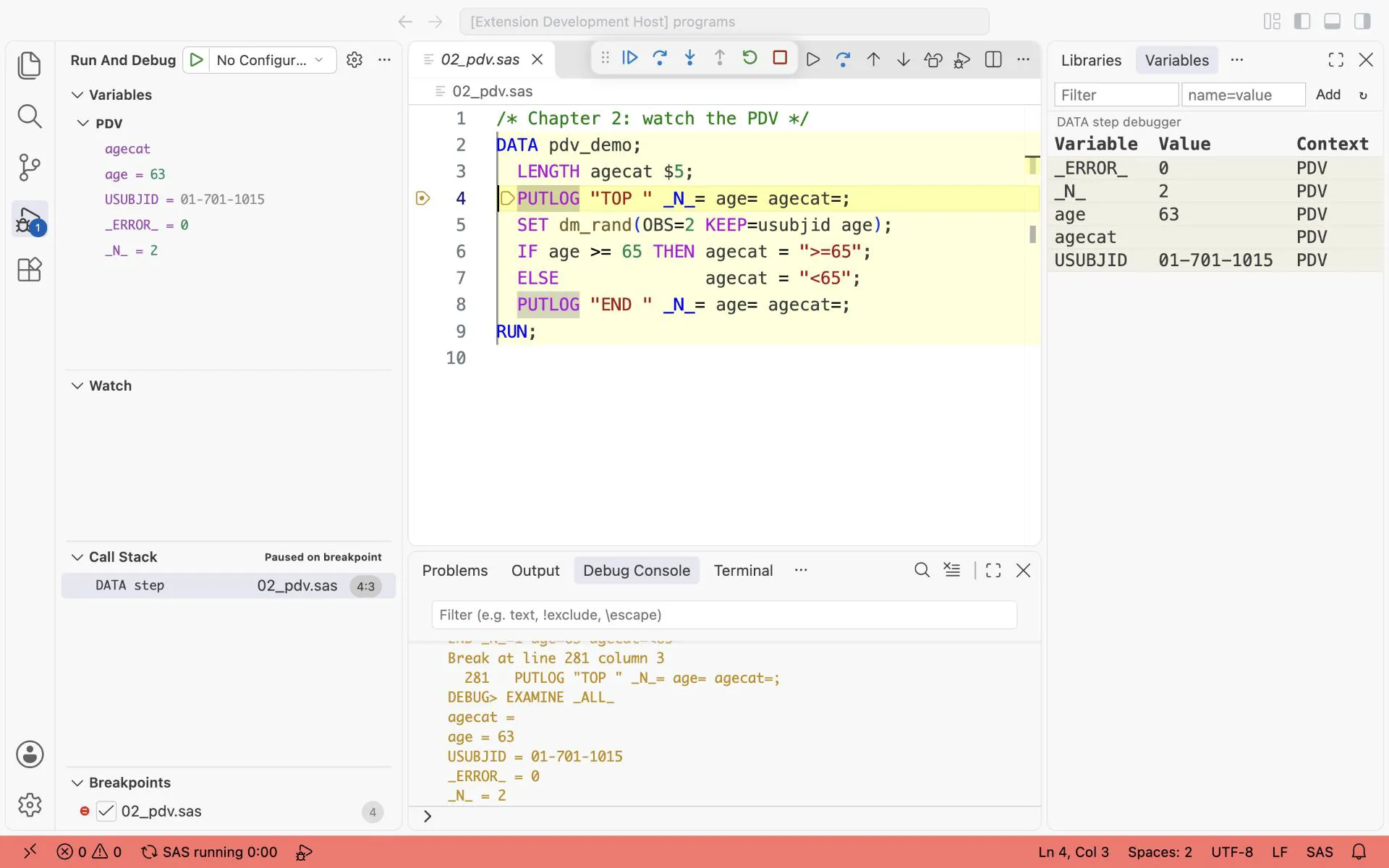
What you should see: the same moment as step 8 of the stepper. _N_ is 2. age is 63, kept from the first record. agecat is blank, because SAS reset it. Two rules to remember:
- Variables that come from
SETorMERGEare kept until the next record is read. - Variables you create with an assignment are set to missing at the top of every loop.
Exercise 2-2. In the PDV program, add n = _N_; after SET. Predict its value at the top of loop 2. Then check it in the debugger.
2.3 WHERE or IF: choose the records
Section titled “2.3 WHERE or IF: choose the records”Both statements select records. They work at different times.
/* Chapter 2: WHERE selects records before they enter the step, a subsetting IF after */DATA old_where;  SET refadm.adsl(KEEP=usubjid age);  WHERE age > 80;RUN;
DATA old_if;  SET refadm.adsl(KEEP=usubjid age);  IF age > 80;RUN;
/* only a subsetting IF can test a variable that the step creates */DATA old_months;  SET refadm.adsl(KEEP=usubjid age);  age_months = age * 12;  IF age_months > 960;RUN;
What you should see in the log:
NOTE: There were 77 observations read from the data set REFADM.ADSL. WHERE age>80;NOTE: The data set WORK.OLD_WHERE has 77 observations and 2 variables.NOTE: There were 254 observations read from the data set REFADM.ADSL.NOTE: The data set WORK.OLD_IF has 77 observations and 2 variables.NOTE: There were 254 observations read from the data set REFADM.ADSL.NOTE: The data set WORK.OLD_MONTHS has 77 observations and 3 variables.WHEREworks before a record enters the step. SAS reads only 77 records.- A subsetting
IFworks inside the step. SAS reads all 254 records, and theIFstops the 177 that fail. A record that fails is not written. - Only an
IFcan test a variable that the step makes, such asage_months.
Use WHERE for the variables of the input. It is faster on large data. Use IF for the variables that you make.
Exercise 2-3. In the third step, change IF age_months > 960; to WHERE age_months > 960;. What does the log say?
2.4 Missing values
Section titled “2.4 Missing values”A missing number is shown as . and a missing text as a blank. For SAS, a missing number is smaller than every number. That is the cause of a common error.
/* Chapter 2: a missing number is smaller than every number */DATA bp;  LENGTH bpcat $7;  SET sdtm.vs(KEEP=usubjid vstestcd visit vsstresn);  WHERE vstestcd = "SYSBP";  IF vsstresn < 140 THEN bpcat = "normal";  ELSE                   bpcat = "high";RUN;
PROC PRINT DATA=bp NOOBS;  WHERE MISSING(vsstresn);  VAR usubjid visit vsstresn bpcat;RUN;
/* the fix: test for a missing value first */DATA bp_fixed;  SET bp;  IF      MISSING(vsstresn) THEN bpcat = "missing";  ELSE IF vsstresn < 140    THEN bpcat = "normal";  ELSE                           bpcat = "high";RUN;
PROC FREQ DATA=bp_fixed;  TABLES bpcat / NOCUM;RUN;
What you should see: three systolic blood pressure records have no value. The first step calls them normal:
| USUBJID | VISIT | VSSTRESN | bpcat |
|---|---|---|---|
| 01-702-1082 | SCREENING 2 | . | normal |
| 01-703-1279 | WEEK 2 | . | normal |
| 01-713-1141 | WEEK 6 | . | normal |
The test vsstresn < 140 is true for a missing value. After the fix, PROC FREQ shows high 3121, missing 3 and normal 5084: 8208 records.
The rule: test for a missing value first, with MISSING(var). This also matters for sorting. A missing value sorts before every other value.
Exercise 2-4. Diastolic blood pressure (DIABP) has missing values too. How many does the trap put into normal?
2.5 Data in the program: DATALINES
Section titled “2.5 Data in the program: DATALINES”For a small table, write the data in the program. These are the analysis windows of chapter 10.3: one row per planned visit, with the first day, the target day and the last day.
/* Chapter 2: data written in the program. The analysis windows of chapter 10.3 */DATA windows;  LENGTH avisit $8;  INPUT avisitn awlo awtarget awhi;  avisit = CATX(" ", "Week", avisitn);  DATALINES; 2   2  15  21 4  22  29  35 6  36  43  49 8  50  57  7012  71  85  9816  99 113 12620 127 141 15424 155 169 17526 176 183   .;RUN;
PROC PRINT DATA=windows NOOBS;RUN;
What you should see: 9 rows, from Week 2 (days 2 to 21, target 15) to Week 26 (from day 176, target 183, no last day).
INPUTreads the values of one line into the variables, in order. Blanks separate the values.DATALINES;starts the data. A line with only;ends it.- A
.in the data is a missing number. The last window has no last day.
Exercise 2-5. Remove the . from the last data line and run again. What happens to Week 26? Look at the log.
2.6 Read and write a text file
Section titled “2.6 Read and write a text file”Other systems often give you CSV files: values separated by commas. The FILE and PUT statements write a text file. The INFILE and INPUT statements read one.
/* Chapter 2: write a CSV file, then read it back with INFILE (needs WINDOWS from 02_read_1) */FILENAME wincsv "%SYSGET(HOME)/sasbook/windows.csv";
/* write: one header line, then one line per record, values separated by commas */DATA _NULL_;  SET windows;  FILE wincsv DSD;  IF _N_ = 1 THEN PUT "avisit,avisitn,awlo,awtarget,awhi";  PUT avisit avisitn awlo awtarget awhi;RUN;
/* read: DSD splits at the commas, FIRSTOBS=2 skips the header line */DATA windows_csv;  LENGTH avisit $8;  INFILE wincsv DSD FIRSTOBS=2 TRUNCOVER;  INPUT avisit $ avisitn awlo awtarget awhi;RUN;
PROC COMPARE BASE=windows COMPARE=windows_csv NOSUMMARY;RUN;%PUT NOTE: PROC COMPARE result SYSINFO=&SYSINFO. (0 means equal);
FILENAME wincsv CLEAR;
What you should see:
NOTE: 9 records were read from the infile WINCSV.NOTE: The data set WORK.WINDOWS_CSV has 9 observations and 5 variables.NOTE: PROC COMPARE result SYSINFO=0 (0 means equal)FILENAMEgives the file a short name,wincsv.DATA _NULL_runs a step that makes no data set. It only writes the file.DSDmeans: values are separated by commas, and two commas in a row mean a missing value.FIRSTOBS=2starts at line 2, after the header line.PROC COMPAREshows that the data read back equals the data written. Chapter 9 explains it.
For a CSV file with a header line, PROC IMPORT can also read it. INFILE and INPUT give you control of each type and length.
Exercise 2-6. Remove FIRSTOBS=2 and run again. What is the first row of WINDOWS_CSV? What does the log say?
2.7 A permanent data set: LIBNAME
Section titled “2.7 A permanent data set: LIBNAME”A one-level name such as dm_rand means the WORK library. SAS deletes WORK when the session ends. To keep a data set, give a folder a short name with LIBNAME, and use a two-level name.
/* Chapter 2: a permanent data set. LIBNAME gives a folder a short name */OPTIONS DLCREATEDIR;LIBNAME mylib "%SYSGET(HOME)/sasbook/mylib";
DATA mylib.dm_rand;  SET sdtm.dm(KEEP=usubjid siteid age sex armcd arm);  WHERE armcd NE "Scrnfail";RUN;
PROC CONTENTS DATA=mylib.dm_rand SHORT;RUN;
What you should see on the first run (a later run says that the libref was assigned):
NOTE: Library MYLIB was created.NOTE: The data set MYLIB.DM_RAND has 254 observations and 6 variables.OPTIONS DLCREATEDIR;letsLIBNAMEcreate the foldermylibif it does not exist.mylib.dm_randis the filedm_rand.sas7bdatin that folder. It stays after the session ends.SDTMandREFADMare libraries of the same kind.00_libs.sasassigns them.
2.8 Dates: from ISO 8601 text to SAS dates
Section titled “2.8 Dates: from ISO 8601 text to SAS dates”SDTM stores dates as text: 2014-03-15, or with a time, 2014-03-15T09:30. SAS stores a date as a number: the days since 1 January 1960. The E8601DA. informat converts the text to a SAS date.
/* Chapter 2: ISO 8601 text to SAS dates */DATA dates;  INFILE DATALINES TRUNCOVER;  INPUT dtc $20.;  full = INPUT(dtc, ?? E8601DA.);  IF LENGTH(dtc) >= 10 THEN dtc10 = INPUT(SUBSTR(dtc, 1, 10), ?? E8601DA.);  FORMAT full dtc10 DATE9.;DATALINES;2014-03-152014-03-15T09:302014-032014
;RUN;
What you should see:
| dtc | full | dtc10 |
|---|---|---|
| 2014-03-15 | 15MAR2014 | 15MAR2014 |
| 2014-03-15T09:30 | 15MAR2014 | 15MAR2014 |
| 2014-03 | . | . |
| 2014 | . | . |
| (blank) | . | . |
For a partial or empty date, the result is missing. ?? stops SAS from writing an Invalid data NOTE for it. Use ?? only when you handle the missing result yourself. FORMAT ... DATE9. changes only how the number is shown.
2.9 Partial dates: impute early or late
Section titled “2.9 Partial dates: impute early or late”The SAP decides how a partial date becomes a full date. The direction depends on what the date is used for:
- Start dates (first dose, AE onset) are imputed early: the first day of the month or year.
- End dates (last dose, end of study) are imputed late: the last day, then capped at a known limit.
- A flag records what was imputed:
Dfor the day,Mfor month and day.
/* Chapter 2: partial dates, imputed early (start) and late (end) */DATA imputed; SET dates(KEEP=dtc); LENGTH adtf $1; yy = INPUT(SUBSTR(dtc, 1, 4), ?? 4.); IF LENGTH(dtc) >= 7 THEN mm = INPUT(SUBSTR(dtc, 6, 2), ?? 2.); IF LENGTH(dtc) >= 10 THEN dd = INPUT(SUBSTR(dtc, 9, 2), ?? 2.); IF NOT MISSING(dd) THEN DO; astdt = MDY(mm, dd, yy); aendt = astdt; END; ELSE IF NOT MISSING(mm) THEN DO; astdt = MDY(mm, 1, yy); aendt = INTNX("month", astdt, 0, "end"); adtf = "D"; END; ELSE IF NOT MISSING(yy) THEN DO; astdt = MDY(1, 1, yy); aendt = MDY(12, 31, yy); adtf = "M"; END; FORMAT astdt aendt DATE9.; DROP yy mm dd;RUN;What you should see:
| dtc | adtf | astdt (early) | aendt (late) |
|---|---|---|---|
| 2014-03-15 | 15MAR2014 | 15MAR2014 | |
| 2014-03-15T09:30 | 15MAR2014 | 15MAR2014 | |
| 2014-03 | D | 01MAR2014 | 31MAR2014 |
| 2014 | M | 01JAN2014 | 31DEC2014 |
| (blank) | . | . |
Apply caps and floors only to imputed dates (when the flag is not blank). Never apply them to dates that were collected.
Exercise 2-7. Add a cap to the imputation: an end date may not be later than 31MAR2014. Apply it only when adtf is not blank.
2.10 Formats: group values without changing them
Section titled “2.10 Formats: group values without changing them”/* Chapter 2: a format groups values without changing them */PROC FORMAT; VALUE agegr LOW -< 65 = "<65" 65 -< 81 = "65-80" 81 - HIGH = ">80";RUN;
PROC FREQ DATA=dm_rand; TABLES age / NOCUM; FORMAT age agegr.;RUN;What you should see: <65 33 (12.99%), 65-80 144 (56.69%) and >80 77 (30.31%). These are the same groups as AGEGR1 in the reference ADSL. In the format, -< means “up to, but not including”.
2.11 Read the log like a QC programmer
Section titled “2.11 Read the log like a QC programmer”A program is finished when the log is clean, not when the output looks right. This step has three problems. SAS reports each one only as a NOTE:
/* Chapter 2: three NOTEs a log check must catch *//* EXPECT: NOTE Character values have been converted to numeric *//* EXPECT: NOTE Variable height is uninitialized *//* EXPECT: NOTE Variable weight is uninitialized *//* EXPECT: NOTE Missing values were generated */DATA log_demo; SET dm_rand(OBS=3); age_months = age * 12; siteid_num = siteid + 0; bmi = weight / height**2;RUN;Open the Suspicious Log tab after F4:
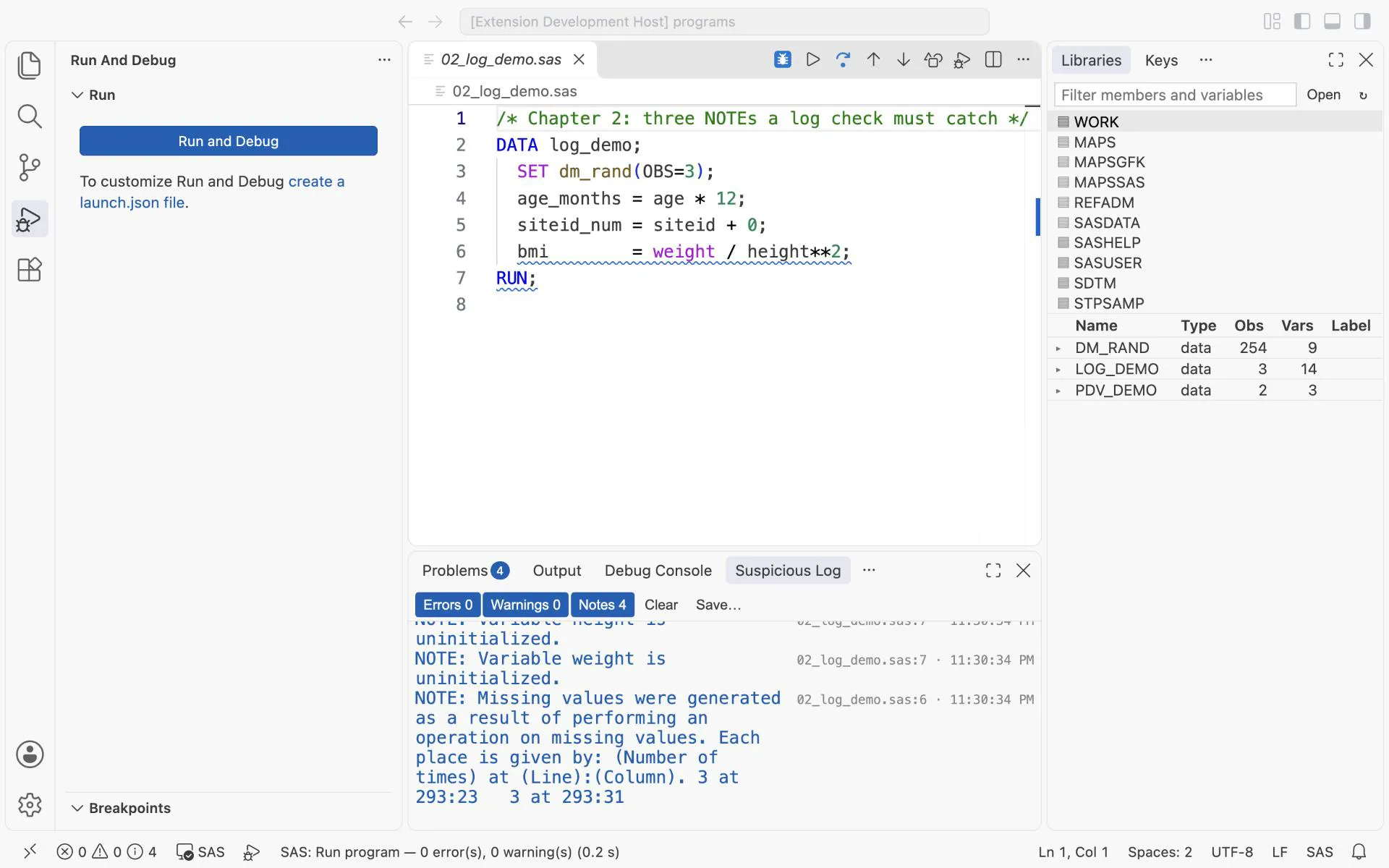
What you should see: four NOTEs, each with its program line.
siteidis text, so SAS converted it to a number without a message in the output.weightandheightare not in DM, so SAS created them empty. A typo in a name gives the same NOTE.- The missing values follow from the empty variables.
Make it a habit: after every F4, look at the Suspicious Log before you look at the data.
Exercise 2-8. Fix the three problems in 02_log_demo.sas until the Suspicious Log stays empty.
The answers to exercises 2-1 to 2-8 are in Answers, Part I.