%pry, the complete guide
%pry is one line in your program. When the run reaches it, the run freezes. You ask: which value has &i. now? What is in this temporary data set? Then you let the run go on. One run, one stop, no %PUT &=i; in ten places.
%pry is in the Professional edition, free during Early Access at the time of writing. All commands are also on the cheat sheet.
Try it here first: a real %pry session on the pilot data, recorded in DataStep Studio. Type a command or click one.
%pry in %explore · recorded in DataStep Studio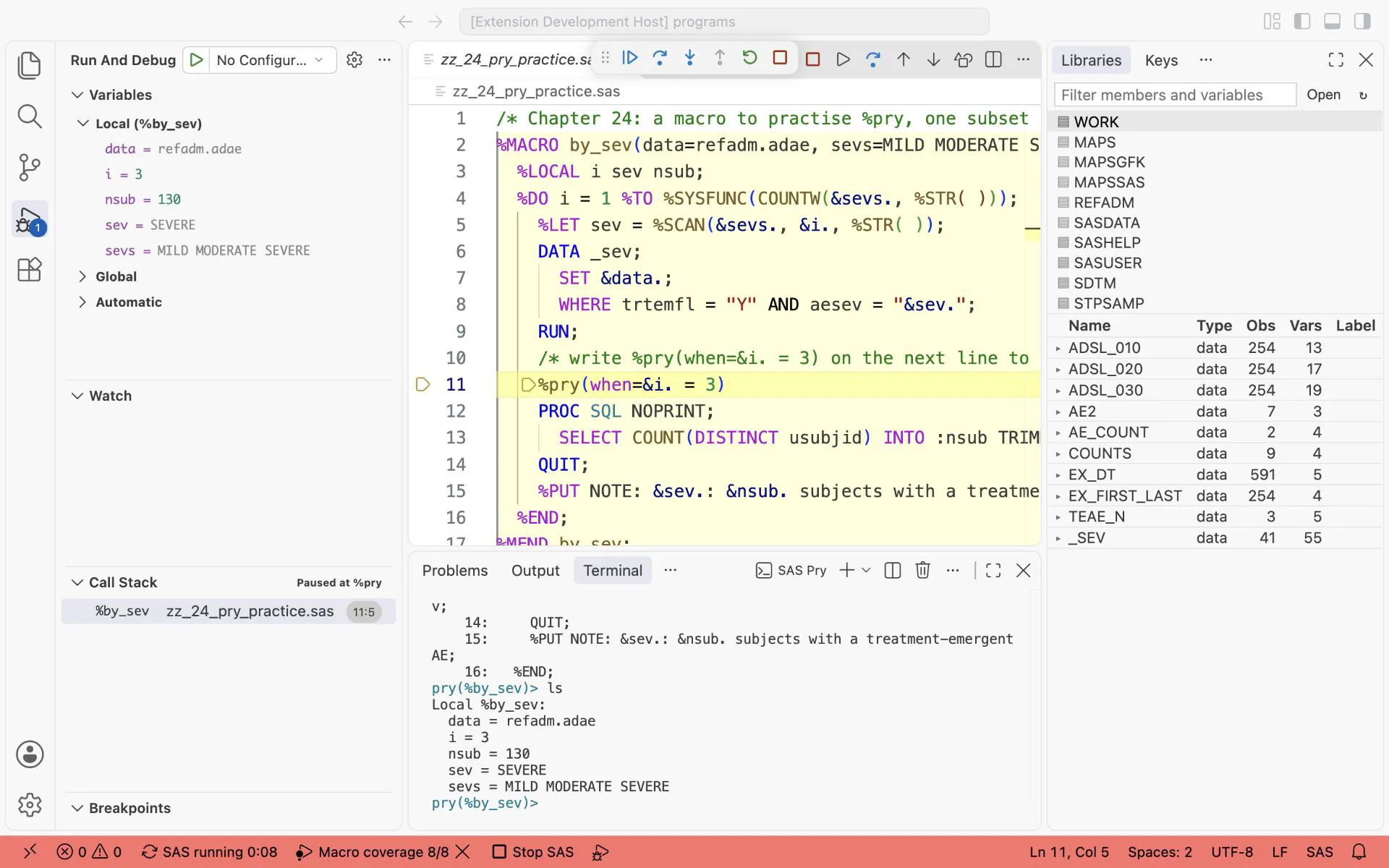
%pry(when=&i. = 3) in the loop: the run stops in the third round, and ls in the SAS Pry terminal shows sev = SEVERE and nsub = 130. Type c to let the run go on.
24.1 Why %pry helps you learn
Section titled “24.1 Why %pry helps you learn”A macro is a program that writes a program. Normally you never see the moment in between: the macro variables while the macro runs, and the temporary data sets it deletes at its end. %pry stops at that moment. Three things become easy:
- Understand someone else’s macro. Stop it inside its loop and look at what it built.
- Find a bug. Stop where the result goes wrong instead of reading 3,000 log lines.
- Try a fix where the bug is. Type the corrected step at the stop and run it on the data of that moment.
24.2 Your first stop in five steps
Section titled “24.2 Your first stop in five steps”/* Chapter 24: a macro to practise %pry, one subset per severity */%MACRO by_sev(data=refadm.adae, sevs=MILD MODERATE SEVERE); %LOCAL i sev nsub; %DO i = 1 %TO %SYSFUNC(COUNTW(&sevs., %STR( ))); %LET sev = %SCAN(&sevs., &i., %STR( )); DATA _sev; SET &data.; WHERE trtemfl = "Y" AND aesev = "&sev."; RUN; /* write %pry(when=&i. = 3) on the next line to stop here */ PROC SQL NOPRINT; SELECT COUNT(DISTINCT usubjid) INTO :nsub TRIMMED FROM _sev; QUIT; %PUT NOTE: &sev.: &nsub. subjects with a treatment-emergent AE; %END;%MEND by_sev;
%by_sev()The macro makes one subset of treatment-emergent AEs per severity and counts the subjects.
- Run the program once with
F4. What you should see: three NOTEs:MILD: 187,MODERATE: 130andSEVERE: 29subjects with a treatment-emergent AE. - Replace the comment on line 10 with
%pry(when=&i. = 3)and pressF4again. What you should see: the run stops in the third round. The%pryline is marked, as at a breakpoint, and the SAS Pry terminal opens with the promptpry(%by_sev)>. - Type
lsand press Enter. What you should see: the macro variables of%by_sev:i = 3,sev = SEVERE,data = refadm.adae,sevs = MILD MODERATE SEVERE, andnsub = 130.nsubstill has the value of round 2, because the PROC SQL of round 3 has not run yet. - Type
vt _sev. What you should see: the first 20 rows ofWORK._SEV, which has 41 rows now, and the data set opens in the data viewer. The prompt changes topry(WORK._SEV)>. - Type
c. What you should see: the run goes on, and the log getsNOTE: SEVERE: 29 subjects with a treatment-emergent AE.
That is the whole idea. The rest of the chapter lists the questions you can ask.
24.3 Where %pry can stop
Section titled “24.3 Where %pry can stop”| Where you write it | What happens |
|---|---|
| in a macro | the macro waits at that line; also in a macro of a file you %INCLUDE, or of your macros folder |
| in a DATA step | the step stops just before the statement after %pry, once for every row where when= is true; the condition uses the row’s variables without &, for example %pry(when=usubjid = "01-701-1015") |
| between two steps | the program runs up to it and waits; your SAS session is free while it waits |
%pry alone stops every time the run reaches it. %pry(when=...) stops only when the condition is true: in a macro, the condition is a macro expression such as &i. = 3.
24.4 What you can do at the stop
Section titled “24.4 What you can do at the stop”The SAS Pry terminal opens by itself at a stop. The examples come from the stop of step 2 (round 3 of %by_sev). help lists every command.
Where am I?
Section titled “Where am I?”| Type | What it does | Example and result |
|---|---|---|
whereami | the lines around the stop, with the stop marked | whereami: lines 5 to 15 of the program, => at line 10 |
bt | which macro called which (the call stack) | bt: one line, #0 %by_sev; in 08_scope.sas a stop in %inner shows %inner above %outer |
up, down | look from the calling macro, and back | stopped in %inner of 08_scope.sas: up, then ls shows where = outer of %outer |
Which values do the macro variables have?
Section titled “Which values do the macro variables have?”| Type | What it does | Example and result |
|---|---|---|
ls | the macro variables of this macro | i = 3, sev = SEVERE, nsub = 130 |
ls -g | your global macro variables | the %LET values of your session |
&i | one value | &sev gives SEVERE |
What is in the data? (as in VIEWTABLE)
Section titled “What is in the data? (as in VIEWTABLE)”vt opens a data set as it is at this moment of the run. The commands after it work on that data set until you vt another one.
| Type | What it does | Example and result |
|---|---|---|
vt work._sev | the first 20 rows, and the data set opens in the data viewer | 41 rows in WORK._SEV |
vt work._sev(FIRSTOBS=21 OBS=41) | other rows, chosen as in PROC PRINT | rows 21 to 41 |
print (OBS=50), print 50 | the first 50 rows (OBS=MAX: all) | all 41 rows |
show, forward, backward | the page again, the next page, the previous page | |
where trta = "Placebo" | a WHERE that stays until where clear | count then gives 6 |
find 01-708-1019 | rows where a text column holds the text | the 3 rows of that subject |
contents | the columns, with type and label | USUBJID char(11) Unique Subject Identifier … |
keep usubjid trta aedecod, drop studyid | which columns the rows show | |
sort usubjid, sort age desc | in which order | |
count | the number of rows | 41 rows |
freq trta | frequencies | Placebo 6, Xanomeline High Dose 10, Xanomeline Low Dose 25 |
freq trta aesev | two columns: a cross table | |
means age | N, missing, mean, std, min, max | N 41, mean 77.5, min 54, max 89 |
profile | each column: type, N, missing, distinct values, min, max | SITEID: 13 distinct values |
dups usubjid | keys that occur more than once | 10 subjects; 01-708-1019 and 01-708-1428 have 3 records each |
compare work.other by usubjid | PROC COMPARE against another data set | see workflow 4 |
sql SELECT ... | any query, as a table | sql SELECT trta, COUNT(DISTINCT usubjid) AS n FROM _sev GROUP BY trta gives 5, 8 and 16 |
Chapter 21 finds the same answers in the data viewer: 41 records, but only 29 subjects.
Try something at the stop
Section titled “Try something at the stop”| Type | What it does | Example |
|---|---|---|
%LET sev = MILD; | change a macro variable | then next twice: the PROC SQL counts the rows of _sev, which are still the SEVERE rows, so the NOTE says MILD: 29. A change acts only on what comes after it. |
| a PROC or DATA step | runs at the stop, on the WORK data and macro variables of that moment | PROC MEANS DATA=_sev N MEAN; VAR age; RUN; gives N 41, mean 77.5 |
| a step over several lines | the prompt shows * until RUN; or QUIT;; ! starts again | type PROC MEANS DATA=_sev N MEAN;, then VAR age;, then RUN; |
edit | a new program in the editor; F4 there runs it at the stop | write PROC FREQ DATA=_sev; TABLES trta*aesev / LIST; RUN; and press F4 |
| Type | What it does | Example |
|---|---|---|
next, n | the next line | n: the PROC SQL runs, then &nsub gives 29 |
| Enter | repeats the last next or step | press Enter to go on line by line |
step, s | into the macro called here | in 08_scope.sas, stopped on the %inner() line: s goes into %inner |
finish, f | to the end of this macro | in %inner: f goes back to %outer |
continue, c | to the next %pry or breakpoint | |
!!! | end the run | |
break 14 if &i. = 2 | stop at line 14 later, when the condition is true | with %pry(when=&i. = 1) (stops in round 1 only): break 14 if &i. = 2, then c stops at the %PUT of round 2, &nsub is 130 |
watch &nsub | stop where a macro variable changes | watch &nsub, then c: the run stops after the PROC SQL that sets it |
| Type | What it does | Example |
|---|---|---|
show-source %by_sev | the source of a macro | the %MACRO by_sev … %MEND lines |
? PROC FREQ | the SAS documentation of a word | ? COUNTW, ? %SCAN |
wtf? | the last error and warning | after the rescue stop below: Variable trtemfl is not on file REFADM.ADSL. |
reload %by_sev | compile the saved macro again | SAS locks a running macro, so the new version is compiled when the run ends and the next run uses it |
24.5 Stop at the first ERROR: %pry(rescue=Y)
Section titled “24.5 Stop at the first ERROR: %pry(rescue=Y)”A macro with a loop can fail in round 1 and still go on, and then it reports a result that looks fine. This happens with %by_sev on a data set without the variable TRTEMFL. Run %by_sev() first, as in the steps above, then:
%by_sev(data=refadm.adsl)What you should see in the log: in each round an ERROR and a WARNING, then a NOTE:
ERROR: Variable trtemfl is not on file REFADM.ADSL.WARNING: Data set WORK._SEV was not replaced because this step was stopped.NOTE: MILD: 29 subjects with a treatment-emergent AEThat number is wrong: _sev still holds the SEVERE rows of the earlier call.
Now let %pry catch it:
- Write
%pry(rescue=Y)on its own line just before%MEND by_sev;and pressF4. What you should see: the run stops right after the first DATA step with an ERROR, before the PROC SQL. The SAS Pry terminal names the ERROR. - Type
ls. What you should see:i = 1,sev = MILD,data = refadm.adsl: the round where it failed. - Type
vt _sev, thenfreq aesev. What you should see: 41 rows, allSEVERE. These are the rows of the earlier call, and the PROC SQL would have counted them as MILD. - Type
!!!to end the run. Then fix the macro: delete_sevat the start of each round (the “Step 0” of the%count_bymacro), or stop when&SYSERR.is not 0.
| Option | Default | What it does |
|---|---|---|
rescue=Y | N | watch every step that runs before this %pry |
error= | Y | a step with an ERROR stops the run |
warning= | N | warning=Y: a step with a WARNING stops it too |
rescue=Y watches every step from the start of the run up to the %pry line, also in the macros around it. A chain of errors stops once, at the first. When no step fails, the run stops at the %pry line as usual. rescue= works in macros and between steps, not inside a DATA step.
24.6 Between steps: walk through a program
Section titled “24.6 Between steps: walk through a program”%pry outside any macro lets you walk through a long program step by step. Take 15_1_production.sas:
- Write
%pryon a new line 2, before the PROC SORT, and pressF4. What you should see: nothing runs yet; the run waits at line 2. - Type
next. The PROC SORT runs. Typevt ex. - Press Enter (it repeats
next): the DATA stepprod_trtruns. Typevt prod_trt, thenwhere MISSING(trtedt), thencount. What you should see:2 rows: subjects 01-705-1018 and 01-705-1382 have no treatment end date. Workflow 4 finds out why. - Type
cto run the rest.
24.7 In a DATA step
Section titled “24.7 In a DATA step”In a DATA step, %pry(when=...) is a conditional breakpoint written into the code. The DATA step debugger starts and stops before the statement after %pry, once for each row where the condition is true. Type in the Debug Console: ls (the variables of the current row), n (one statement), c (the next matching row). 03_retain_pry.sas is the example, and chapter 23 explains it.
| In a macro | In a DATA step | |
|---|---|---|
when= tests | macro variables: when=&i. = 3 | the variables of the current row: when=age > 14 |
| How often it stops | each time the run reaches the line | once for every row where when= is true |
| What waits | the macro, between two steps | the DATA step, between two statements |
| What you look at | macro variables and the data sets made so far | the variables of the current row |
| Where you type | the SAS Pry terminal or the Debug Console | the Debug Console |
24.8 Good to know
Section titled “24.8 Good to know”%pryis a DataStep Studio tool. Run programs that contain%pryin DataStep Studio.- Only the macros around
%pryare prepared for stepping, so a large macro library runs as fast as without. - The setting
datastepStudio.debug.pryoff makes every%prydo nothing, so a program with a forgotten%prystill runs.datastepStudio.debug.pryTerminaldecides whether the SAS Pry terminal opens at each stop. - Remove
%prylines before a program goes to QC: they are a tool for you, not part of the deliverable.
Exercises
Section titled “Exercises”Exercise 24-1. In 24_pry_practice.sas, stop in round 2 with %pry(when=&sev. = MODERATE). What does &nsub show before and after next?
Exercise 24-2. At the stop, find the subject with the most MODERATE records with dups usubjid.
Exercise 24-3. Put a plain %pry between two steps of 06_teae.sas and walk through it with next and vt.
Answers: Chapter 24 answers.
Next: debug a macro.