Groups and order: SORT, BY, FIRST., LAST., RETAIN
Clinical data comes in groups. Records belong to a subject. A subject has visits. A visit has measurements. Four tools work on these groups: PROC SORT, BY with FIRST. and LAST., RETAIN, and OUTPUT. You will use them in almost every ADaM program. In real production programs, FIRST. appears in about one program in three, and RETAIN almost as often.
4.1 Sort, and remove duplicates on purpose
Section titled “4.1 Sort, and remove duplicates on purpose”A BY statement needs data that is sorted by the BY variables. PROC SORT sorts. With NODUPKEY, it also keeps only the first record of each key.
/* Chapter 4: one record per subject and preferred term */PROC SORT DATA=sdtm.ae(KEEP=usubjid aedecod) OUT=ae_pt NODUPKEY DUPOUT=ae_dups; BY usubjid aedecod;RUN;What you should see in the log:
NOTE: There were 1191 observations read from the data set SDTM.AE.NOTE: 369 observations with duplicate key values were deleted.NOTE: The data set WORK.AE_PT has 822 observations and 2 variables.NOTE: The data set WORK.AE_DUPS has 369 observations and 2 variables.1191 AE records become 822 records: one row per subject and preferred term. DUPOUT= keeps the 369 removed records in their own data set. So you can check what you removed. Never remove records without a way to see them.
Exercise 4-1. Change 04_sort.sas to keep one record per subject and system organ class (aebodsys). How many records are deleted?
4.2 FIRST. and LAST.: know where a group starts and ends
Section titled “4.2 FIRST. and LAST.: know where a group starts and ends”With BY usubjid, SAS creates two temporary variables. FIRST.usubjid is 1 on the first record of a subject. LAST.usubjid is 1 on the last record. This program counts the AEs of two subjects. Click Next to watch it, one statement at a time.
04_first_last.sas
PDV
| Variable | Value |
|---|
just changed kept from the last record
SAS Log
What you should see in WORK.AE_COUNT: two rows, n_ae = 3 for subject 01-701-1015 and n_ae = 4 for subject 01-701-1023.
Three rules from the stepper:
n_ae + 1;is a sum statement. It retainsn_aeand starts it at 0.- Reset the counter at
FIRST.of the group, or the count of one subject flows into the next. - With an explicit
OUTPUTin the step,RUNwrites nothing by itself.IF LAST.usubjid THEN OUTPUT;writes one row per subject.
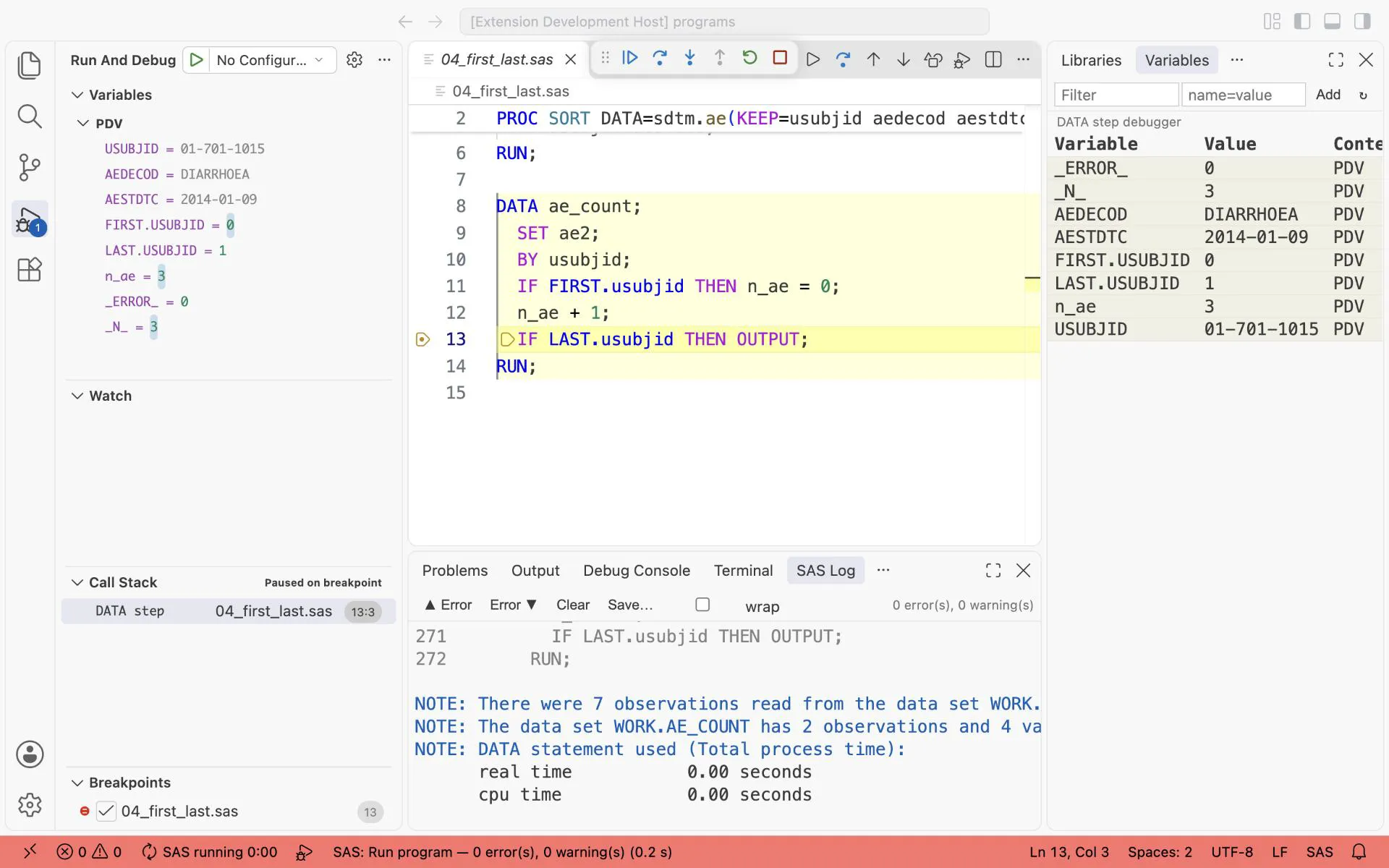
Stopped at IF LAST.usubjid with the condition last.usubjid = 1: the third and last AE of 01-701-1015. n_ae = 3 and LAST.USUBJID = 1, so this record is written.
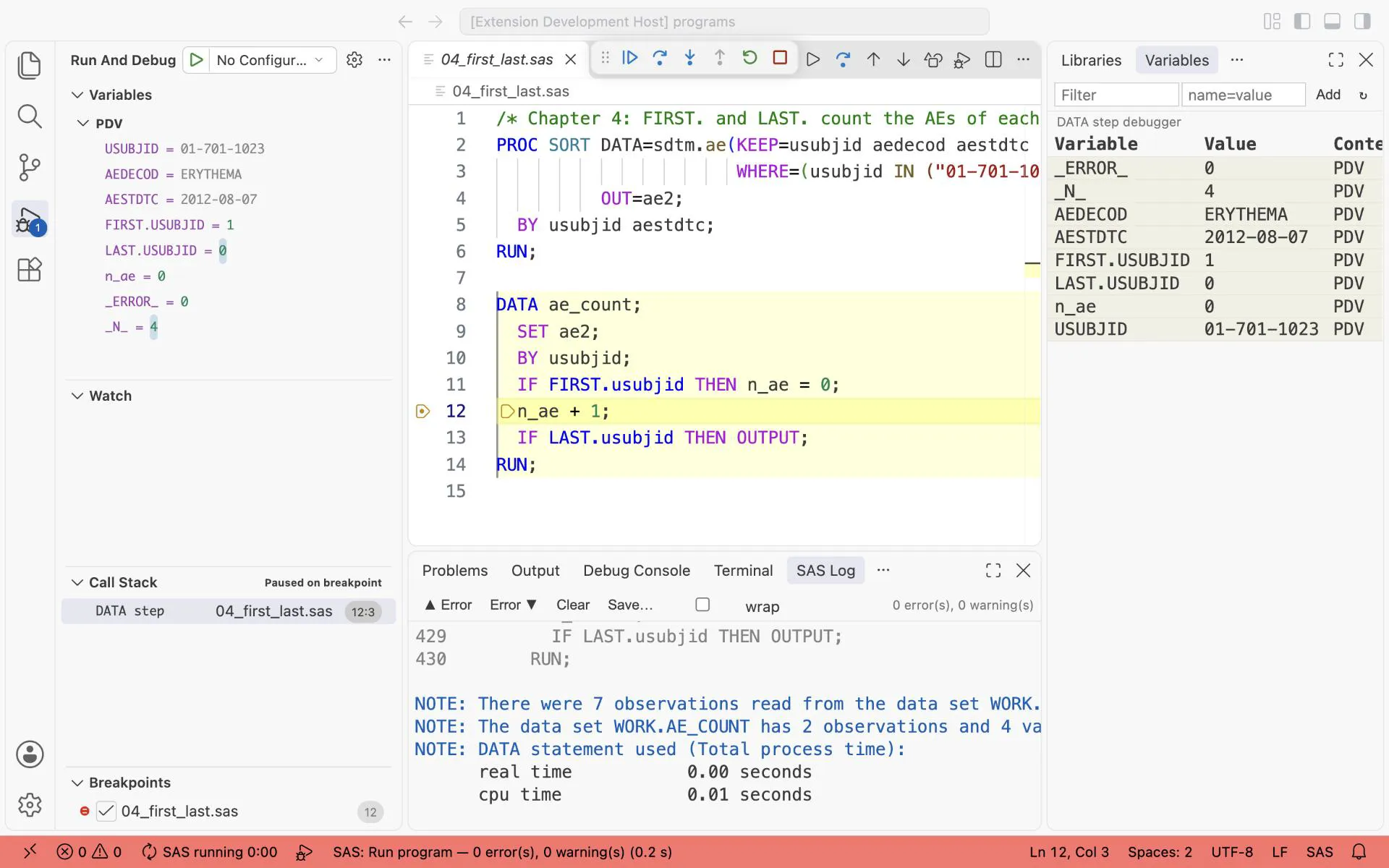
Stopped at n_ae + 1 on the first record of 01-701-1023 (FIRST.USUBJID = 1): the counter was just reset, n_ae = 0.
Exercise 4-2. In 04_first_last.sas, remove IF FIRST.usubjid THEN n_ae = 0;. Use the three rules above to predict n_ae for subject 01-701-1023. Then run it.
4.3 RETAIN: carry a value to later records
Section titled “4.3 RETAIN: carry a value to later records”At the top of every loop, SAS sets the variables that you create back to missing (see the PDV in chapter 2). RETAIN stops that for the variables that you name. The most common use in ADaM: keep the baseline value, and compute the change at every later visit.
04_retain.sas
PDV
| Variable | Value |
|---|
just changed kept from the last record
SAS Log
What you should see in WORK.WT_CHG:
| VISITNUM | VISIT | VSBLFL | VSSTRESN | base | chg |
|---|---|---|---|---|---|
| 1 | SCREENING 1 | 53.98 | . | . | |
| 3 | BASELINE | Y | 54.43 | 54.43 | . |
| 4 | WEEK 2 | 53.07 | 54.43 | -1.36 | |
| 5 | WEEK 4 | 53.98 | 54.43 | -0.45 | |
| 7 | WEEK 6 | 53.07 | 54.43 | -1.36 | |
| 13 | WEEK 26 | 53.52 | 54.43 | -0.91 |
(Weeks 8 to 24 have the same weight as week 6: 53.07, change -1.36.)
Now the same step without RETAIN:
/* Chapter 4: the same step without RETAIN */PROC SORT DATA=sdtm.vs(WHERE=(vstestcd = "WEIGHT" AND usubjid = "01-701-1015")) OUT=wt1; BY visitnum; RUN;
DATA wt_noretain;  SET wt1(KEEP=usubjid visit visitnum vsblfl vsstresn);  IF vsblfl = "Y" THEN base = vsstresn;  IF NOT MISSING(base) AND vsblfl NE "Y" THEN chg = vsstresn - base;RUN;
What you should see: base is 54.43 only on the BASELINE row. It is missing on every other row, so chg is missing everywhere. The log says nothing about it. That is why the debugger is the fastest way to learn RETAIN.
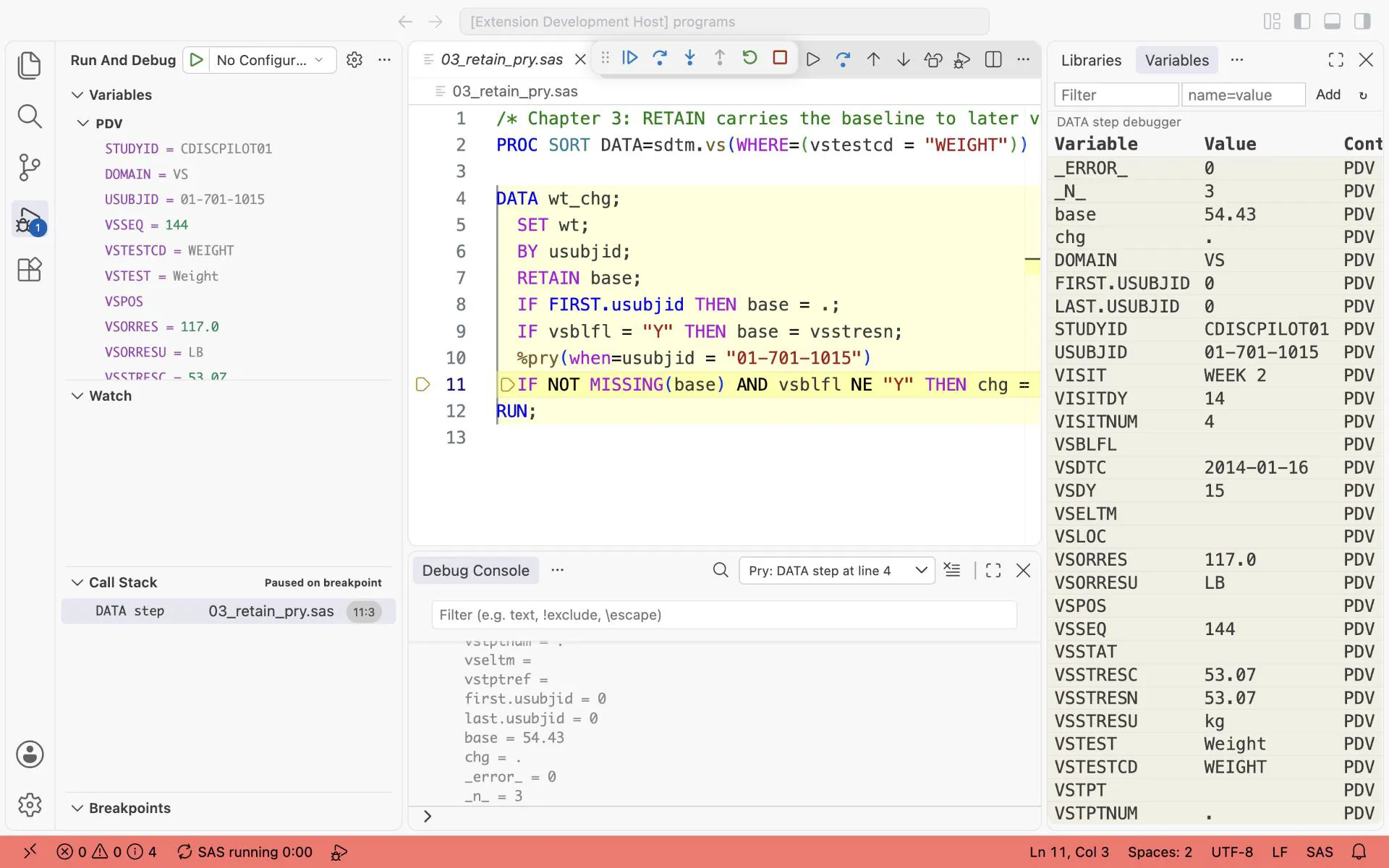
%pry stops the RETAIN step at the WEEK 2 record of subject 01-701-1015 (N = 3): base = 54.43 is kept from the BASELINE record, chg is still missing, and FIRST.USUBJID = 0. Here the %pry line was added to a copy of the program, 03_retain_pry.sas.
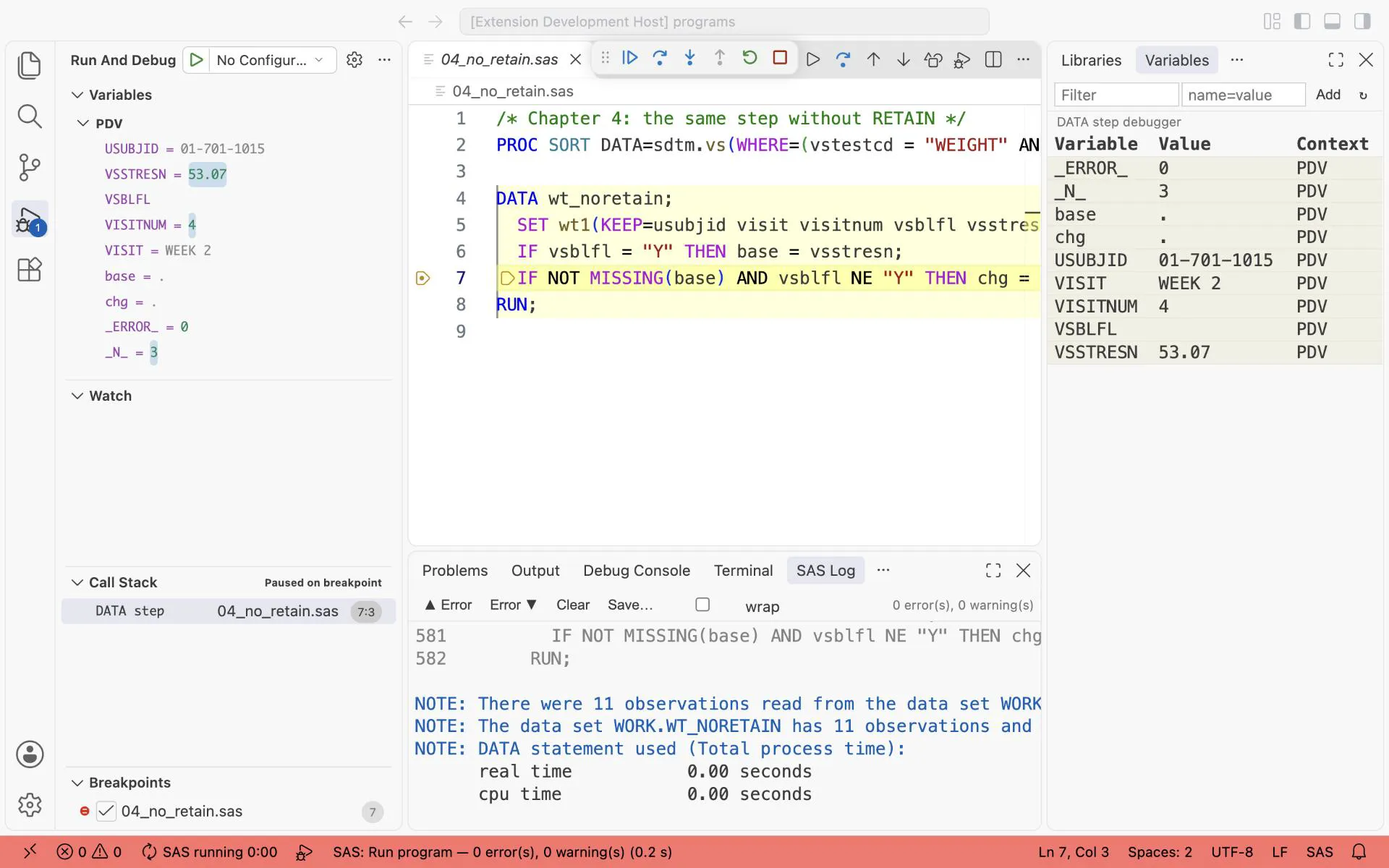
The same step without RETAIN, stopped at WEEK 2 of 01-701-1015: base is missing again, so no change can be computed.
Exercise 4-3. Add pchg (percent change from baseline) to 04_retain.sas. What must you check before you divide?
4.4 OUTPUT: write records on purpose
Section titled “4.4 OUTPUT: write records on purpose”One DATA step can write several data sets. Name them all in the DATA statement and send each record with OUTPUT.
/* Chapter 4: one pass, two output data sets */DATA ae_ser ae_nonser; SET sdtm.ae(KEEP=usubjid aedecod aeser); IF aeser = "Y" THEN OUTPUT ae_ser; ELSE OUTPUT ae_nonser;RUN;What you should see:
NOTE: There were 1191 observations read from the data set SDTM.AE.NOTE: The data set WORK.AE_SER has 3 observations and 3 variables.NOTE: The data set WORK.AE_NONSER has 1188 observations and 3 variables.3 + 1188 = 1191: every record went to exactly one data set. Check this sum in your own programs. It proves that the IF/ELSE covers every case.
Exercise 4-4. Add a third output data set to 04_output.sas for records where aeser is missing. Does the sum still hold?
Answers
Section titled “Answers”The answers to Exercises 4-1 to 4-4 are in Answers, Part I.