Case study: from the SAP to a study macro
The library macro of chapter 19 works in every study. Most macros you write at work are smaller: they do one rule of one study’s statistical analysis plan (SAP). Chapter 10 used one of them, %m_baseline, for vital signs and for a lab parameter. This case study shows how such a macro is made, in five moves from production work:
- Copy the SAP text into the program, next to the code that does it.
- Look at the data before you write the rule, and make one call per rule.
- Write one study macro: the mechanism goes in the macro, the rule goes in the call.
- Give the macro a full header and parameter checks.
- Prove the result against an independent program.
The data is the CDISC pilot study. The SAP text is an example definition written for this book.
1. The SAP text goes into the program
Section titled “1. The SAP text goes into the program”A reviewer reads your program next to the SAP. Make that easy: paste the SAP definition as a comment block right above the code that does it, as 10_2_advs_bp.sas does.
/*****************************************************************************//* Example SAP definition: Baseline *//* Baseline is the last non-missing value on or before the day of the first *//* dose. Blood pressure and pulse are measured in three positions: each *//* position has its own baseline. *//*****************************************************************************/Start each step with a comment that says what the step does, /* Step 020: the baseline record, as the SAP says */. A reviewer then finds every rule of the SAP by reading the comments alone.
2. Look at the data before you write the rule
Section titled “2. Look at the data before you write the rule”The SAP says “the last value on or before the first dose”. Three facts of the pilot data decide how the code looks:
- The BASELINE visit of the vital signs is on the day of the first dose, for every record. So the condition must be
adt <= trtsdt. Withadt < trtsdtthe BASELINE visit would never count. - Blood pressure and pulse have three positions per visit (
ATPTN815, 816, 817). Weight has one value per visit. That gives two rules: one baseline per subject and parameter, and one per subject, parameter and position. Each rule is one call:by=usubjid paramcdandby=usubjid paramcd atptn. - The chemistry labs (ALT and the others) have no BASELINE visit at all, and some subjects have an unscheduled retest before the first dose. A rule based on the name of a visit would fail there; a rule based on dates works for every BDS data set.
3. The study macro
Section titled “3. The study macro”/* Chapter 10: the study macros for BDS data sets, %m_baseline and %m_chg. Run this file once, then 10_2 and later programs use them. */
/******************************************************************************* Macro : %m_baseline (study macro) Version : 2.0 Purpose : Mark the baseline record of each group, as the SAP defines it: the last record that meets the condition. SAP text : example SAP definition written for this book "Baseline is the last non-missing value on or before the day of the first dose. When that value comes from a screening visit, the screening value is the baseline. Blood pressure and pulse are measured in three positions: each position has its own baseline." Parameters : data= a BDS data set (required) out= the output data set, sorted by &sortby. (required) by= one baseline per group (default usubjid paramcd) where= which records can be baseline, a WHERE condition (default adt <= trtsdt AND NOT MISSING(aval)) sortby= the by= variables, then the time order: the last record of a group is its baseline (default &by. adt). Add a key such as the SDTM sequence number when two records of a group can have the same date. baseline_visit= AVISITN of the new records when copy=Y (default 0) copy= N: set ABLFL = "Y" on the collected baseline record (default; the reference ADVS of the pilot does this) Y: also add a copy with AVISIT "Baseline", AVISITN = &baseline_visit., ABLFL "Y". Only for records without an analysis visit, else a group has two Baseline rows Preconditions : &data. has the variables of by=, sortby= and where=; sortby= starts with the variables of by= Postconditions : &out. has all records of &data. and the variable ABLFL, "Y" on exactly one record per group that has a record meeting where=; with copy=Y one more record per such group; work data sets _mbl_: are deleted Validation level : independent double programming of the baseline values Author : your name, date Change history : 2026-11-01 1.0 first version, case study of Part V 2026-11-01 1.1 parameters renamed to the book's interface: data= (was input=), where= (was baseline_cond=), by= (was groupby=), out= (was output=) 2026-11-01 2.0 moved to chapter 10 for every BDS data set: defaults for by=, where= and sortby=; copy=N flags the record, copy=Y adds a baseline record; out= has all records*******************************************************************************/%MACRO m_baseline(data=, out=, by=usubjid paramcd, where=adt <= trtsdt AND NOT MISSING(aval), sortby=&by. adt, baseline_visit=0, copy=N) / DES = 'Mark the baseline record of each group'; %LOCAL macro mversion i p n last; %LET macro = %UPCASE(&SYSMACRONAME.); %LET mversion = 2.0;
/* Check the parameters: required ones, the input, the sort order, copy= */ %DO i = 1 %TO 5; %LET p = %SCAN(data out by where sortby, &i.); %IF %LENGTH(%SUPERQ(&p.)) = 0 %THEN %DO; %PUT %STR(ERR)OR: [¯o.] Parameter %UPCASE(&p.)= is required.; %RETURN; %END; %END; %IF NOT %SYSFUNC(EXIST(&data.)) %THEN %DO; %PUT %STR(ERR)OR: [¯o.] Data set &data. does not exist.; %RETURN; %END; %LET n = %SYSFUNC(COUNTW(&by., %STR( ))); %DO i = 1 %TO &n.; %IF %UPCASE(%SCAN(&by., &i., %STR( ))) NE %UPCASE(%SCAN(&sortby., &i., %STR( ))) %THEN %DO; %PUT %STR(ERR)OR: [¯o.] SORTBY= must start with the BY= variables.; %RETURN; %END; %END; %LET copy = %UPCASE(©.); %IF ©. NE N AND ©. NE Y %THEN %DO; %PUT %STR(ERR)OR: [¯o.] COPY= must be N or Y, not ©..; %RETURN; %END; %LET last = %SCAN(&by., -1, %STR( ));
%PUT NOTE: [¯o.] Version &mversion. started %SYSFUNC(DATE(), DATE9.) %SYSFUNC(TIME(), HHMM.);
/* Step 010: the records in time order within each group, numbered */ PROC SORT DATA=&data. OUT=_mbl_010; BY &sortby.; RUN; DATA _mbl_010; SET _mbl_010; _mbl_n = _N_; RUN;
/* Step 020: the number of the last record of each group that can be baseline */ DATA _mbl_020(KEEP=_mbl_n); SET _mbl_010(WHERE=(&where.)); BY &by.; IF LAST.&last.; RUN;
/* Step 030: flag that record, or add a copy of it */ DATA &out.(DROP=_mbl_n); LENGTH ablfl $1; MERGE _mbl_010 _mbl_020(IN=_mbl_bl); BY _mbl_n; %IF ©. = N %THEN %DO; IF _mbl_bl THEN ablfl = "Y"; ELSE ablfl = ""; %END; %ELSE %DO; ablfl = ""; OUTPUT; IF _mbl_bl THEN DO; avisit = "Baseline"; avisitn = &baseline_visit.; ablfl = "Y"; OUTPUT; END; %END; RUN;
/* Remove the work data sets of this macro */ PROC DATASETS LIBRARY=work NOLIST NOWARN; DELETE _mbl_:; RUN; QUIT;%MEND m_baseline;Read it from top to bottom:
- The header quotes the SAP. It lists the purpose, the parameters, the preconditions (true before the call), the postconditions (true after it), the validation level and the change history. A reviewer can check the macro against the SAP without reading the code.
- The change history is the story of the macro. Version 1.0 worked on one data set. Version 1.1 got the book’s interface (
data=,out=,by=,where=). Version 2.0 works on every BDS data set: the SAP rule became the default values, andcopy=chooses between flagging the record and adding a baseline record. When a table changes, the version in the log tells you which macro made it. - The parameter checks are part of the macro. One loop checks that five parameters are not empty.
pholds a parameter name, such asdata, and%SUPERQ(&p.)gives the value of that parameter. Then the data set must exist, andcopy=must be N or Y.sortby=must start with theby=variables, orLAST.would not mean “last in the group”. Every failed check writesERROR: [M_BASELINE] ...and stops with%RETURNbefore any step runs. - A version message starts the log of every call:
NOTE: [M_BASELINE] Version 2.0 started .... - Numbered work data sets with a private prefix,
_mbl_010and_mbl_020, are deleted at the end withDELETE _mbl_:;. - The mechanism is small. Sort and number the records. Find the last record of each group that meets
where=. Flag that record, or add a copy of it.LAST.&last.uses the last word ofby=: forusubjid paramcd atptnit isLAST.atptn.
The macro does not know what “baseline” means in this study. The default of where= is this study’s rule, and a call can give another one. When the SAP changes, you change the call or the default, and the mechanism stays tested.
4. Use it: one call per rule
Section titled “4. Use it: one call per rule”Chapter 10 calls the macro once per rule, with the rule in the call:
/* blood pressure and pulse: one baseline per position */%m_baseline(data=advs_bp_010, out=advs_bp_020, by=usubjid paramcd atptn,            sortby=usubjid paramcd atptn adt vsseq)
/* weight: one baseline per parameter, the defaults */%m_baseline(data=advs_020, out=advs_wt_sap, sortby=usubjid paramcd adt vsseq)
/* ALT: a lab parameter, the same call */%m_baseline(data=adlb_010, out=adlb_020, sortby=usubjid paramcd adt lbseq)
sortby= adds the SDTM sequence number, so that two records of a group on the same day always come in the same order.
The production design that this macro comes from added a baseline record, a copy of the last pre-dose record with AVISIT = "Baseline". The reference ADVS flags the record itself; the ADaM implementation guide allows both designs. copy= keeps both designs in one macro: copy=N (the default) flags, copy=Y adds. Exercise 10-5 shows that both give the same BASE.
5. Prove it: compare with an independent program
Section titled “5. Prove it: compare with an independent program”The pilot comes with a reference ADVS and ADLBC, made by another team. Chapter 10 compares with them, and every difference has a reason:
| Data | Difference | Why |
|---|---|---|
| Blood pressure and pulse | 01-718-1150, 9 baseline records | no BASELINE visit for blood pressure: the SAP rule takes SCREENING 1 |
| Weight | 01-702-1082, 1 baseline record | no weight at the BASELINE visit: the SAP rule takes SCREENING 1 |
| ALT | 24 subjects, BASE changes for 22 | an unscheduled test before the first dose is the last value |
The reference takes the baseline from a named visit; the SAP takes the last value before the first dose.
6. Wrong calls stop early
Section titled “6. Wrong calls stop early”/* EXPECT: ERROR [M_BASELINE] *//* Case study: wrong calls of %m_baseline stop before any step runs (needs 10_1 and the macros of 10_2_0) */
/* 1: a required parameter is empty */%m_baseline(data=advs_020, out=x1, by=)
/* 2: the input does not exist */%m_baseline(data=advs_typo, out=x2)
/* 3: the sort order does not start with the groups */%m_baseline(data=advs_020, out=x3, sortby=usubjid adt paramcd)
/* 4: copy= has a value the macro does not know */%m_baseline(data=advs_020, out=x4, copy=yes)
%PUT NOTE: x1 exists=%SYSFUNC(EXIST(x1)) x2 exists=%SYSFUNC(EXIST(x2)) x3 exists=%SYSFUNC(EXIST(x3)) x4 exists=%SYSFUNC(EXIST(x4));What you should see:
ERROR: [M_BASELINE] Parameter BY= is required.ERROR: [M_BASELINE] Data set advs_typo does not exist.ERROR: [M_BASELINE] SORTBY= must start with the BY= variables.ERROR: [M_BASELINE] COPY= must be N or Y, not YES.NOTE: x1 exists=0 x2 exists=0 x3 exists=0 x4 exists=0Each message names the macro and the problem, and no output data set is made. A half-made data set is worse than none: the next step would use it without a word.
7. Debug it in DataStep Studio
Section titled “7. Debug it in DataStep Studio”-
Run
10_2_0_bds_macros.sasonce withF4. Put the cursor on the first%m_baseline(call in10_2_advs_bp.sasand click Debug Macro. DataStep Studio finds the definition in10_2_0_bds_macros.sasin the same folder and puts your call in the call pane. Click Start Debug. See Debug a macro.What you should see: the debugger stops at the first statement of
%m_baseline. The Variables view shows the parameters of this call:by = usubjid paramcd atptn,data = advs_bp_010,out = advs_bp_020, and the defaults that the call did not change, such aswhere. This is the fastest way to answer “what did this call get?”.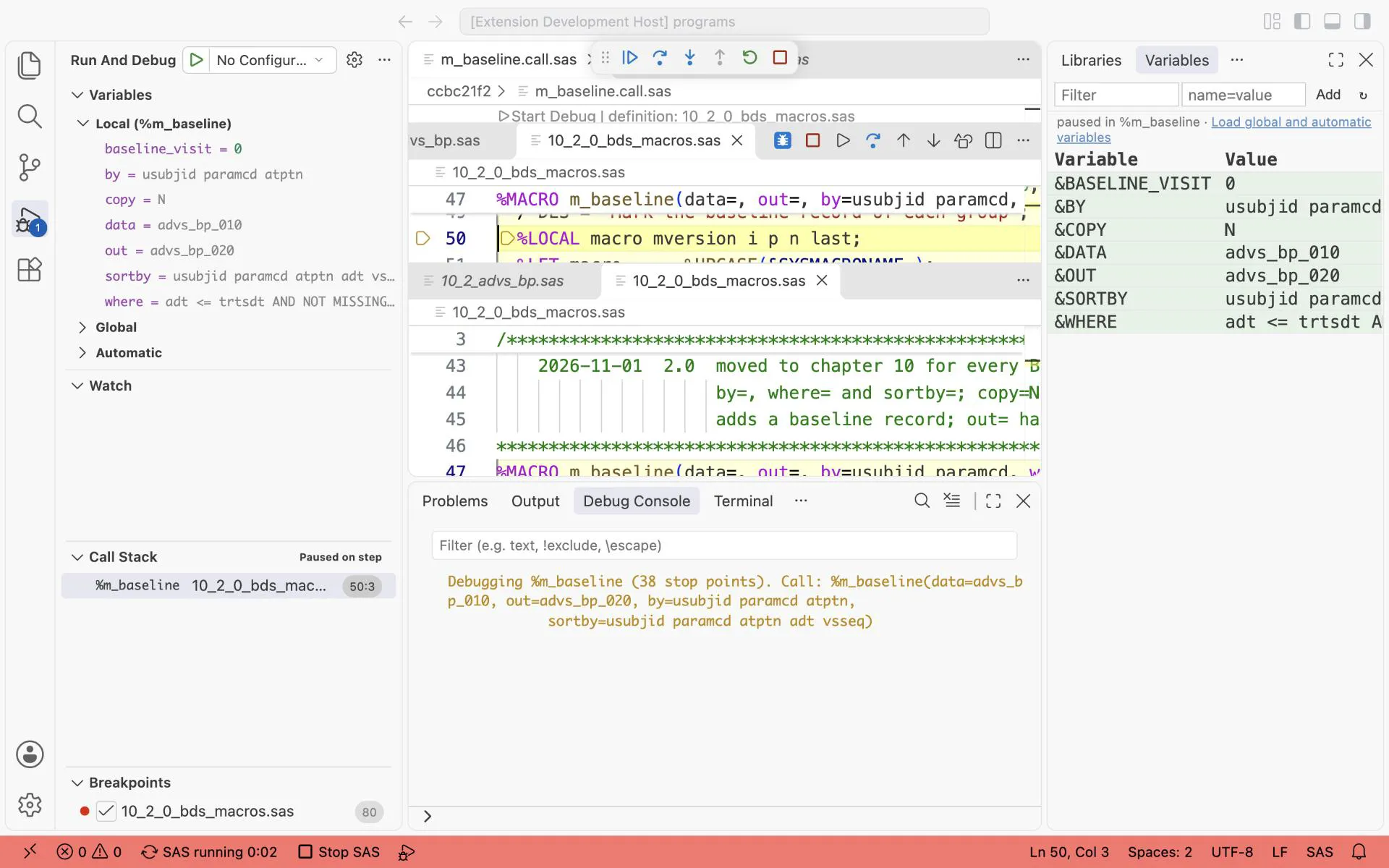
Debug Macro from the first %m_baseline( call in 10_2_advs_bp.sas: the debugger stops at the first statement of %m_baseline 2.0 in 10_2_0_bds_macros.sas. Variables: by = usubjid paramcd atptn, copy = N, data = advs_bp_010, out = advs_bp_020.
-
To look at the data inside the macro, write
%pry(when=%SCAN(&by., -1) = atptn)in10_2_0_bds_macros.sas, on a line before/* Remove the work data sets of this macro */. Run that file, then run10_2_advs_bp.saswithF4. The run stops in the blood pressure call only. -
In the SAS Pry terminal, type
vt advs_bp_020, thenwhere usubjid = "01-718-1150" AND ablfl = "Y", thenshow.What you should see: the 9 baseline records of this subject, all from SCREENING 1. Type
cto let the run go on. See %pry, the complete guide.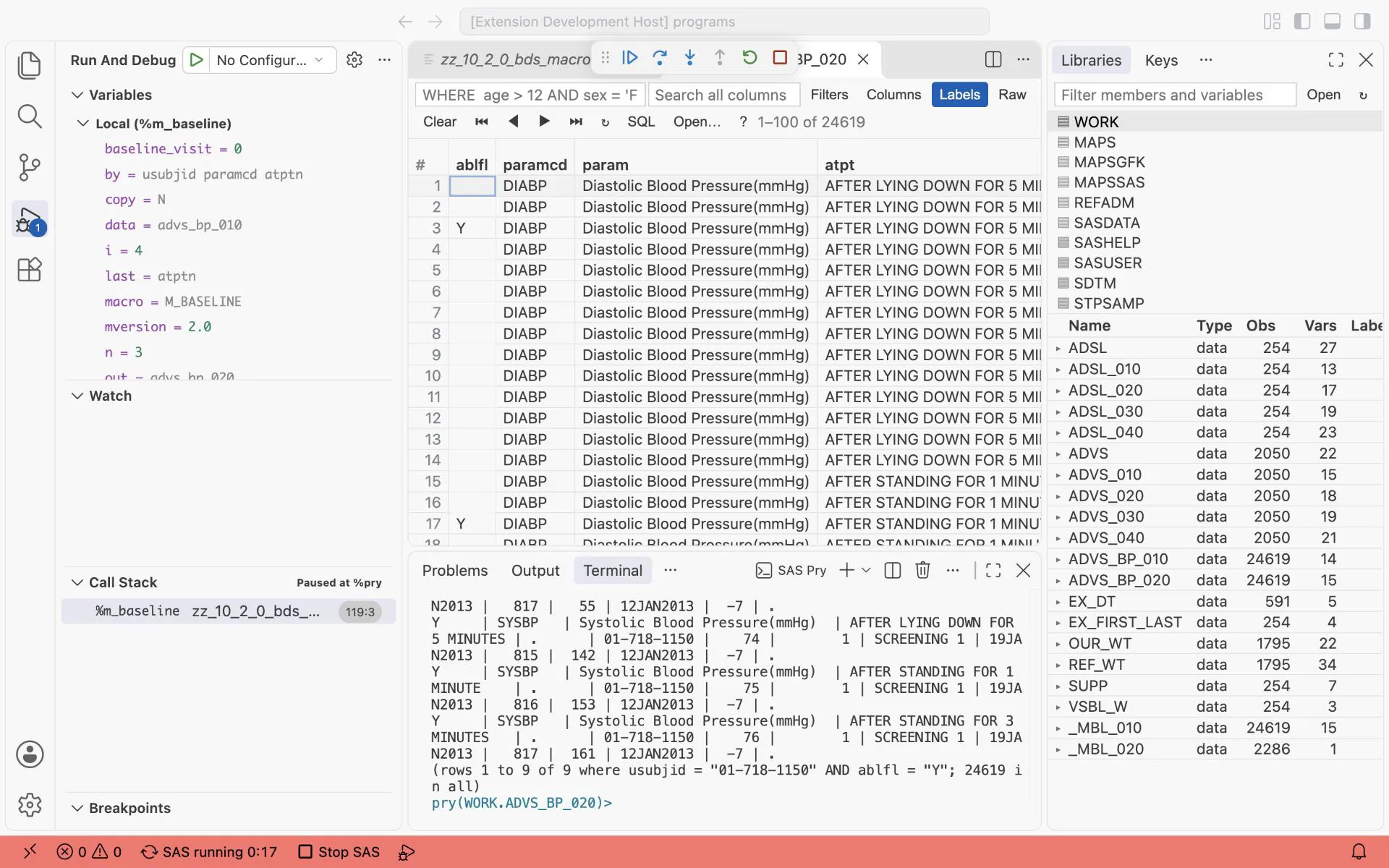
%pry inside %m_baseline, in the call by position only. vt advs_bp_020 and where usubjid = “01-718-1150” AND ablfl = “Y”: rows 1 to 9 of 9, every baseline record of this subject comes from SCREENING 1.
8. Study macro or library macro?
Section titled “8. Study macro or library macro?”| Study macro | Library macro | |
|---|---|---|
| Does | one rule of one SAP | a task every study has |
| Example | %m_baseline, chapter 10 | %count_subj, chapter 19 |
| Lives | in the study folder, next to the programs | in the team’s autocall library |
| Tested by | the double programming of the study | its own test harness, before every release |
| Header | the SAP text it does | an example call |
Promote a study macro to the library when the third study needs the same rule. Then the condition and the group stay parameters, the SAP text in the header becomes an example, and the macro gets its own tests.
Exercises
Section titled “Exercises”- Your SAP says: “If a time point has more than one measurement, the baseline is the average of the last set of measurements before the first dose.” The pilot data has no such repeats. Write the program for a study that has them: which step comes before the
%m_baselinecall, and which BY variables does it use? - Add a
debug=parameter to%m_baselinethat keeps the_mbl_data sets, as%count_subjdoes. - Call
%m_baselinewithcopy=Yon the blood pressure records of10_2_advs_bp.sas, then%m_chg. How many records are added, and isBASEon the collected records the same as inADVS_BP?
Answers: Answers, Parts IV and V.